Stock Register
On this page
The Stock Register is the dated register of the stock of every item. For each item it lists the days on which its stock moved, with the stock at the start of the day, what came in, what went out and the stock left, and for a receipt or a return, the supplier or customer, the bill, the batch and its dates. It counts every bill, wholesale or retail. The Retail Stock Register is the same register for retail bills only.
Open the report
Press Alt+5 for Stock Reports, then U. It opens for the financial year from its first day to today, for all categories, in product order. Choose the category you keep the register for.
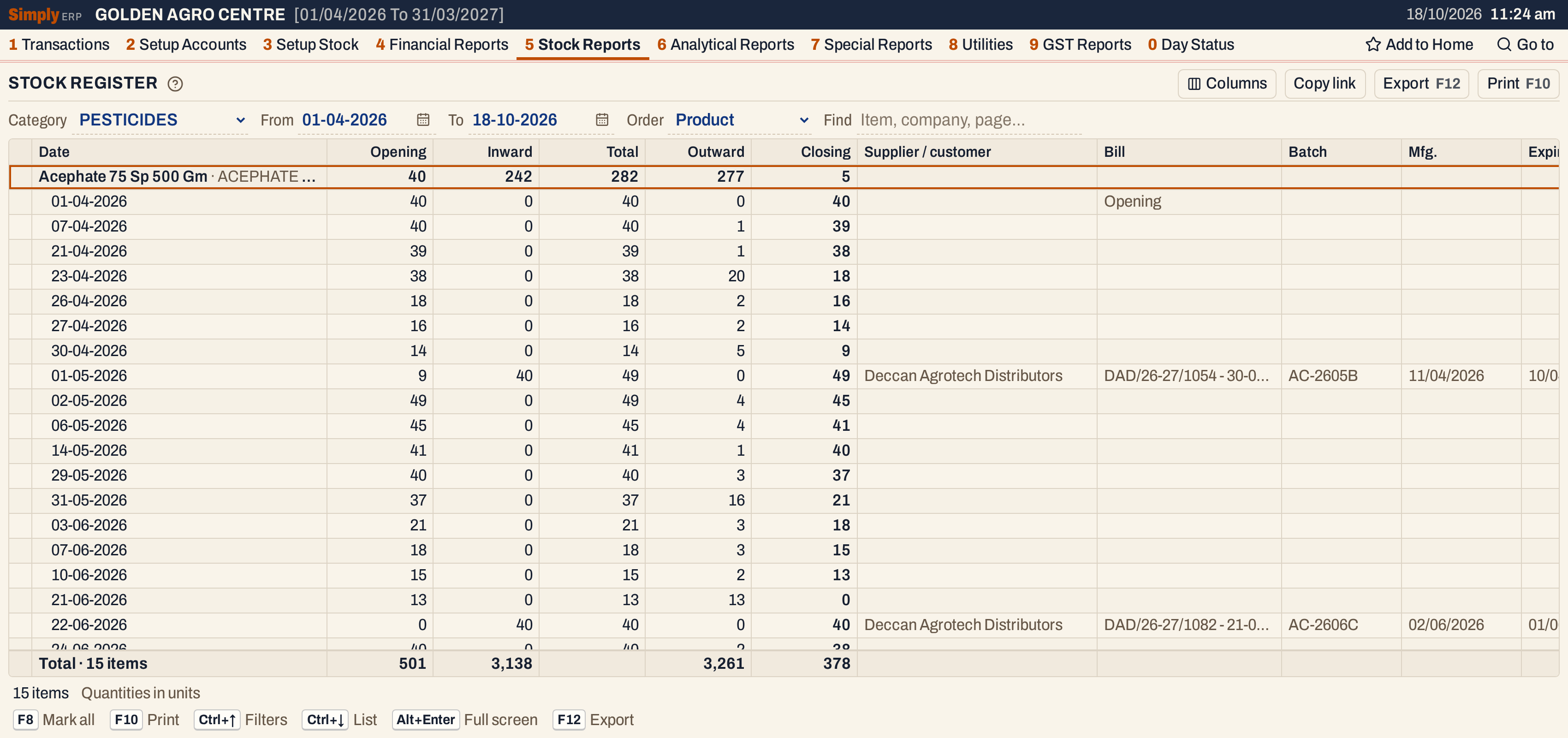 Each item is a heading line with its totals for the period; its days come under it. The total line counts 15 items.
What it lists
One heading line for each item of the category that has a stock to start with or a movement in the period, and under it the lines of its days.
The movements are:
- Purchase bills and sales returns, which bring stock in;
- Sale bills and purchase returns, which take stock out;
- Goods In / Out entries (1 P): goods received or delivered before their bill, until the bill covers them.
Bills of every bill book are counted, whatever its W/R setting (Wholesale, Retail or none). Damages and breakage (1 V) and transfers between godowns or pools are outside this register. The date of a line is the posting date of the bill. Quantities are in units (packs), as on the bill.
Columns
On screen:
| Column | What it shows |
|---|---|
| Date | The day of the line. On the heading line, the item’s name, with its technical name when it has one. |
| Opening | The stock at the start of the line. On the heading line, at the start of the period. |
| Inward | Units received: purchases and sales returns. |
| Total | Opening plus Inward. |
| Outward | Units that went out: sales and purchase returns. |
| Closing | Total less Outward. A negative stock is red. |
| Supplier / customer | On a line of a receipt or a return, the supplier or the customer of the bill. |
| Bill | The bill number and the date of the bill, such as DAD/26-27/1166 - 01-10-2026. Opening on the opening line. |
| Batch | The batch of the receipt or return. |
| Mfg., Expiry | The manufacturing and expiry dates of the batch. |
A text column that no line fills is not shown. The Total column is empty in the total line at the bottom. Columns hides Supplier / customer, Bill, Batch, Mfg. or Expiry; the print leaves them out too.
The print has the register’s own titles: Opst, Inward, Total, Outward, Clstk, Supplier, Inv.No., Batch No., Mfg.Date and Exp.Date.
Choices
| Choice | What it does |
|---|---|
| Category | Lists only the items of that category. * All lists every category. |
| From, To | The period, both days included. Both must fall in the financial year. It opens from the first day of the year to today. |
| Order | Product: items in name order. Company: a heading for each manufacturer, with its items in name order under it; items with no manufacturer come last under (No manufacturer). |
| Find | Shows only the items whose name, manufacturer or technical name matches what you type. |
Every choice is kept in the page address, so Copy link gives a link that opens the same register.
 The choices above the list.
How the figures are worked out
Opening. The stock at the start of the period is the item’s opening stock (3 G) plus all the units received (purchases, sales returns and goods received) before the From date, less all the units that went out (sales, purchase returns and goods delivered) before it. When it is not nil, the item has an Opening line dated on the From date.
A line. Each line’s Opening is the Closing of the line above:
- Total = Opening + Inward;
- Closing = Total − Outward.
The heading line adds the period up: its Opening is the first line’s, Inward and Outward are the totals, its Total is Opening + Inward and its Closing is the last line’s.
Which lines. For each day:
- Each purchase bill, and each Goods In entry, is a line, with its supplier, bill, batch and dates. If one bill brought several batches, they are listed together in the line, separated by “ / “.
- Each purchase return is a line of its own, with its supplier and return number.
- All the day’s sales (and goods delivered) are added to the first line of the day: its first purchase line or, if it has none, its first purchase return line. On the From date, the opening line takes them when the item has one. If the day has none of these, the sales are a line of their own, with no supplier or bill.
- Each sales return is a line of its own, with its customer and return number.
Within a day the lines come in this order: purchases, purchase returns, sales on a line of their own, sales returns.
So the Outward of a line that has a supplier is not only the return: it also holds the day’s sales when that line is the day’s first. In the screenshot below, the line of the purchase return PR/1 on 18-10-2026 has an Outward of 11: the 4 units returned to the supplier and the day’s 7 units sold.
Bill column. It shows the bill number and the date of the bill. The date is the date on the bill, which can be earlier than the line’s date, the day it was posted: on 02-10-2026 the receipt DAD/26-27/1166 is dated 01-10-2026.
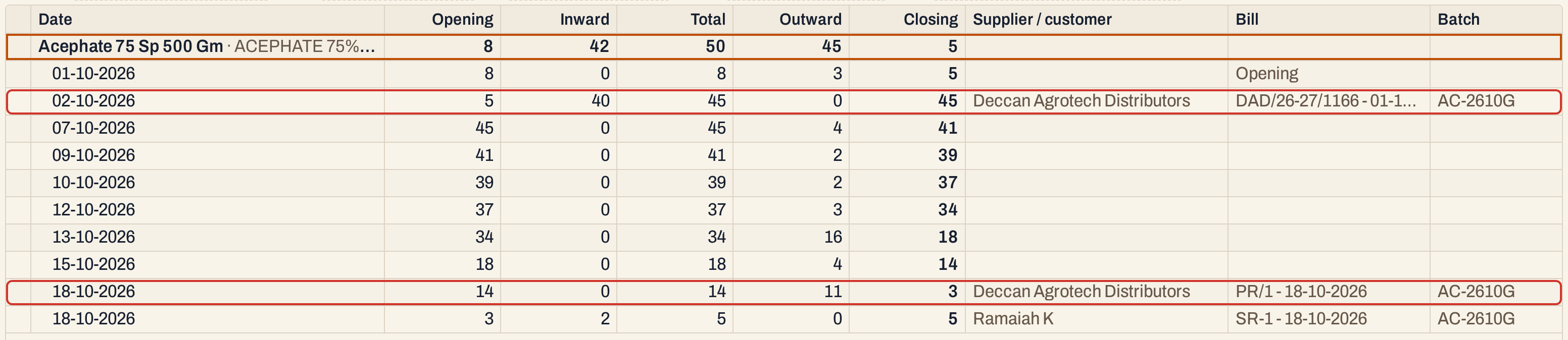 The receipt and the purchase return, marked, are lines with a supplier. The sales of 01-10-2026 are on the opening line, and those of 18-10-2026 on the line of the purchase return.
Totals. The line at the bottom counts the items and adds up the heading lines: Opening is the sum of the items’ opening stocks, Inward and Outward their movements, and Closing the sum of their closing stocks. The print’s total line shows only Inward and Outward.
Company order
With Order set to Company, the items are listed under a heading for each manufacturer, in name order. The totals are the same.
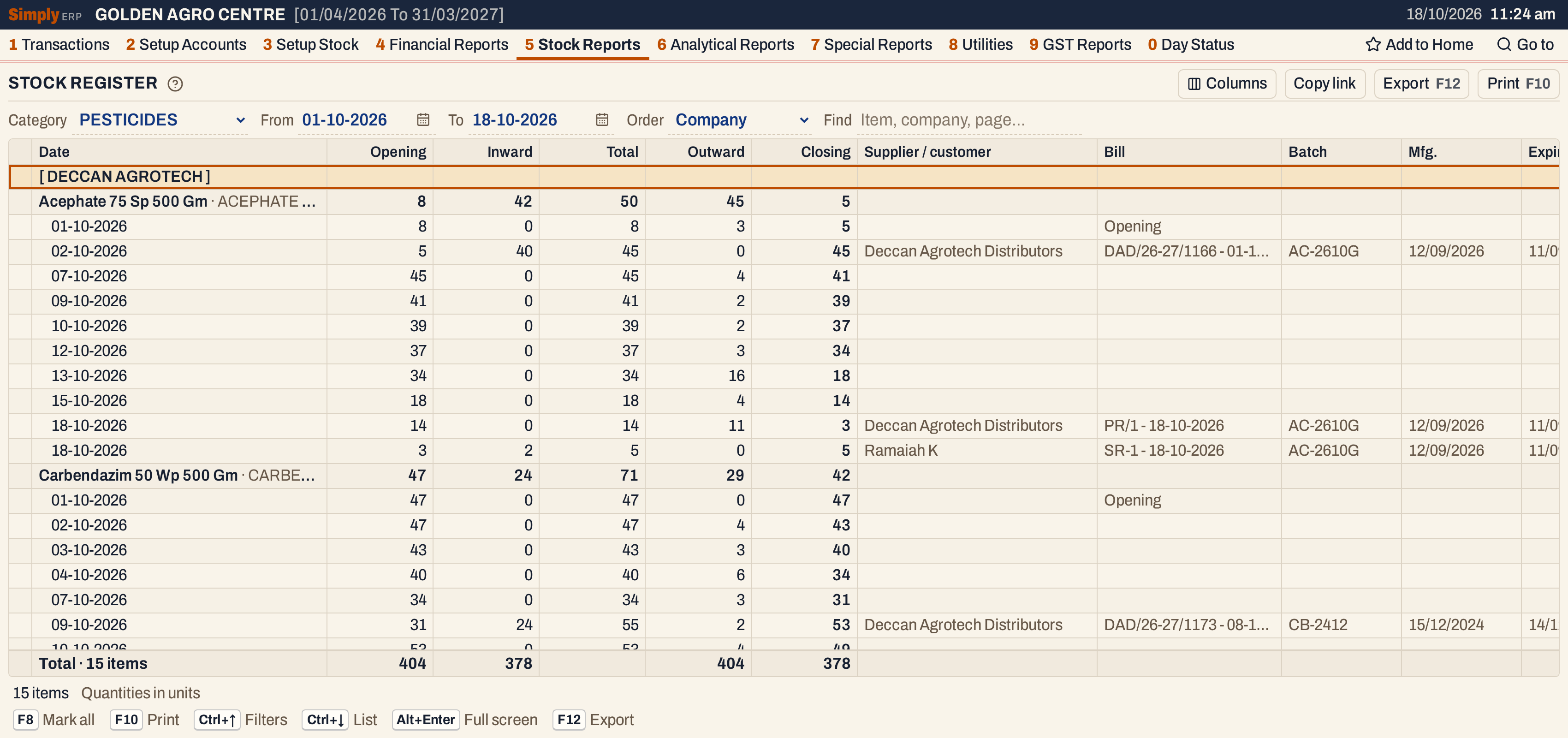 The manufacturer is a heading in brackets, and its items follow.
Print, mark and export
Press F10 to print. The print is the register’s own form on A4. Its title is the category’s name in capitals followed by STOCK REGISTER (for example PESTICIDES - STOCK REGISTER), or STOCK REGISTER when the category is All, then the category and the period. For a category whose name begins with Fert or Nutr, it carries the F O R M - N heading and, when the licence numbers are set in Company Details, the C.R. NO. line.
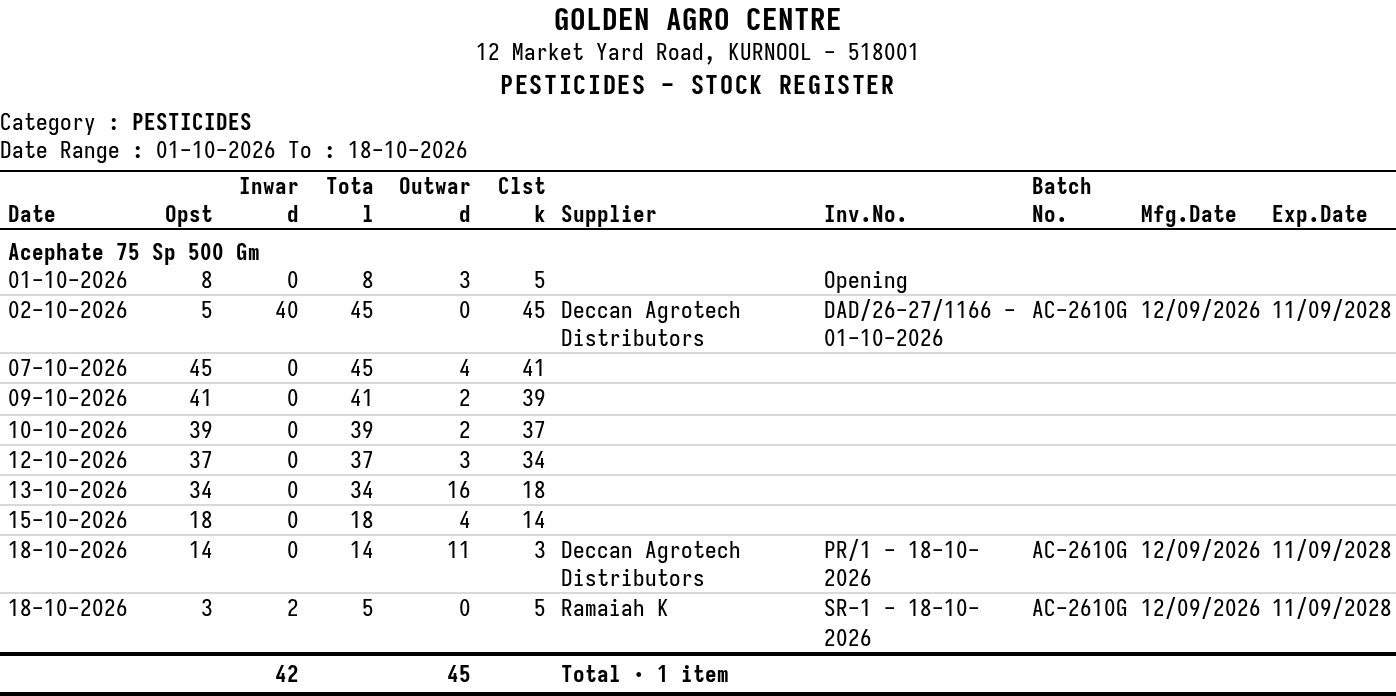 The print for one item.
- F2 marks an item, on its heading or on any of its lines. F8 marks them all. F10 then prints only the marked items, and the print says Marked items only.
- Enter on an item’s heading opens its stock ledger for the same period. On a line that comes from one bill, it opens the bill.
- F12 saves the register as an Excel workbook with the same heading, columns and lines as the print.
- Alt+Enter gives the whole window to the list.
Updated 4 November 2026.