Products & Technical Names
On this page
The Products & Technical Names list prints your items in one of three ways, chosen under Show: the products with their closing stock on a date, the product groups with their technical names, or every item with its technical name and M.R.P. Use it to check how your items are set up, or to print a sheet for a stock count.
Open the report
Press Alt+3 for Setup Stock, then M. The report opens on Products & closing stock, as on today’s working date, with every item in item order.
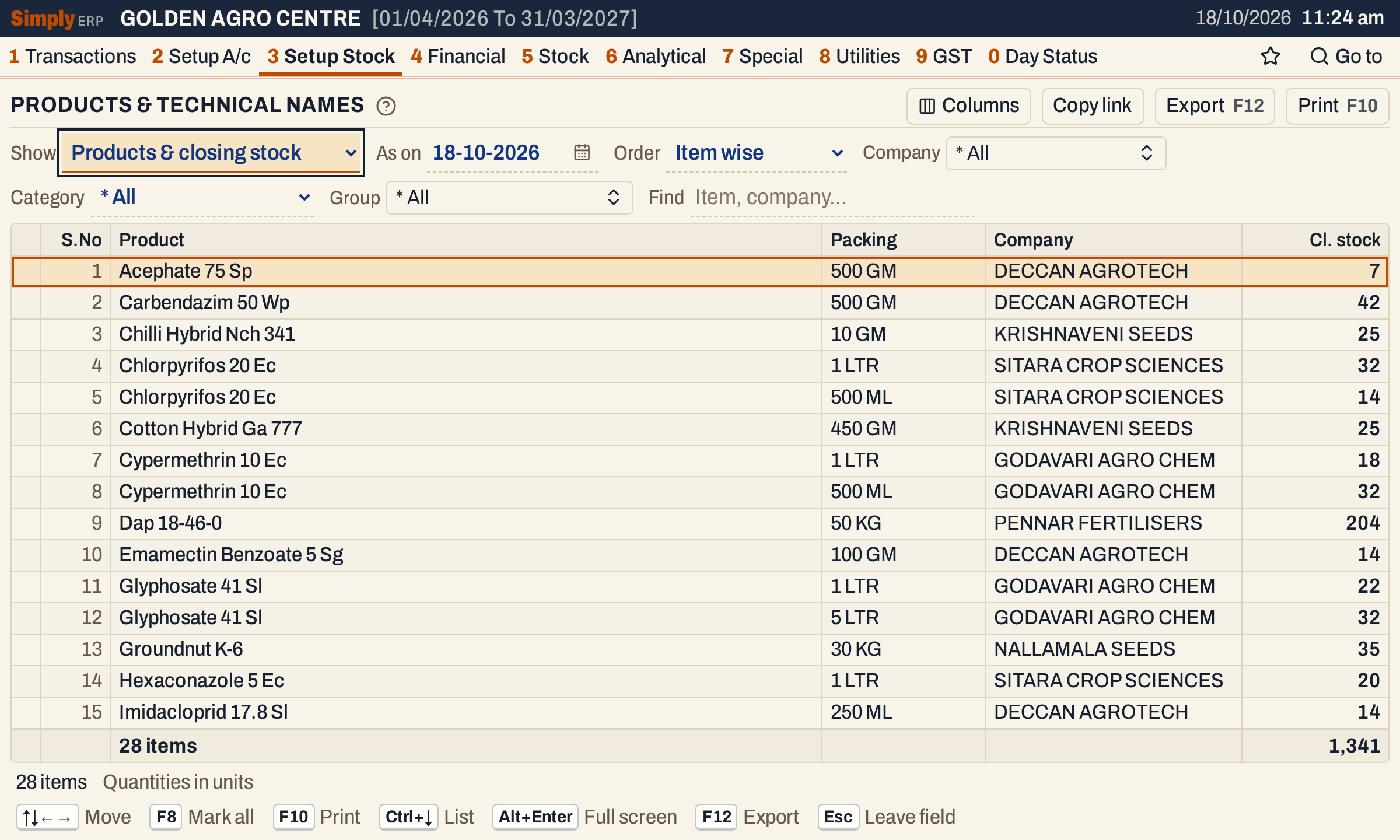 Products & closing stock as on 18-10-2026: each item with its packing, company and closing stock in units.
Choices
 The choices above the list.
| Choice | What it does |
|---|---|
| Show | Products & closing stock (the default): the items with stock or movement, and their closing stock. Technical names: one line for each product group. Products, technical & MRP: every item with its technical name, company and M.R.P. |
| As on | The date the closing stock is taken on. It starts on the working date and can be any date in the financial year. Only the products view shows it. |
| Order | Item wise (the default): by product name, then packing. Company wise: a heading for each company, in name order, with its lines under it. Lines with no company come last, under * Unknown. |
| Company | The companies to list. * All is the default. |
| Category | One of your item categories (PESTICIDES, FERTILIZERS and SEEDS in the screenshots), or * All. Choosing one clears the Group choice. |
| Group | The product groups to list, from the groups of the chosen category. |
| Find | Shows only the lines that match what you type. |
Click a column title to sort by it, and click again to reverse. A figure column sorts largest first. Changing Show clears the sort and any marked lines. Changing Company, Category or Group clears the marked lines.
Columns
| Column | What it shows |
|---|---|
| S.No | The number of the line in the order shown. Company headings are not numbered. |
| Product | The product’s name, without its packing. In Products, technical & MRP the column is Product name and shows the item’s full name, which includes the packing. |
| Packing | The item’s packing. Products & closing stock only. |
| Technical name | The technical name set for the item, blank when none is set. Technical names, and Products, technical & MRP. |
| Company | The item’s company. Not shown in Company wise order, where the headings give it. Columns hides it in the other order. |
| Cl. stock | The closing stock in units on the As on date, in red when it is below nil. Products & closing stock only. |
| M.R.P. | The item’s M.R.P., blank when none is set. Products, technical & MRP only. |
The total line counts the items, or the groups in the technical names view, and adds up Cl. stock. M.R.P. has no total.
Products & closing stock
Each item with stock or movement is a line, with its packing, its company and its closing stock on the As on date. An item is left out when its opening stock, stock in, stock out and closing stock are all nil. S.No numbers the lines that remain.
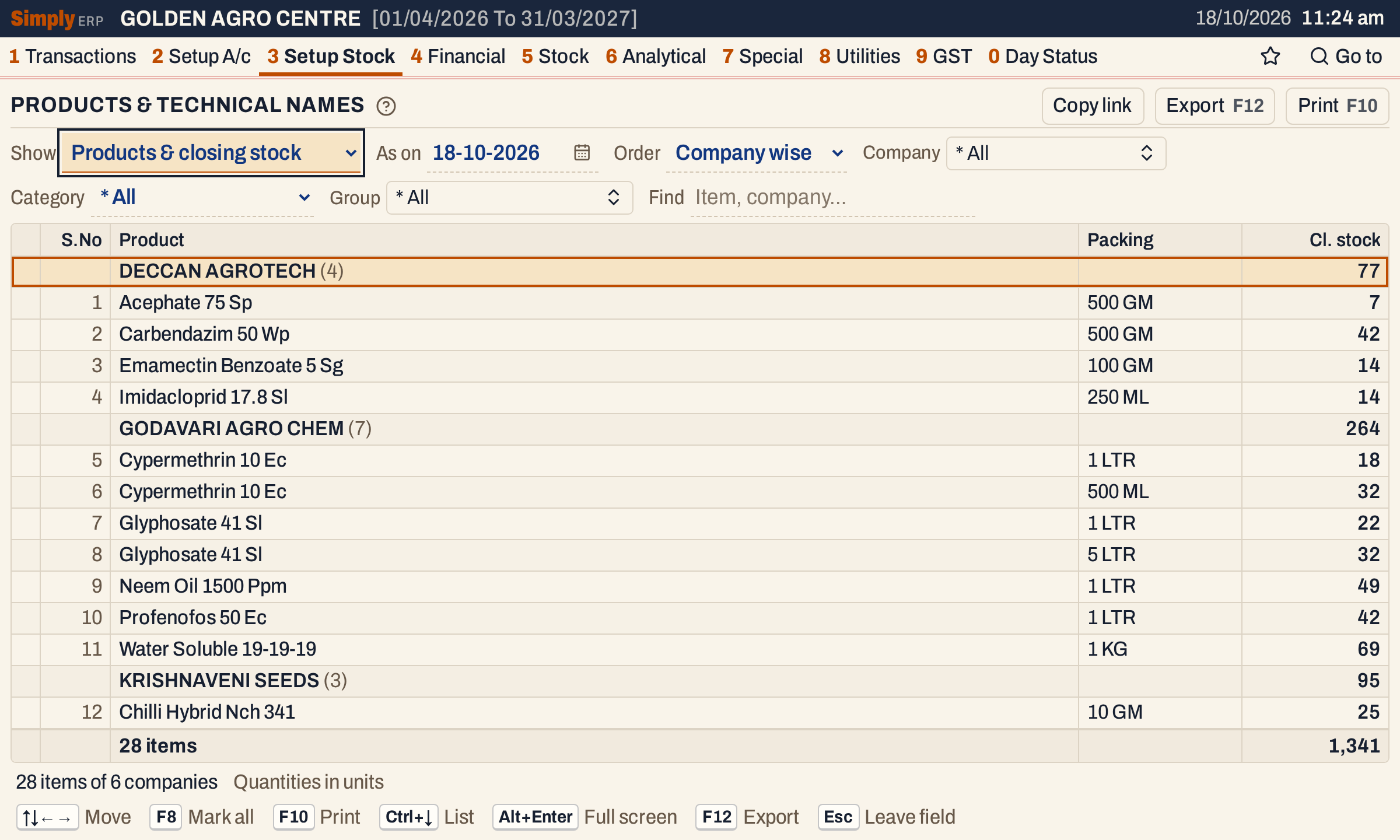 Company wise: each heading shows its company’s items and closing stock, and the total line adds all the companies. The status line counts the companies.
Technical names
Technical names lists each product group once, with its company and technical name. A group with no technical name set has a blank in that column.
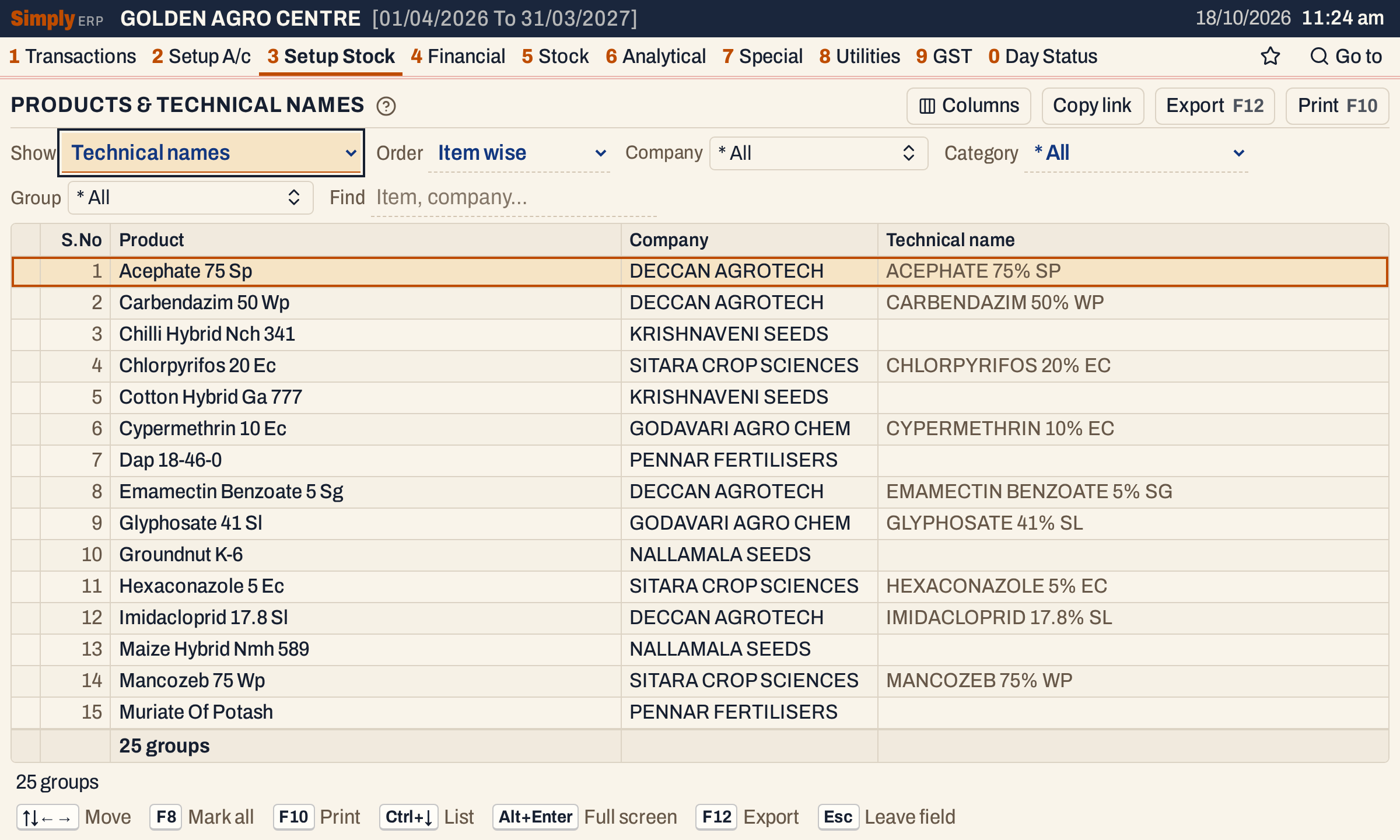 Technical names shows 25 groups, not 28 items: Chlorpyrifos 20 Ec, Cypermethrin 10 Ec and Glyphosate 41 Sl each have two packings and make one group.
Products, technical & MRP
This view lists every item with its full name, which includes the packing, its technical name, its company and its M.R.P. It has no closing stock.
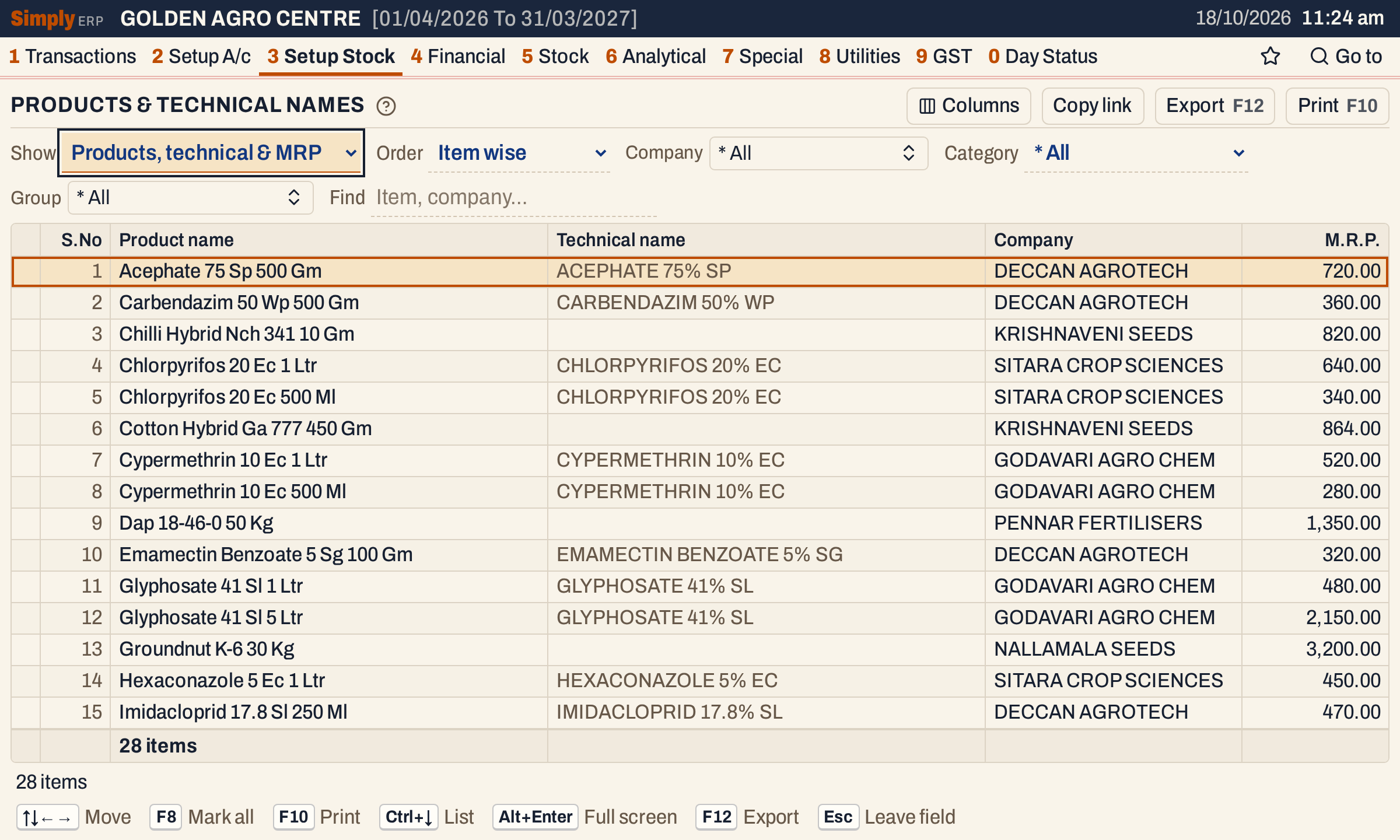 Every item, with the name it is set up with, its technical name and its M.R.P.
How the figures are worked out
- Closing stock on the As on date = the item’s opening stock + stock in − stock out − leakage, counting everything posted up to and including that date.
- Stock in: purchase bills, sales returns, and goods received under Goods In / Out (D.C.).
- Stock out: sale bills, purchase returns, and goods delivered under Goods In / Out (D.C.).
- Leakage: the quantities taken off by Damages / Breaks entries.
- A bill quantity that a Goods In / Out entry already covers is counted once, in the goods entry.
- For example, Acephate 75 Sp 500 Gm in the screenshots: opening 40 + stock in 240 − stock out 273 = 7. Dap 18-46-0 50 Kg: 60 + 800 − 656 = 204.
- The figure is in units, as the item is counted, not converted to cases or litres. The total line adds up the closing stock of the lines shown, and a company heading adds up its own lines.
- Items are the stock entries that are items, not product groups. The Company, Category and Group choices narrow the items, then Find.
- Technical names takes each product group once, from the first of its items in name order. Its company and technical name are that item’s.
- Find keeps a line when every word you type matches part of its name, packing, company or technical name, in any view. Capitals and punctuation do not count, and a word of three or more characters that is not all digits also matches when its letters come in that order, close together.
- The count on the total line gives the items, or the groups in the technical names view. In Company wise order the status line also gives the number of companies.
Open, mark, print and export
- Enter on a product opens its stock ledger from the start of the financial year to the As on date. In the other two views, Enter opens the product group.
- F2 or Space marks a line, and F8 marks all of them. F10 prints only the marked lines when any are marked, and every line when none is. Typing letters jumps to a product.
- F10 prints under the heading PRODUCTS LIST, with the category, and for Products & closing stock the line As On with the date. The products print adds a blank Physical St.Position column, so a count can be written in by hand against each item. The print leaves out a Company column you hid and numbers its lines from 1.
- F12 exports the list. Copy link gives a link that opens it with the same choices.
Updated 4 November 2026.