Fert. Stock Statement
On this page
The Fert. Stock Statement is the stock return of a fertilizer shop. For each fertilizer item it shows the stock you began the year with, what came in and went out before your period, what came in and went out during it, and the stock left. A second view adds the items up by technical name in tonnes, the way fertilizer stock is reported to the department.
Open the report
Press Alt+5 for Stock Reports, then S. The statement opens for the financial year from its first day to today, for the first category whose name begins with FERT (or the first category when none does), with one line for each item.
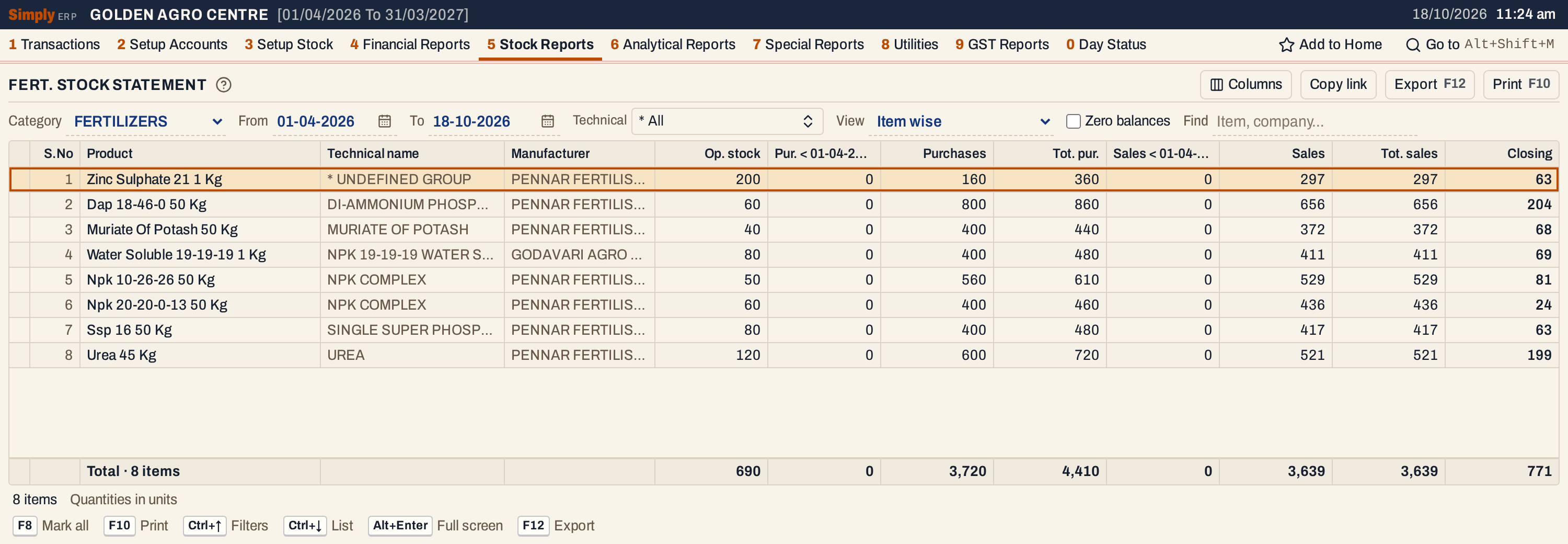 Eight fertilizer items. The total line adds up each column: 690 units of opening stock, 3,720 purchased, 3,639 sold, 771 left.
What it lists
One line for each item of the chosen category. The category choice has no * All: the statement is made for one category at a time.
An item is left out when its Tot. pur. and Tot. sales are both nil: no opening stock, and nothing received or issued since the year began. Tick Zero balances to list it anyway.
Items come in the order of their technical name (an item with none first), then manufacturer, then name.
The movements are the same ones the Stock Statement reads:
- purchase bills and sales returns count as received;
- sale bills, purchase returns and damage entered in 1 V count as issued;
- goods received or delivered on a challan (1 P) count on the date of the entry, and when the bill for goods already received arrives only the units not received before are counted.
All of them count on the date the document is posted. The item’s own opening stock (3 G) is the starting point.
Columns
| Column | What it shows |
|---|---|
| S.No | The line’s number. |
| Product | The item’s name (Technical name in the technical view). |
| Technical name | The item’s technical name, or * UNDEFINED GROUP when it has none. Item wise view only. |
| Manufacturer | The item’s company. Item wise view only. |
| Op. stock | The item’s opening stock from Setup Stock, the stock at the start of the year. |
| Pur. < date | Units received before the From date: purchases and sales returns posted from the start of the year up to the day before From. The title carries the From date. |
| Purchases | Units received from the From date to the To date. |
| Tot. pur. | Op. stock plus Pur. < date plus Purchases: everything that came in since the year began. |
| Sales < date | Units issued before the From date: sales, purchase returns and damage. |
| Sales | Units issued from the From date to the To date. |
| Tot. sales | Sales < date plus Sales: everything that went out since the year began. |
| Closing | The stock at the end of the To date. Red when it is below zero. |
The line under the grid counts the items and adds up every figure column. The status line says how many items are listed and whether the quantities are in units or tonnes.
Choices
| Choice | What it does |
|---|---|
| Category | The category to report. The first category whose name begins with FERT is chosen when the report opens, or the first category when none does. |
| From, To | The period, both days included. Both dates must fall in the financial year. |
| Technical | Shows only the items with the technical names you choose; * All is every name. The list ends with * UNDEFINED GROUP for items with none. |
| View | Item wise (one line for each item, in units) or Technical wise (tonnes) (one line for each technical name). |
| Zero balances | Lists items with no opening stock and nothing received or issued since the year began. |
| Find | Shows only the items whose name, technical name or manufacturer matches what you type. |
| Columns | Hides S.No, Technical name, Manufacturer or any figure column. The print leaves them out too. |
Click a column title to sort by it, and click again to reverse. Every choice is kept in the page address, so Copy link gives a link that opens the same statement.
 The choices above the grid.
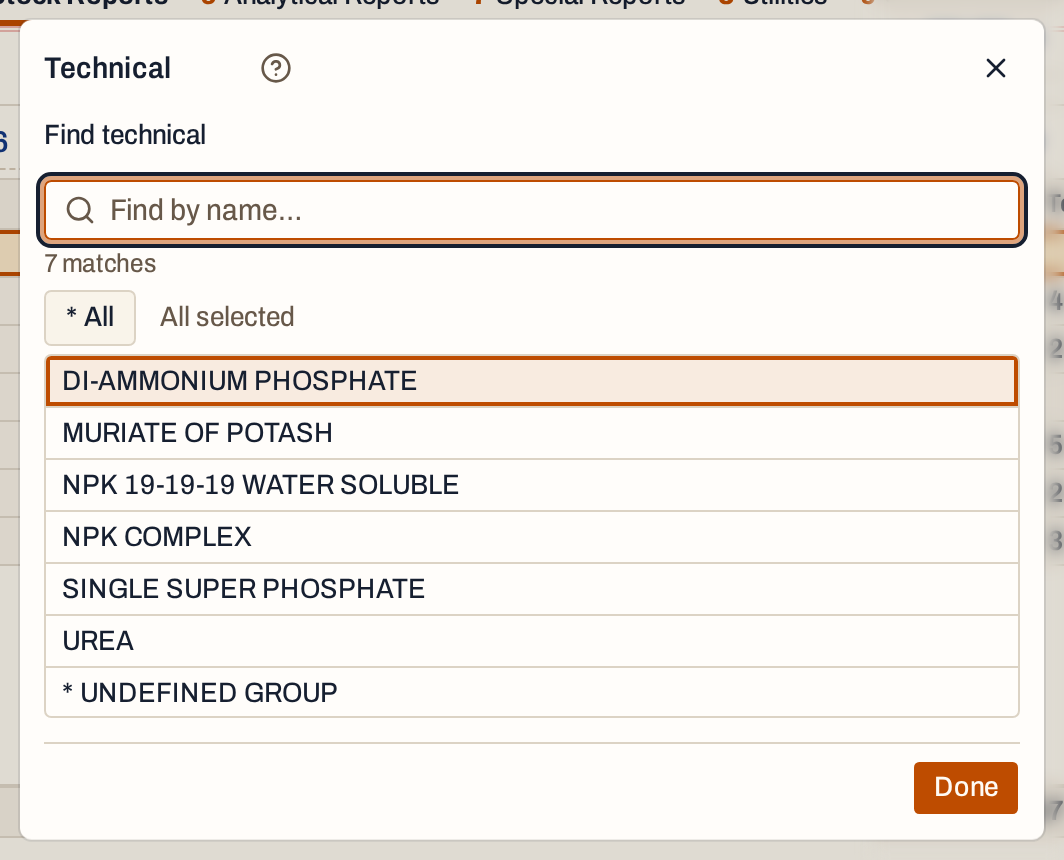 Technical lists the technical names of the category. Choose one or more and press Done.
How the figures are worked out
Each figure is a count of units worked out for the item. Receipts are purchases plus sales returns; issues are sales plus purchase returns plus damage. Each of the opening stock, the receipts before the period, the issues before the period and the receipts and issues in the period is rounded to a whole number of units before it is added.
- Op. stock = the item’s opening stock.
- Pur. < date = receipts posted before the From date.
- Purchases = receipts posted from the From date to the To date.
- Tot. pur. = Op. stock + Pur. < date + Purchases.
- Sales < date = issues posted before the From date.
- Sales = issues posted from the From date to the To date.
- Tot. sales = Sales < date + Sales.
- Closing = Tot. pur. − Tot. sales.
The column titles say Purchases and Sales, but returns and damage are inside them: Purchases includes sales returns, and Sales includes purchase returns and damaged stock.
For Zinc Sulphate 21 1 Kg in the first screenshot: 200 + 0 + 160 = 360 received, 0 + 297 = 297 issued, and 360 − 297 = 63 left.
A statement that starts later in the year shows what happened before it. From 01-10-2026, the same item’s 160 purchased and 260 sold before October move into the “before” columns, and October’s own 0 purchased and 37 sold are in Purchases and Sales. The totals and the closing stock do not change.
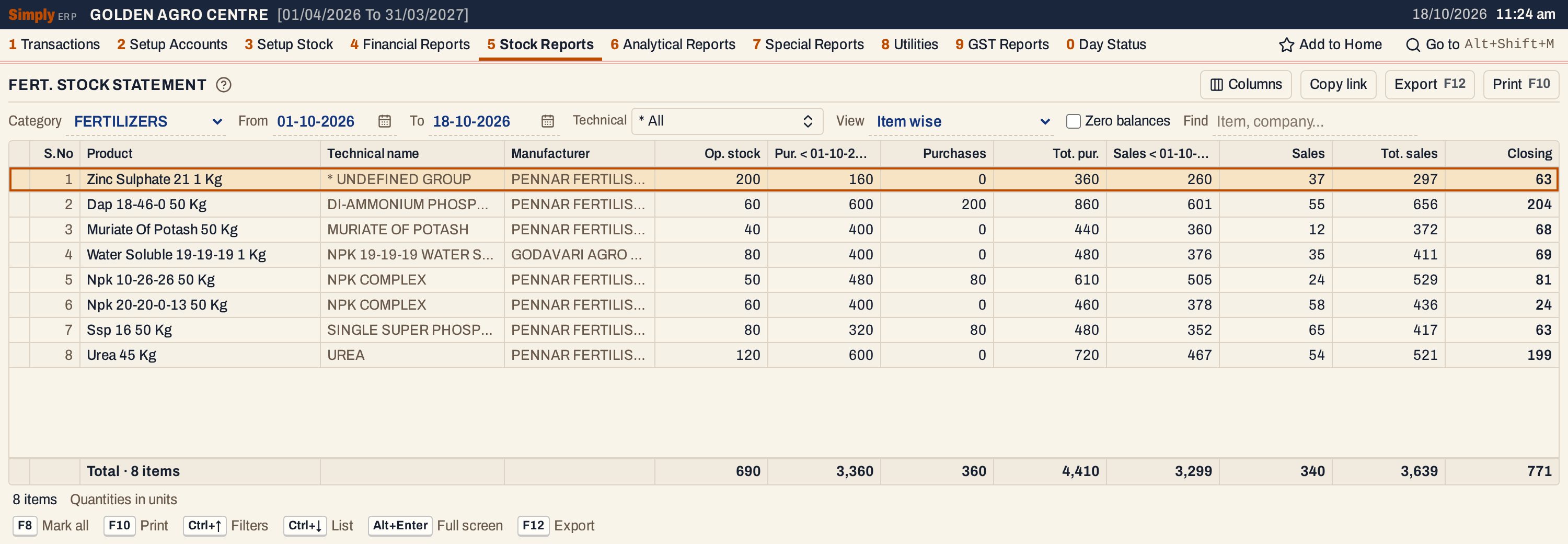 With From at 01-10-2026, the before columns carry what was received and sold from April to September. The titles of those columns end with the From date, here cut short by the width of the column.
Technical wise, in tonnes
With View set to Technical wise (tonnes), each technical name is one line with the number of items in brackets, and the quantities are in tonnes with three decimals. Every item’s figures are multiplied by its pack size in kilograms or litres and divided by 1,000, and then added up for the technical name. A 50 Kg bag counts as 0.05 tonne, a 1 Kg pack as 0.001 tonne. An item whose pack size is not recorded counts as zero.
Technical names come in alphabetical order, with * UNDEFINED GROUP first. The line under the grid adds up the technical names, and Closing is again Tot. pur. − Tot. sales.
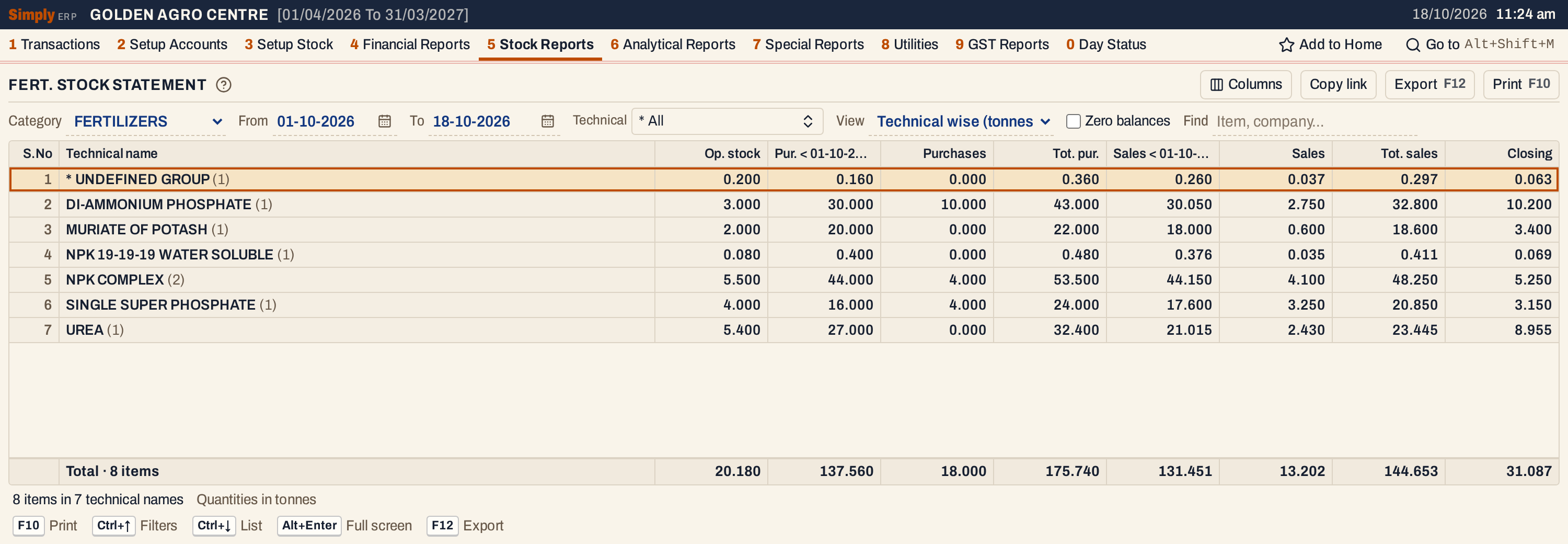 Seven technical names cover the eight items. Dap’s 204 bags of 50 Kg close at 10.200 tonnes, and NPK COMPLEX adds its two items.
Open, mark, print and export
- Enter on an item opens its Stock Ledger for the same period. In the technical view, Enter on a technical name returns to the item wise view with that technical name chosen.
- F2 marks an item and F8 marks them all. F10 then prints only the marked items. Marking is not offered in the technical view.
- F10 prints the statement as it is on the screen, headed FERTILISERS STOCK STATEMENT with the category and, for a fertilizer category, the licence number from Company Details. Under it come the period and whether the quantities are in units or tonnes, then your choices.
- F12 saves it as an Excel workbook. It also gives the technical name and manufacturer of each item.
- Alt+Enter gives the whole window to the list.
Updated 4 November 2026.