Purchase Returns Statement
On this page
The Purchase Returns Statement lists the goods you sent back to your suppliers in a period: which supplier, which item and batch, how many units, at what price and for how much. Use it to see what went back to each supplier, or to total the returns of an item or manufacturer.
Open the report
Press Alt+5 for Stock Reports, then L. The report opens for the financial year from its first day to today, grouped by supplier.
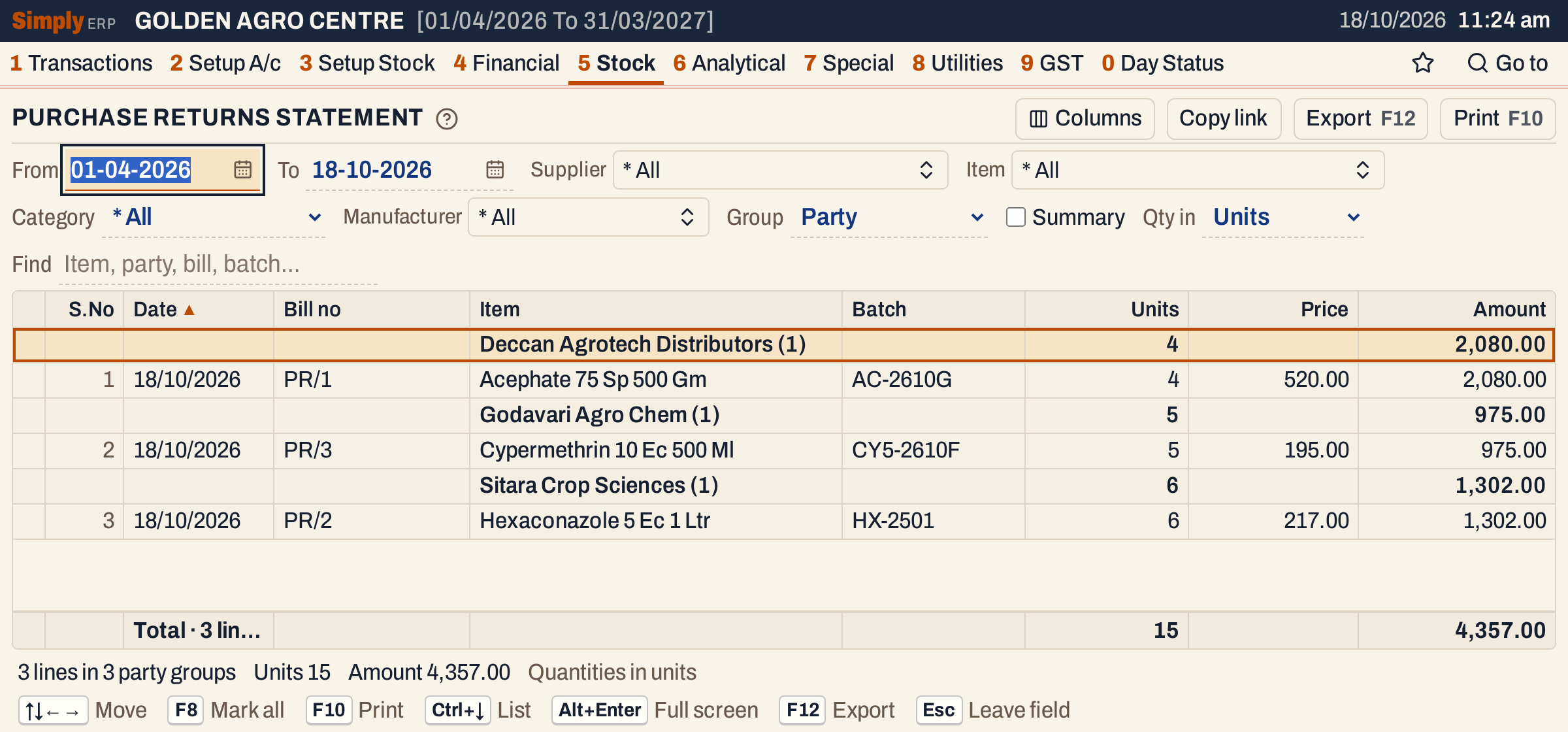 Each supplier is a heading with the number of lines under it, its units and its amount. The totals line is under the grid.
What it lists
One line for each item line of each purchase return whose Date is in the period. A purchase return is made on Transactions → G S T Outward (Direct) → New Entries with the Purchase Returns bill type.
- Bills of every other type are left out: purchases, sales, sales returns, notes and vouchers.
- Charges and other lines that are not items are left out.
- A return of several items has one line for each item, with the same bill number.
The first day and the last day of the period both count. The books post a purchase return on that date, and it is the date shown.
Columns
| Column | What it shows |
|---|---|
| S.No | The line’s number in the list. Group headings are not numbered. |
| Date | The date of the return. |
| Bill no | The number of the return bill. |
| Supplier | The supplier’s name. Shown when the report is not grouped by supplier; when it is, the name is on the group heading. |
| Item | The item’s name. When the report is grouped by item, the name is on the group heading. |
| Batch | The batch the goods came from. Shown only when at least one line has a batch. |
| Units | The quantity returned. |
| Price | The unit price on the return line: without GST when the supplier has a GSTIN, with GST included when not. Shown when at least one line has a price. Blank on group headings and the totals line. |
| Amount | The value of the line. |
The status line under the grid gives the number of lines and groups, the total units and the total amount, and says which unit the quantities are in.
Choices
| Choice | What it does |
|---|---|
| From, To | The period. Both dates must fall in the financial year. It opens with the first day of the year and today. |
| Supplier | Shows only the suppliers you pick. The list holds the suppliers that have a return in the period. |
| Item | Shows only the items you pick, from the items returned in the period. |
| Category | Shows only items of one category. It also narrows the Supplier, Item and Manufacturer lists to those with a return of that category. |
| Manufacturer | Shows only items of the manufacturers you pick. |
| Group | Party (the default): a heading for each supplier. Item: a heading for each item. Manufacturer: a heading for each manufacturer, with (No manufacturer) for items without one. None: one flat list. |
| Summary | One line per group instead of every return line. Not available with Group None. |
| Qty in | Units, Litres / kg, Tonnes or Quintals. |
| Find | Shows only lines whose item, supplier, bill number, batch or manufacturer matches what you type. |
| Columns | Hides the columns you do not want, on the screen and in the print. |
Click a column title to sort by it, and click again to reverse. Hold Shift and click to sort within the first sort. Groups are in name order; click Units or Amount to put the groups in order of their totals. Every choice is kept in the page address, so Copy link gives a link that opens the same report.
 The choices above the grid.
How the figures are worked out
- Units is the quantity on the return line, as you entered it.
- Price is the unit price on the return line: the price without GST for a supplier with a GSTIN, the price with GST included for one without.
- Amount depends on the supplier. When the supplier has a GSTIN, it is the line’s taxable value: the price times the units, less any discount, before GST. When the supplier has no GSTIN, it is the line’s net amount, with the GST included. Because of the discount, Amount is not always Units times Price.
- A group heading adds up its lines’ Units and Amount. The totals line adds up every line shown.
- Price is not averaged: it is blank on group headings, in a summary and on the totals line.
On the showcase books, return PR/1 sends 4 units of Acephate 75 Sp 500 Gm back to Deccan Agrotech Distributors at 520.00. Deccan has a GSTIN, so the Amount is 4 × 520.00 = 2,080.00, the taxable value. The return bill itself also carries 374.40 of IGST, which this report does not show.
The three returns add up to 4 + 5 + 6 = 15 units and 2,080.00 + 975.00 + 1,302.00 = 4,357.00.
 The totals line and the status line for the three returns.
Group by item with Summary
Choose Group Item and tick Summary to see one line per item, with the number of lines in brackets.
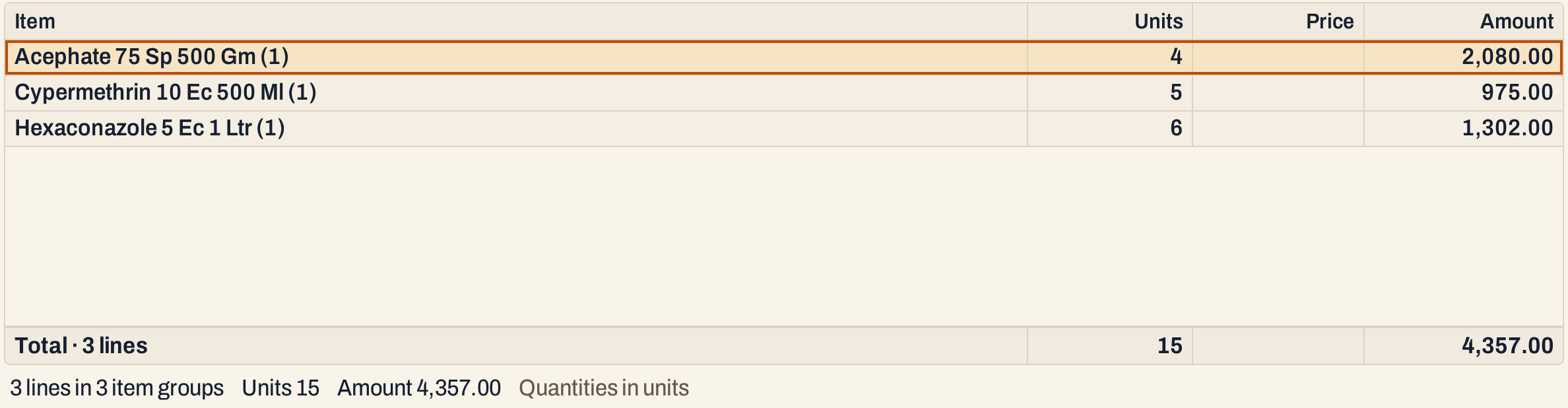 One line per item. The Price column is blank in a summary.
Quantities in litres and kilograms
Litres / kg multiplies each line’s units by the item’s pack size, so a return of 4 packs of 500 gm reads as 2.000 kg. The price is divided by the pack size, so it becomes the price of a litre or kg: 520.00 a pack of 500 gm is 1,040.00 a kg. Tonnes and Quintals divide the litres or kg by 1,000 and by 100. The Amount does not change. An item with no pack size recorded shows zero, and the status line says how many lines are affected.
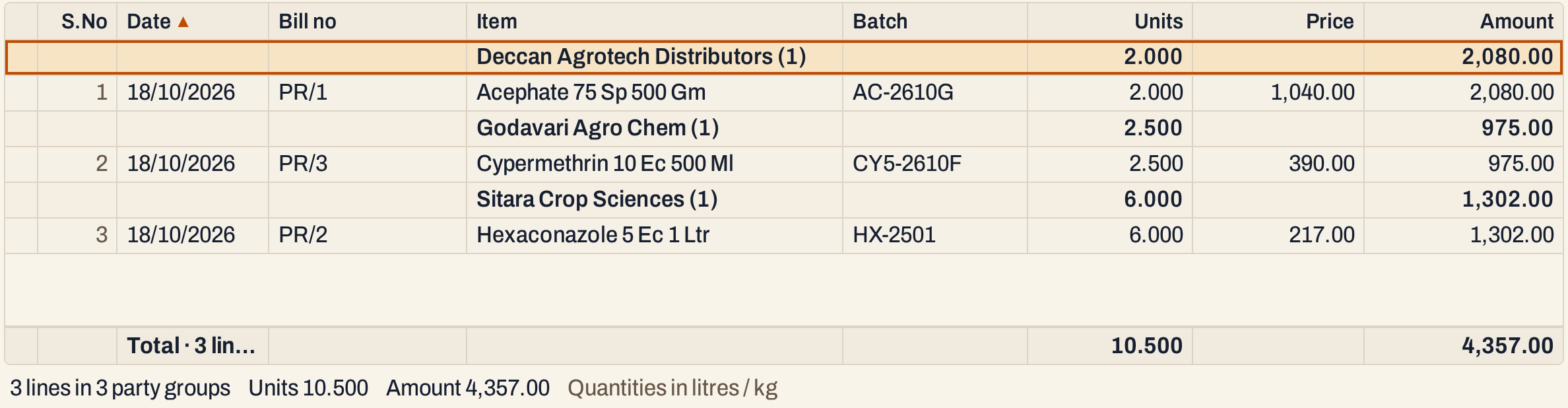 The same three returns in litres and kilograms.
Open, mark, print and export
- Enter on a line opens its bill. Enter on a group heading shows only that group’s lines: it sets the Supplier, Item or Manufacturer choice to the group and turns Summary off.
- Type the first letters of a name to jump to it: a group heading, or on a line its item (its supplier, when grouped by item).
- F2 marks a line and F8 marks them all. F10 then prints only the marked lines.
- F10 prints the report as it is on the screen, titled PURCHASE RETURN STATEMENT, with the supplier choice, the period, the unit of the quantities and the choices you made in its heading.
- F12 saves it as an Excel workbook.
- Alt+Enter gives the whole window to the list.
To see all purchases from the same suppliers, use the Purchase Statement. For the stock effect of returns together with purchases and sales, see the Stock Statement.
Updated 4 November 2026.