Bank Book
On this page
The Bank Book lists what went into and out of one bank account: the cheques you issued, the transfers customers made, the cash you deposited, and bills paid through the bank. Use it to tick off a bank statement line by line. It shows the cheque or transfer number beside each posting, which the Ledger of the same account does not.
Open the report
Press Alt+4 for Financial Reports, then P. The report opens on the first bank account by name, for the financial year from its first day to today. Choose another account in Bank A/c.
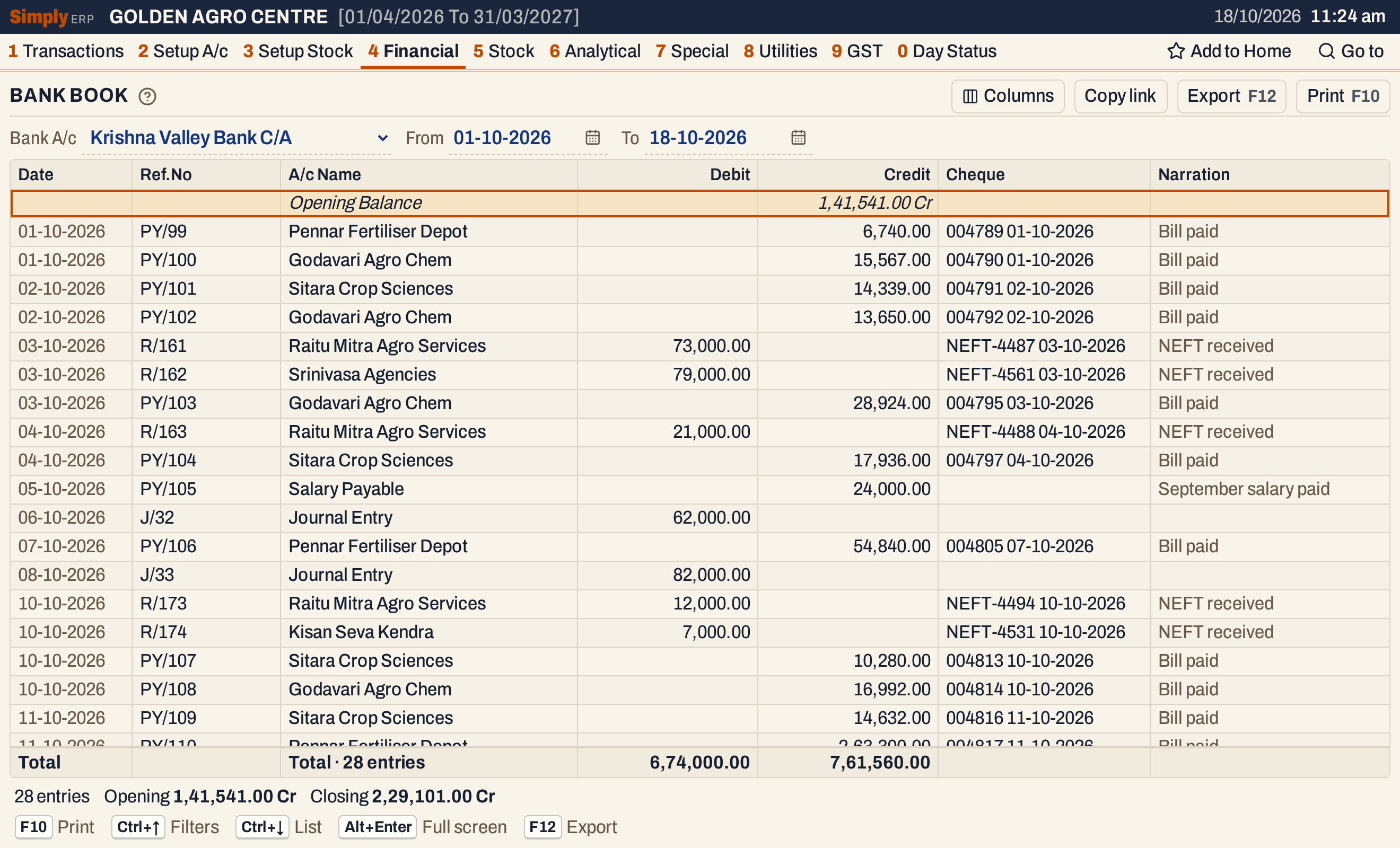 October on the current account. Debit is money into the bank, Credit is money out.
What it lists
One line for each posting to the bank account with a date in the period, with the account on the other side of it:
- receipts and payments made through the bank: the customer who paid, the supplier who was paid;
- bills settled to the account, for a bank account that takes card or wallet payments (a bill is one line, naming its sales account);
- journals that move money into or out of the account, such as a cash deposit (the other side reads Journal Entry).
Only accounts of the account type Bank have a bank book. The account’s opening balance and postings of nil are not listed as lines; the opening balance is the first line of the book. Books with no bank account say so and show nothing.
Columns
| Column | What it shows |
|---|---|
| Date | The date of the posting. |
| Ref.No | The voucher’s or bill’s number: PY/99 for a payment, R/161 for a receipt, J/32 for a journal, P/260 for a sale bill. |
| A/c Name | The account on the other side of the posting. For a journal it reads Journal Entry; for a bill, its sales account. |
| Debit | Money into the bank: a deposit or receipt. |
| Credit | Money out of the bank: a withdrawal or payment. |
| Cheque | The cheque number and date, or the transfer type and its number and date, as typed on the voucher, for example 004789 01-10-2026 or NEFT-4487 03-10-2026. Shown only when a line has one. |
| Narration | The narration of the posting. |
The first line is the Opening Balance, with its figure under Debit (Dr) or Credit (Cr). There is no balance on each line. The totals line adds the Debit and Credit columns of the lines shown and counts them, and the status line gives the opening and closing balances.
 The period’s deposits and withdrawals, and the opening and closing balances.
Choices
| Choice | What it does |
|---|---|
| Bank A/c | The bank account. It starts on the first one by name. |
| From, To | The period. Both dates must fall in the financial year. The opening balance is the balance on the day before From. |
| Columns | Hides the Date, Ref.No, Cheque or Narration column. The print leaves out the date, cheque and narration too, and the Excel file leaves out all that are hidden. |
 The choices above the grid.
Click a column title (Ref.No, A/c Name, Debit or Credit) to sort the lines by it, and click again to reverse. Every choice is kept in the page address, so Copy link gives a link that opens the same book.
A bank account that settles card or wallet sales shows each bill as one line, with the sales account in A/c Name and the bill’s narration:
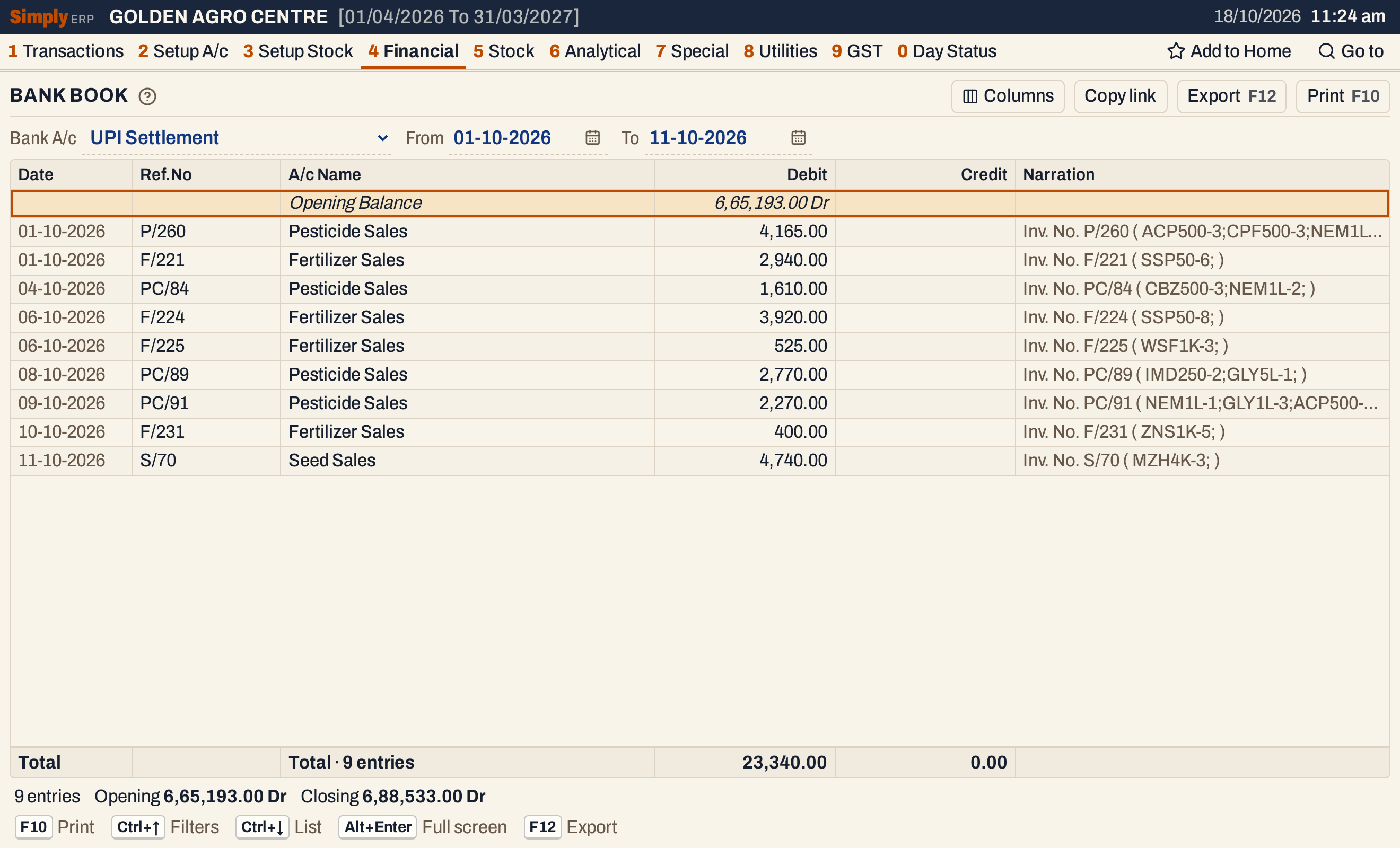 UPI Settlement: nine bills paid by UPI in eleven days, each debited to the account.
How the figures are worked out
- Opening Balance = the account’s opening balance + all it received − all it paid before the From date. It is marked Dr when the bank holds money for you and Cr when the account is overdrawn. On 01-10-2026 this account stood at 1,41,541.00 Cr.
- Debit and Credit are the posting’s own side. A cheque you issue credits the bank; a transfer from a customer debits it.
- Closing = Opening + Debit − Credit of the period, with a Cr balance counted as minus, then marked Dr or Cr. Here, −1,41,541.00 + 6,74,000.00 − 7,61,560.00 = −2,29,101.00, which is 2,29,101.00 Cr, the figure the Trial Balance shows for the account on 18-10-2026.
- Lines come in date order, and on one day in the order they were posted.
The Bank Book lists the same postings as the Ledger of the bank account, with the cheque on each line and without the running balance.
Open, print and export
- Enter on a line opens the bill or voucher behind it. Back returns to the same line.
- F10 prints the book, headed LEDGER with the bank account and the period. The columns are Tr.Date, Particulars, Credit and Debit, with Credit first and no Ref.No. The other account’s name is printed in capitals with the narration and the cheque under it. The print closes with the opening balance, the totals and the closing balance.
- F12 saves it as an Excel workbook, with the figures as numbers and the reference, cheque and narration in columns of their own.
- Alt+Enter gives the whole window to the list.
Updated 4 November 2026.