Consolidated Outstanding
On this page
The Consolidated Outstanding lists what every linked party owes at the To date, grouped by area (the City / town in the party’s account), with the interest on its balance and the total due. Each party’s figures come from its statement over all the years and companies you linked, so a due that began last year is counted in full. Use it to see who owes how much, and to print the list with the interest for a collection round.
It reads the books of other years and companies, so it works in the SimplyERP app on the device that holds those books. In SimplyERP Online, which has only this year’s backup, the screen says so instead of showing the list.
Open the report
Press Alt+4 for Financial Reports, then V. The list fills in at once for every party linked in Setup. The period starts as the financial year’s first day to today. Press Setup to link the parties; it opens the setup of the Consolidated Ledger. When the list is empty and no area or party type is chosen, the setup lists open above the choices by themselves.
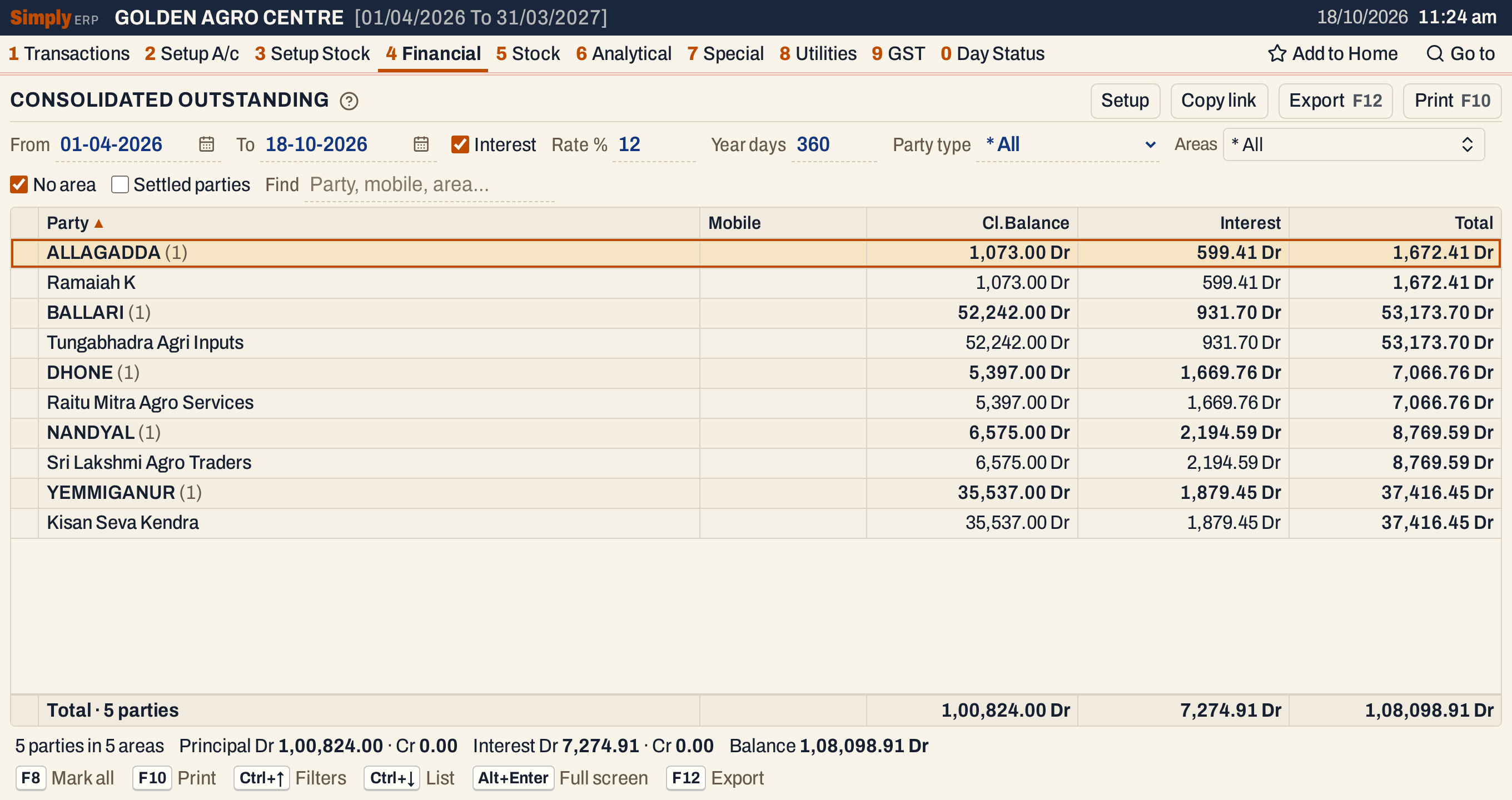 Each area is a heading in capitals with the number of its parties in brackets. Under it come its parties, with the closing balance, the interest and the total.
What it lists
One line for each linked party: an account you linked across company databases (see the Consolidated Ledger’s Setup) whose type is Customer, Farmer or Customer - Supplier. Accounts of other types are left out.
- The lines are grouped under the area of the party, which is the City / town in its account, in capitals. The City / town, the type and the phone number are read from the party’s account in the first year of each business that ends on or after the From date. When the businesses give different towns, the party is listed under them joined by a comma.
- A party with a nil closing balance at the To date is left out, unless you tick Settled parties and it has had something in the period: an opening balance, postings, or interest.
- A party with no City / town in its account is listed under * GENERAL while No area is ticked, and left out when it is not. When you pick areas, such a party is listed only if * GENERAL is one of them.
- Each area heading carries the total of its parties, and the line under the grid the total of all of them.
Columns
| Column | What it shows |
|---|---|
| Party | The party’s name. On an area heading, the area and the number of its parties. |
| Mobile | The phone number in the party’s account. Blank when none is recorded. |
| Cl.Balance | The balance at the To date, marked Dr or Cr. |
| Interest | The interest on the balances of the period, marked Dr or Cr. |
| Total | The balance with the interest added, marked Dr or Cr. |
| Opening | Only with Interest unticked: the balance at the start of the period. |
| Period debit, Period credit | Only with Interest unticked: what was posted to the party in the period. |
| Closing | Only with Interest unticked: the same as Cl.Balance. |
With Interest unticked the report shows the principal only, in the columns Opening, Period debit, Period credit and Closing, and has no Interest or Total.
Choices
| Choice | What it does |
|---|---|
| From, To | The period. The balances start from the opening balance on the day before From, and the interest runs from From to To. The years you linked must cover the whole period (see the Consolidated Ledger). |
| Interest | Ticked by default. Untick it for the principal only. |
| Rate % | The yearly rate, for balances on both sides. The default is 12. From 0 to 99.99, with at most two decimals. |
| Year days | The number of days in the year the rate is counted on. The default is 360. From 1 to 9999. |
| Party type | * All (the default), Farmer, Customer or Customer / Supplier. |
| Areas | The areas to list. * All (the default) lists every area. Pick some in the list. |
| No area | Ticked by default. Lists the parties with no City / town, under * GENERAL. With areas picked, * GENERAL must be picked too. |
| Settled parties | Lists the parties with a nil closing balance that had something in the period. |
| Find | Shows only the parties that match what you type: name, legal name, mobile or area. The totals follow the parties shown. |
 The choices above the list.
Every choice, the sort and the parties you have marked are kept in the page address, so Copy link gives a link that opens the same report.
Choose areas
The Areas choice opens a list of the areas of the linked parties, which you can search. Click an area to tick it, and Done closes the list. The report shows only the ticked areas.
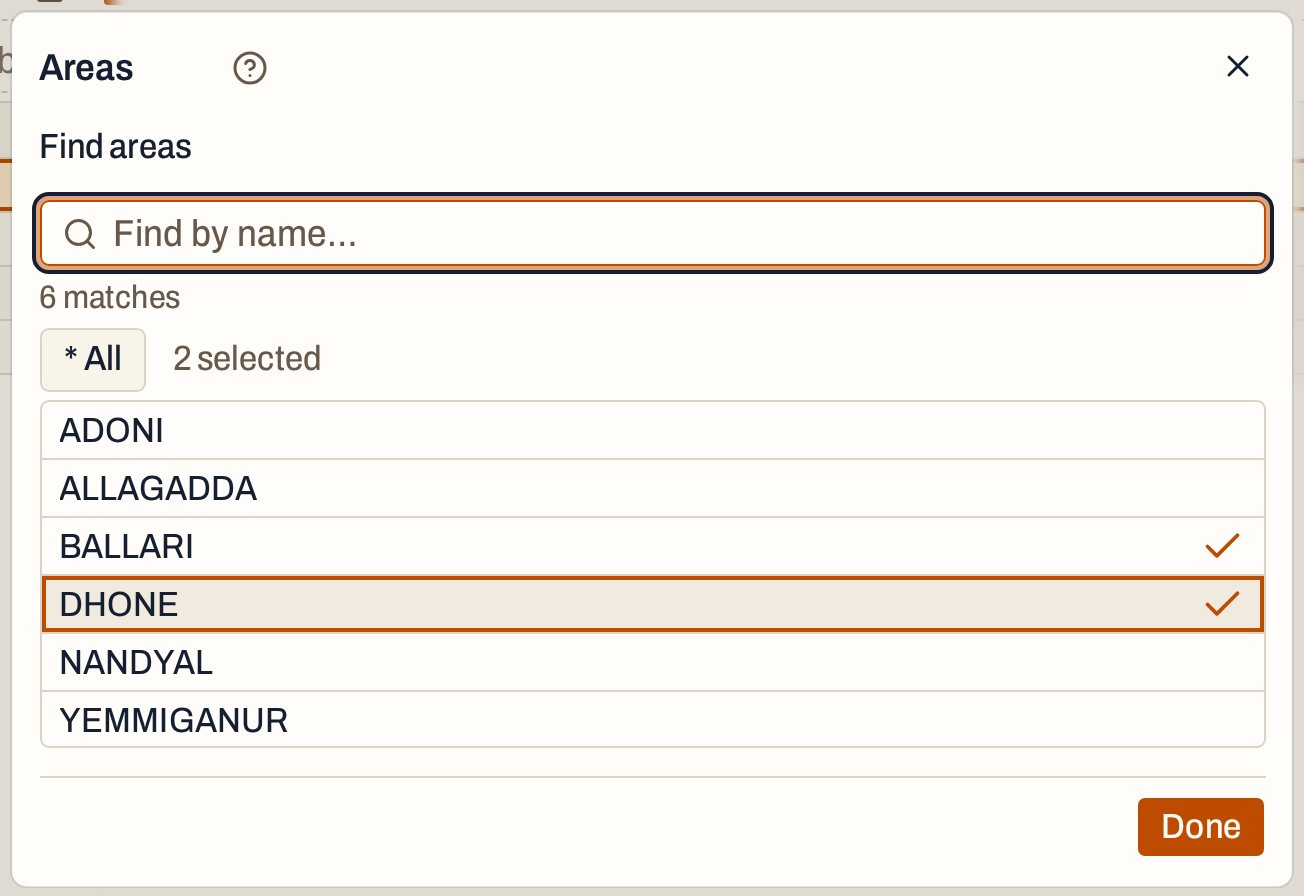 Two of the six areas ticked.
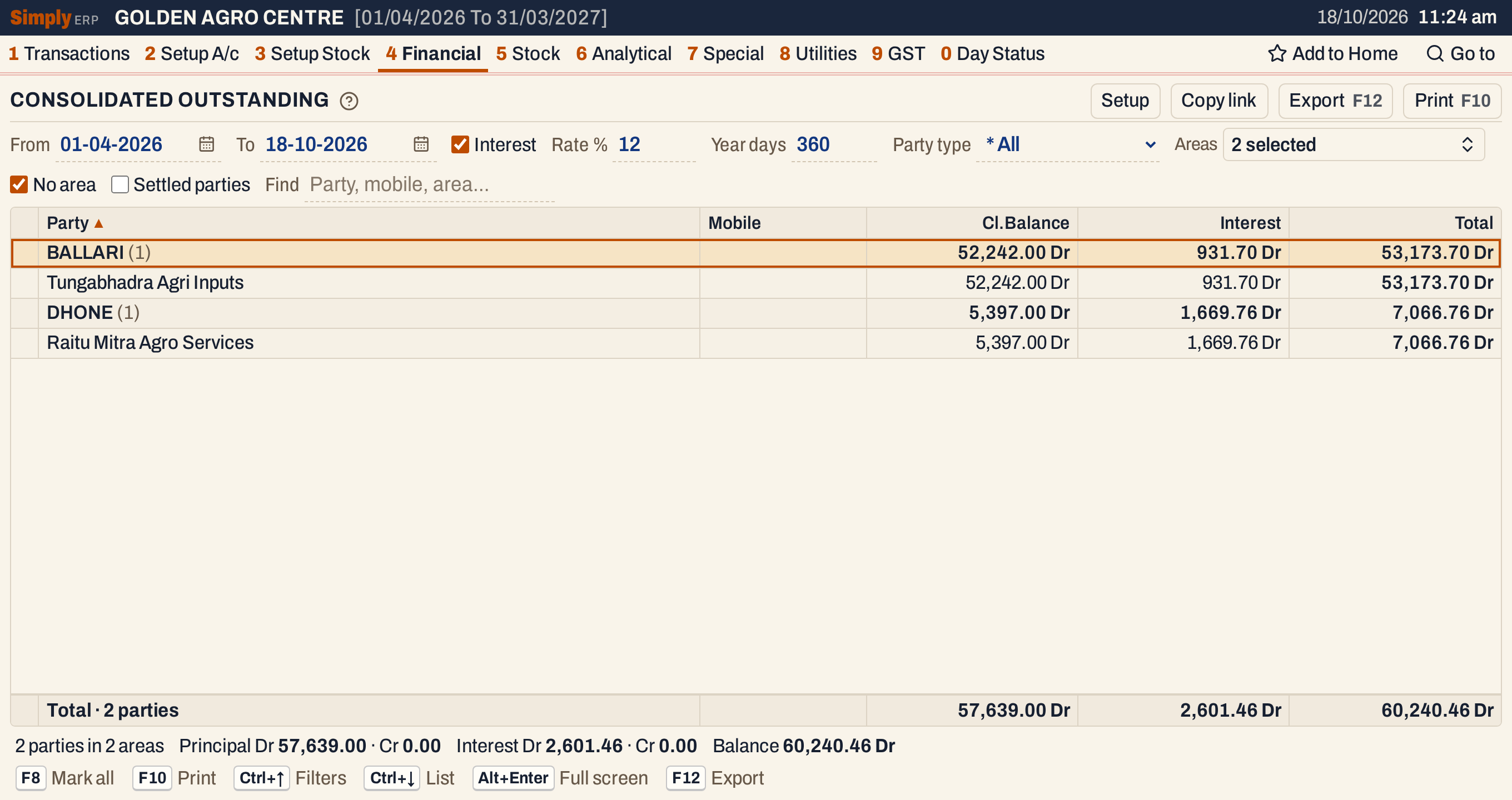 The totals follow: two parties, with a balance of 60,240.46 Dr.
How the figures are worked out
Each party’s figures are those of its Consolidated Ledger over the period.
- Cl.Balance = the party’s opening balance on the From date + its debits − its credits from the From date to the To date, over all the linked years of all the businesses. A positive balance is Dr and a negative one Cr. The opening balance is the opening of the first selected year of each business plus its postings dated before From, as in the Consolidated Ledger.
- Interest is charged on the balance day by day, as the Single method of the Consolidated Interest: the opening balance is charged from the From date up to the first posting, the balance after each posting from the posting’s date up to the next posting’s date, and the last balance up to the To date, which is not counted. A debit balance earns interest on the Dr side and a credit balance on the Cr side, both at the same Rate % and Year days.
- Interest on a stretch = balance × rate % × days ÷ year days, rounded to the paisa, half up, once for each stretch. The interest of the party is the interest of its debit stretches less the interest of its credit stretches, marked Dr when it is positive and Cr when it is negative.
- Total = the closing balance as a signed amount (Dr positive) + the interest on the debit stretches − the interest on the credit stretches, marked Dr or Cr. Cl.Balance 52,242.00 Dr with interest 931.70 Dr gives 53,173.70 Dr.
- Opening, Period debit, Period credit (principal only) = the party’s opening on the From date, and the debits and credits posted to it from From to To. Opening + Period debit − Period credit is the Closing. In the picture Ramaiah K has 3,450.00 Dr + 92,123.00 − 94,500.00 = 1,073.00 Dr.
- Area headings and totals. The figures of an area are the sums of its parties’ figures, the debit balances and credit balances added up on each side and shown as a net. The line under the grid gives Principal Dr and Cr, Interest Dr and Cr, and Balance, which is the debit totals less the credit totals of the Total column.
The interest here and the interest in the Consolidated Interest agree. From 01-04-2025 the party Sri Lakshmi Agro Traders has the same 4,541.43 Dr interest in both, and the same total of 11,116.43 Dr.
 With From set to the first day of last year, last year’s balances are charged as well.
 The status line gives the principal, the interest and the balance on each side. The balance is 1,00,824.00 + 7,274.91 = 1,08,098.91 Dr.
Settled parties
A party that has paid in full has a nil closing balance and is left out. The interest it owed for the period is then not in the list. Tick Settled parties to list it, with its interest.
 Venkatesh Gowda paid in full on 17-10-2026. His closing balance is nil, and 840.26 of interest is still due for the period.
Principal only
Untick Interest to list the principal only. The Interest and Total columns go, the Rate % and Year days choices go, and the columns Opening, Period debit and Period credit come in. The sort goes back to the party’s name.
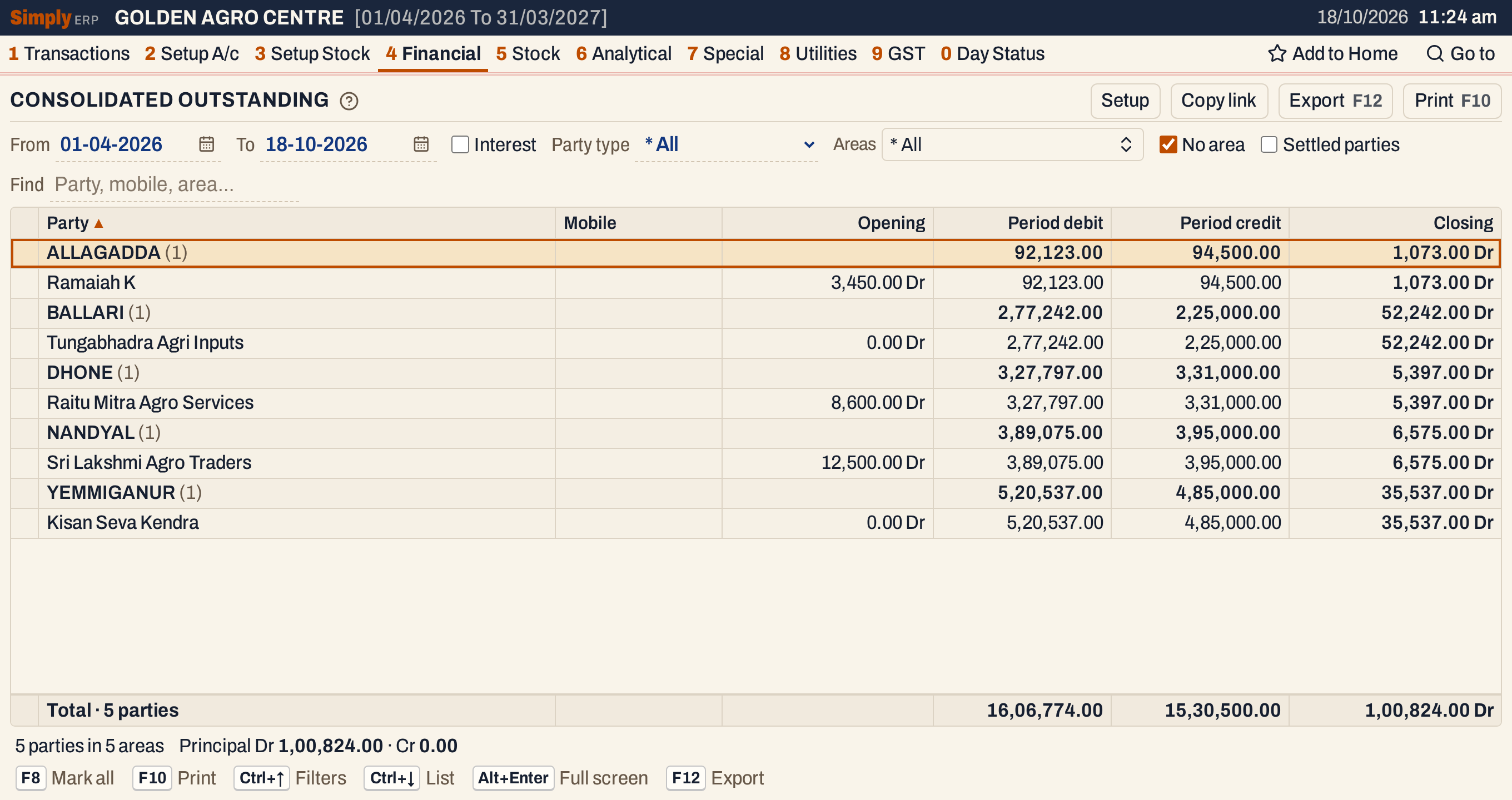 Without interest. The opening balances are not added up in the totals line.
When the years do not join up
If a party’s year opens with another balance than the year before closes at, a red message under the list names the party and the business, and the report carries the earlier year’s closing balance, as in the Consolidated Ledger.
 Last year closed at 3,450.00 Dr, but this year was opened with 3,200.00 Dr. The figures of the other pictures are taken after the opening was corrected.
Open, sort, mark, print and export
- Enter on a party opens its Consolidated Interest for the same period, the same rate and the same year days on both sides. Back returns to the same line.
- Click a column title to sort the parties inside each area by it, and again to reverse the order. Shift+click adds the column as a further key. Figures start with the largest. The areas stay in name order, with * GENERAL first.
- F2 or Space marks a party, and F8 marks all of them. The status line says how many are marked, and F10 then prints only those, with the totals of the areas and of the whole list worked out again.
- Typing letters jumps to a party whose name starts with them.
- F10 prints the list as CUSTOMERS OUTSTANDING WITH INTEREST, or CUSTOMERS OUTSTANDING with Interest unticked. Its heading gives the period, whether only marked parties are printed, and your choices: the rate and year days, the party type, the areas, whether parties without an area or settled parties are in, and Find. The columns are Account, Mobile, Cl.Balance, Interest and Total. It ends with Tot.Balance, Tot.Interest (each with its Dr and Cr) and BALANCE. The principal-only print ends with Totals of the debits, the credits and the closing.
- F12 saves it as an Excel workbook, with the figures as numbers.
- Alt+Enter gives the whole window to the list.
Updated 4 November 2026.