Trial Balance
On this page
The Trial Balance lists the balance of every account in your books on one page: what each customer owes, what you owe each supplier, your cash and bank, sales, purchases, expenses, GST and capital. Its debit and credit columns must add up to the same total. When they do, the status line says Tallied.
Open the report
Press Alt+4 for Financial Reports, then E. The report opens for the financial year from its first day to today, with opening balances, grouped by account type.
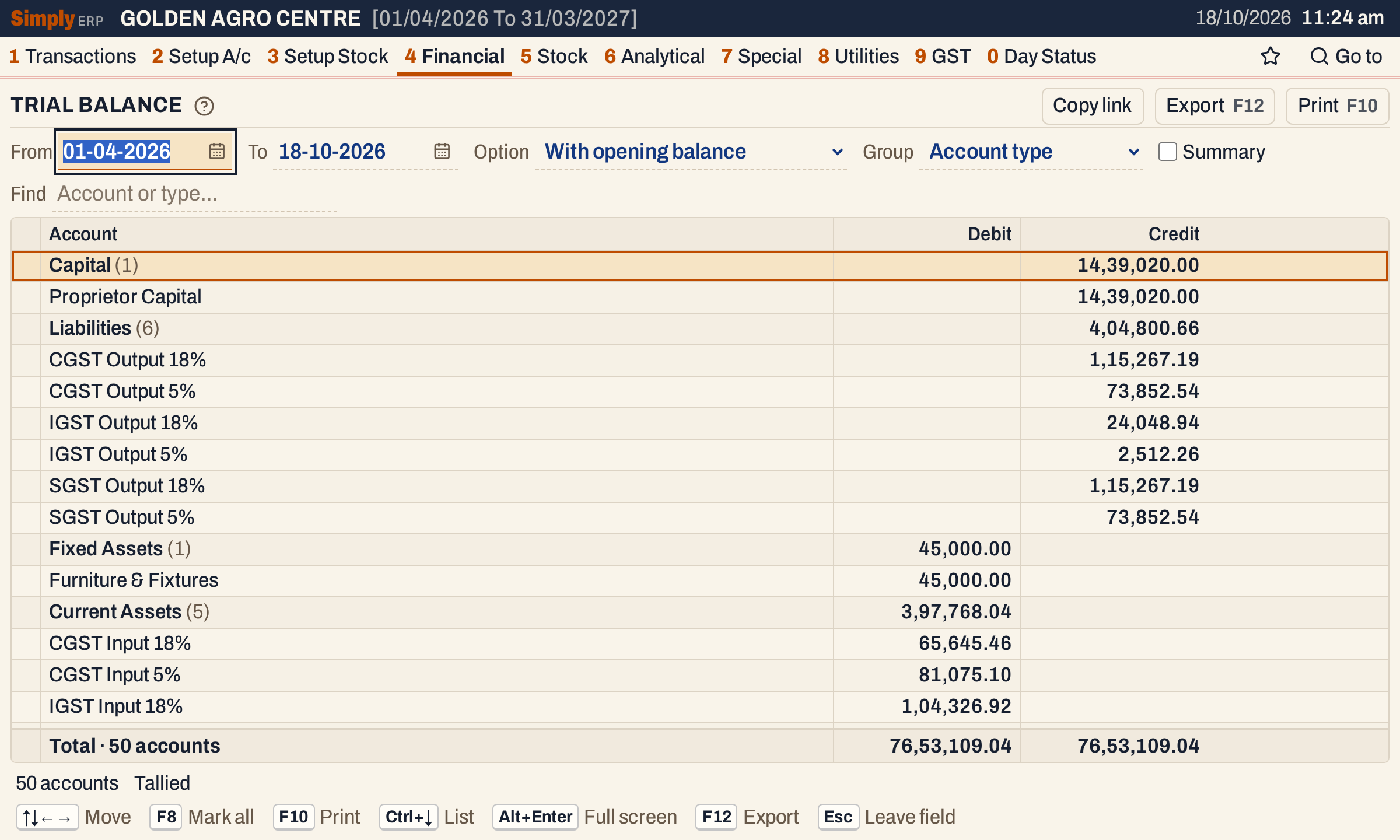 Each account type is a heading with the number of accounts under it and their total.
What it lists
One line for each account that has a balance under the option you choose:
- every ledger in Head of Accounts (2 A): parties, cash, bank, sales and purchase accounts, GST accounts, expenses, capital and the rest;
- everything posted to them: opening balances, bills, returns, notes, receipts, payments, journals and charges.
An account whose figures are all nil under the option is left out.
Columns
| Column | What it shows |
|---|---|
| Account | The account’s name. With Summary ticked, the account type instead, with the number of accounts in it. |
| Type | The account type (shown when Group is None; hide it with Columns). |
| Opening | The balance at the start of the period, marked Dr or Cr. Detailed option only. |
| Trn. Debit | The debits posted in the period. Detailed option only. |
| Trn. Credit | The credits posted in the period. Detailed option only. |
| Debit / Cl. Debit | The closing balance, when it is a debit. |
| Credit / Cl. Credit | The closing balance, when it is a credit. |
The totals line under the grid counts the accounts listed and adds up the Trn. Debit, Trn. Credit and closing Debit and Credit columns. The Opening column has no total.
Choices
| Choice | What it does |
|---|---|
| From, To | The period. Both dates must fall in the financial year. The opening balance is the balance on the day before From. |
| Option | Transactions only: only the period’s postings, without opening balances. With opening balance (the usual): the closing balance on the To date. Detailed (opening, transactions): the opening balance, the period’s debits and credits and the closing balance side by side. |
| Group | Account type: each type is a heading with its accounts under it. None: one list in ledger order. |
| Summary | One line per account type instead of every account. The box shows only when Group is Account type. |
| Find | Shows only the accounts whose name or type matches what you type. |
| Columns | Hides the Type, Opening, Trn. Debit or Trn. Credit column. The print leaves them out too. |
Click a column title to sort by it, and click again to reverse. Every choice is kept in the page address, so Copy link gives a link that opens the same report.
 The choices above the grid.
How the figures are worked out
For each account SimplyERP adds up its postings on the ledger:
- Opening = the account’s opening balance + everything posted to it before the From date. Credits less debits; a credit balance is marked Cr.
- Trn. Debit and Trn. Credit = the debits and credits posted from the From date to the To date, both days included.
- Closing = Opening + Trn. Credit − Trn. Debit. It is shown under Credit when the result is a credit and under Debit when it is a debit.
With Transactions only, the balance is the period’s credits less its debits, and the opening balance is not counted.
Customers, suppliers and farmers are grouped by the side of their balance, not by their account type: a customer who has paid in advance appears under Sundry Creditors. The four party groups are Sundry Debtors, Sundry Creditors, Farmers Debtors and Farmers Creditors, and they come after the other account types. With Group None and the first two options, each party group is one line instead of a line per party; the Detailed option lists each party.
The account types come in the order set in Setup Order (T.B) (8 M), and accounts within a type in name order.
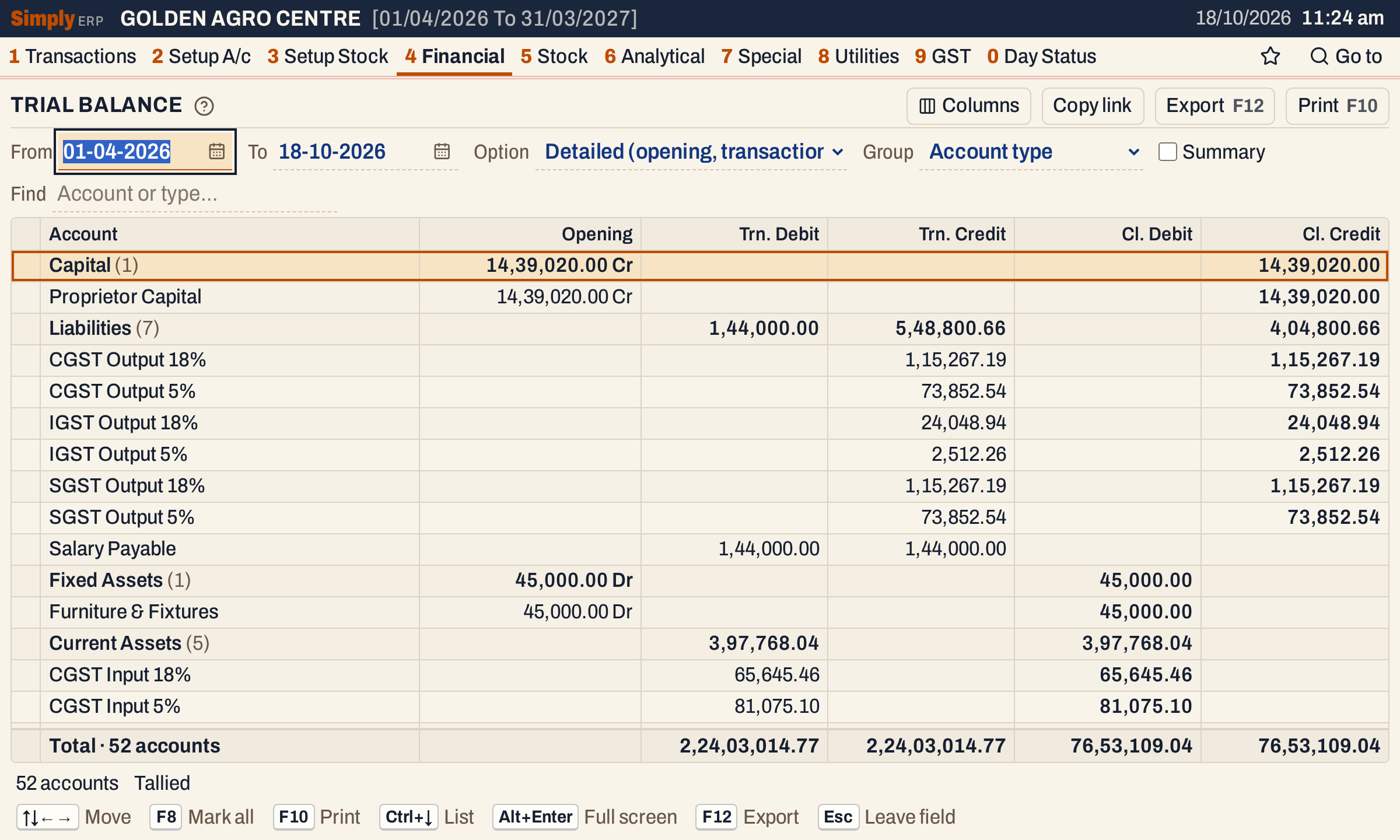 Detailed shows how each balance was reached. Salary Payable appears here because it had postings in the period, although its balance is nil.
When it does not tally
Every document SimplyERP saves posts equal debits and credits, so the trial balance tallies. If the debit and credit totals differ, the status line shows Trial balance not tallied with the difference and its side, and the print adds a line giving the difference. Check Trial Balance (8 P) lists the documents whose postings do not balance or post to an account that no longer exists.
 Debits equal credits: the books are tallied.
Summary
Tick Summary for one line per account type. This is the quickest way to see the total of sales, purchases, expenses, debtors and creditors.
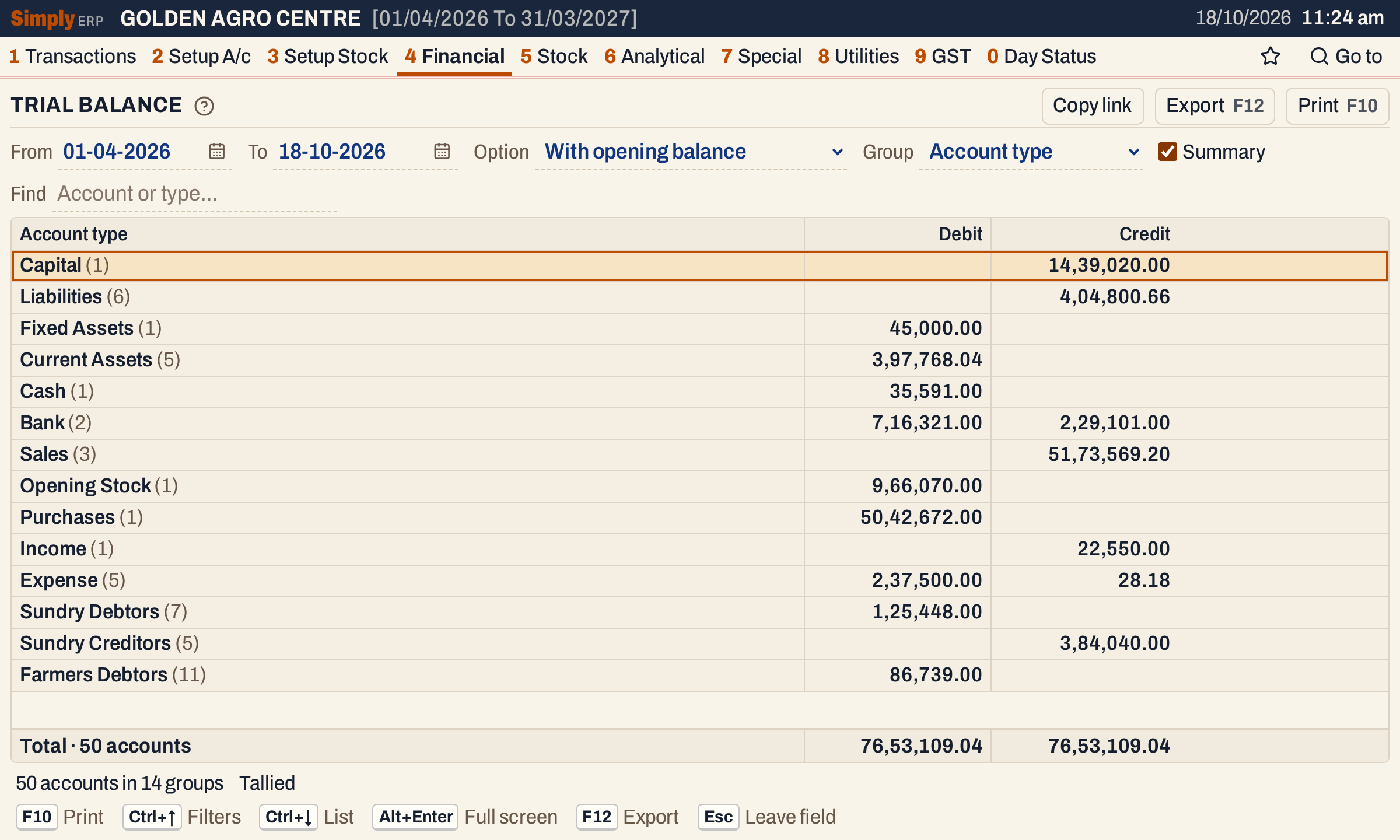 One line per account type, tallied at the same totals.
Open, mark, print and export
- Enter on an account opens its ledger for the same period. In the summary, Enter on an account type turns Summary off and puts the cursor on that type in the full list.
- F2 marks an account and F8 marks them all. F10 then prints only the marked accounts. Marking is not available in the summary.
- F10 prints the report as it is on the screen, with the period and your choices in its heading.
- F12 saves it as an Excel workbook, with the figures as numbers.
- Alt+Enter gives the whole window to the list.
Updated 4 November 2026.