Balance Sheet (Grouped)
On this page
The Balance Sheet (Grouped) draws the balance sheet from the account groups you set up: each account’s balance goes into the group it belongs to, and each group carries a schedule number, as the notes to a balance sheet do. Use it when you want the balances of your routes, banks, loans or any other groups of accounts as lines of their own. For the plain balance sheet of every account, use the Balance Sheet.
Open the report
Press Alt+4 for Financial Reports, then I. The report opens as on the working date (today, unless you have set another date), kept inside the financial year, in the A/c wise view.
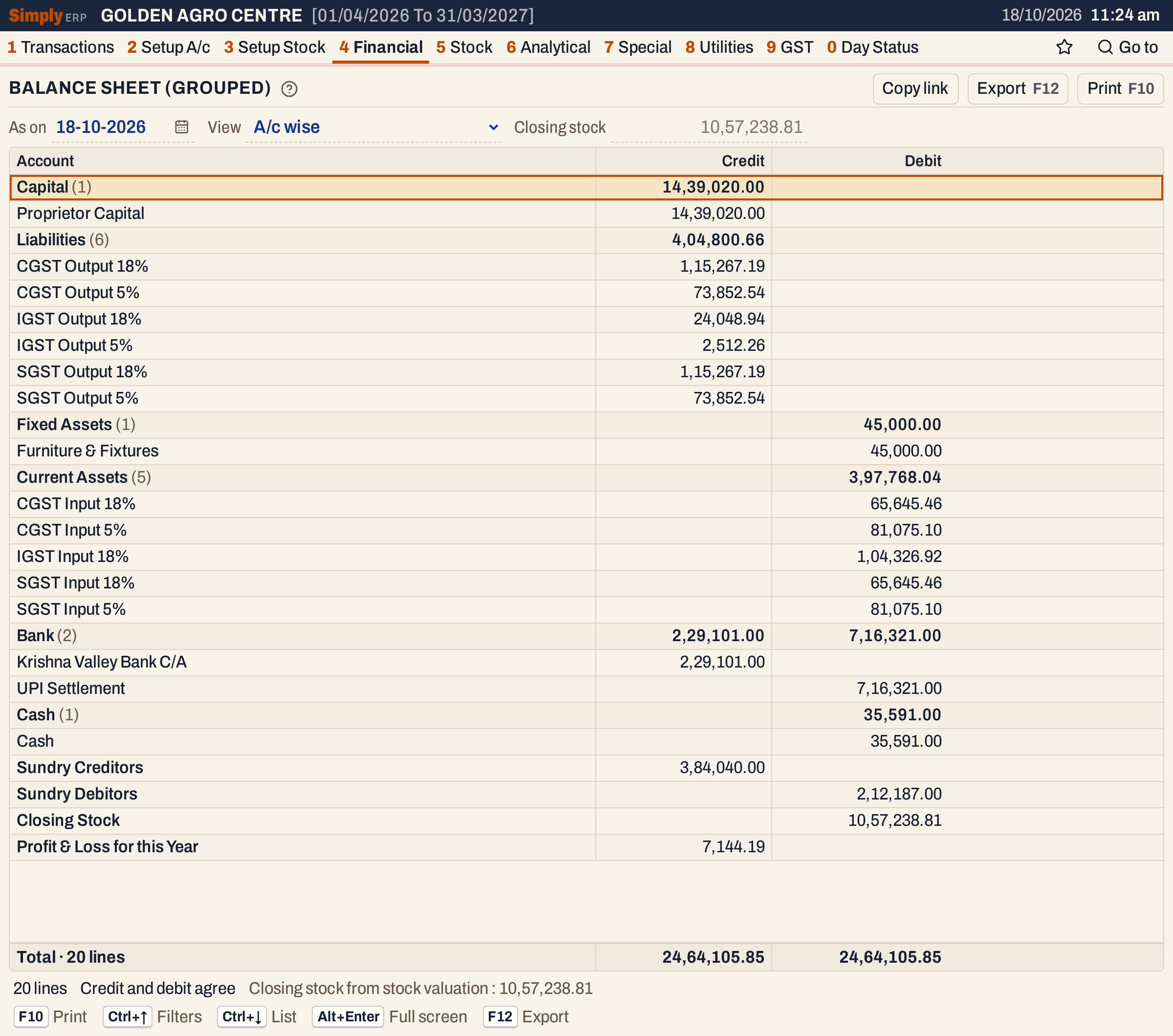 On these books every account with a balance sheet balance is in an account group, so the two sides agree: 24,64,105.85 each, and the status line says Credit and debit agree.
What it lists
This report lists only the accounts that belong to an account group. An account with a balance sheet balance but no group is not in it, whatever its balance. Groups are set in the account’s form (the Account group field) or for many accounts at once in A/c Grouping; the groups themselves, with a group type (Asset, Liability, Income, Expense or Unspecified) and a schedule number from 0 to 99, are kept under 2 A, Show A/c groups.
- Only balance sheet accounts count: not the sales, purchases, income and expense accounts, whose result comes in through the profit or loss line. The Statement field in an account’s form decides which statement an account belongs to.
- The balance of an account is everything posted to it up to the end of the As on day, opening balance included. An account whose balance is nil is left out.
- Every group adds up its accounts’ credit balances and debit balances separately, so a group can have both a Credit and a Debit figure.
Two lines are added by SimplyERP, as in the Balance Sheet:
- Closing Stock (in the group STOCK IN TRADE, schedule B), a debit, when it is not nil;
- Profit & Loss for this Year (in the group P & L): the net profit of the Profit & Loss Statement as a credit, or the net loss as a debit.
Because of the first rule, the two sides of this report agree only when every balance sheet account that has a balance is in a group. When they do not, the status line shows Credit and debit differ by the amount, in red, and the amount is the net balance of the accounts left out (their credits less their debits, or the other way round).
On the books in the pictures, every account has been given a group, so the sides agree. Before that, only some customers, farmers and suppliers were in groups, and the report showed this:
 The status line on the same books before the accounts without a group were given one. The difference, 8,37,939.62, is the net balance of the capital, GST, cash, bank, fixed asset and some party accounts that were in no group.
Views
The View choice gives three layouts of the same figures.
| View | What it shows |
|---|---|
| A/c wise | The accounts under the account type they belong to, with a heading and count for each type. Customers, suppliers, farmers, debtors, creditors and company accounts are not listed one by one: they are added into Sundry Creditors (their credit balances) and Sundry Debitors (their debit balances). Then the Closing Stock and the profit or loss. |
| Group wise | One line for each account group, with its schedule number and its credit and debit totals. |
| Group wise with schedules | Each group as a heading with the number of lines under it and its totals, then the group’s accounts, each with its own balance. |
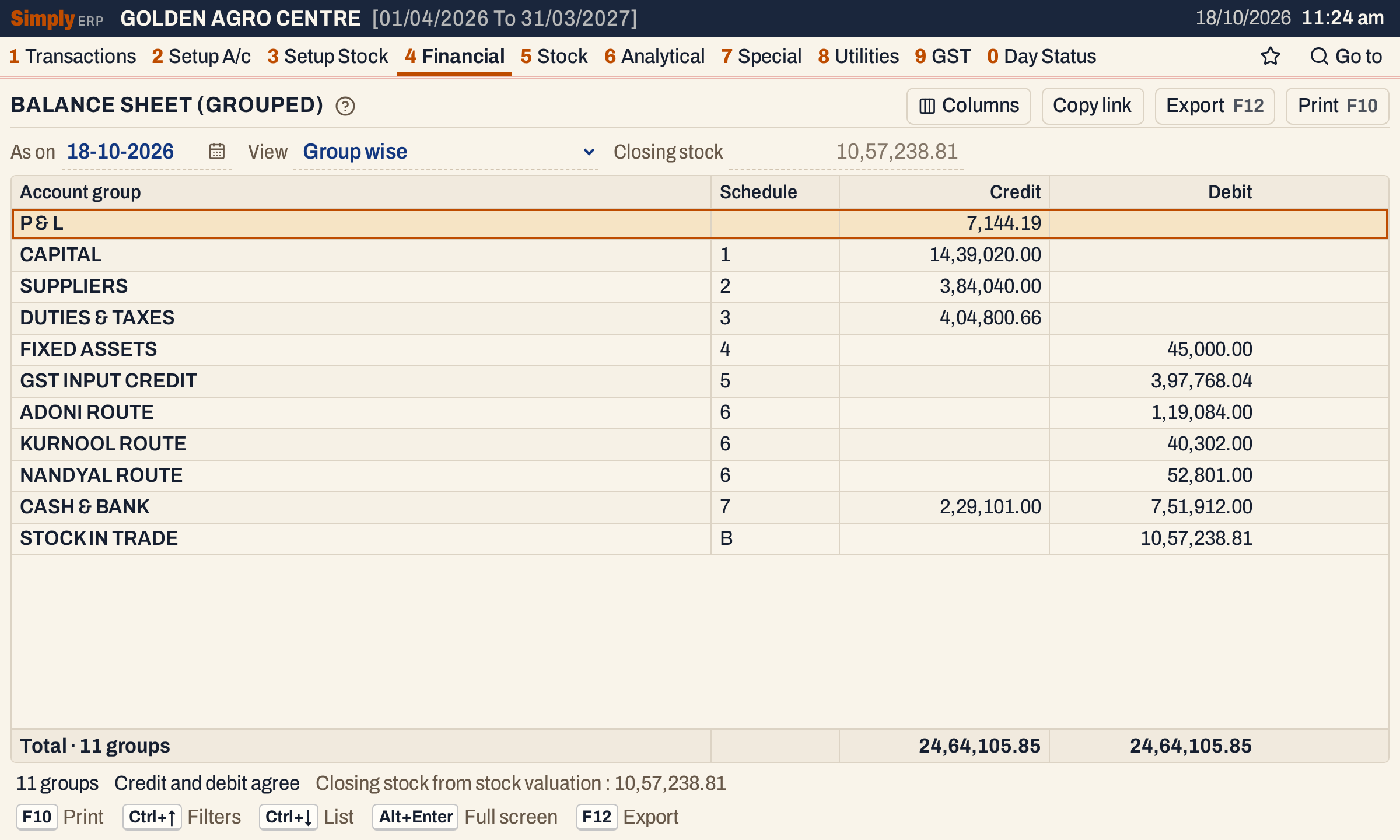 Group wise: a line for each group, in the order of the schedule numbers. P & L has no schedule number and comes first; STOCK IN TRADE has schedule B and comes last. CASH & BANK has both a credit figure (the overdrawn bank account) and a debit figure.
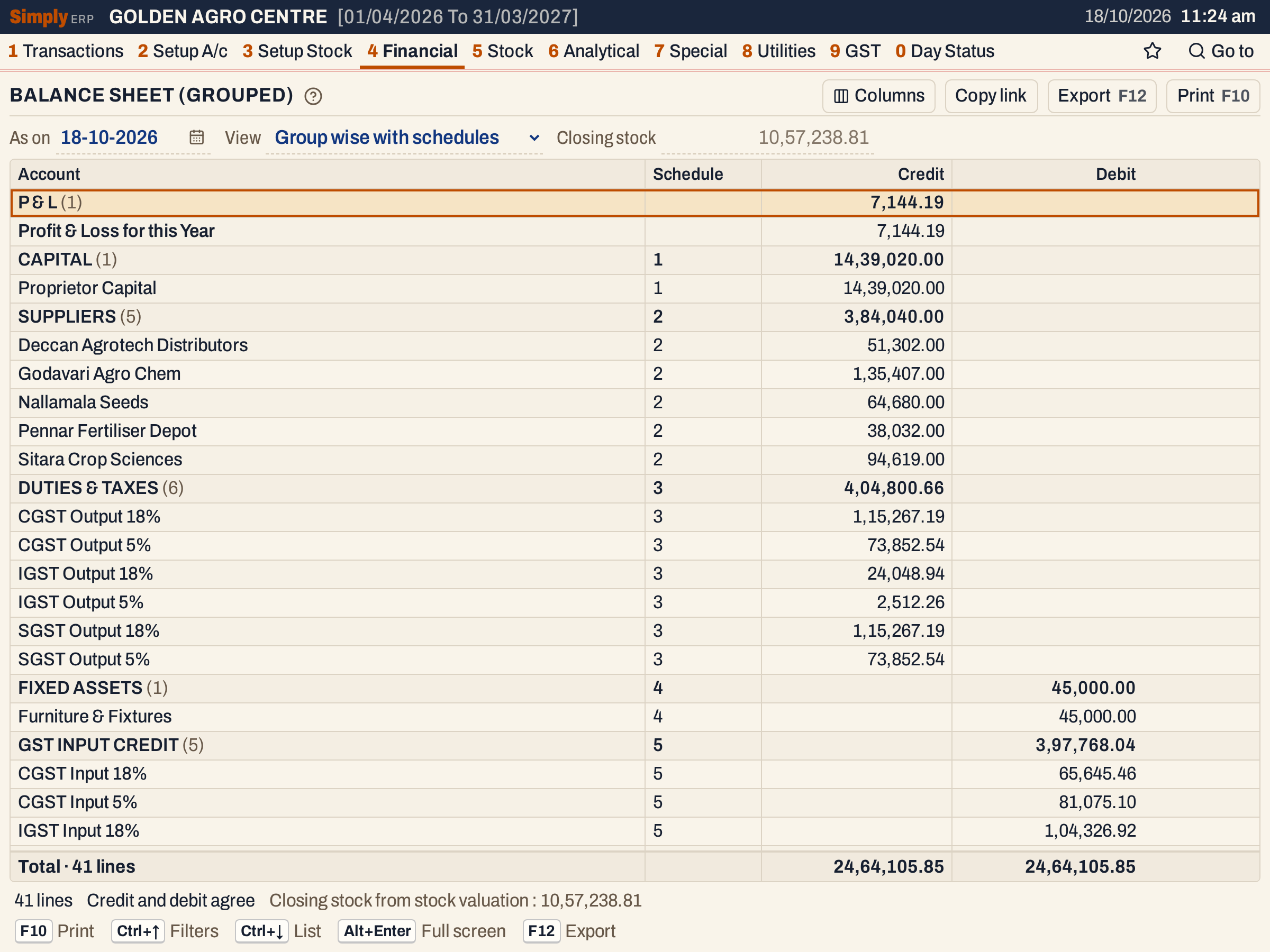 With schedules, each group is a heading with the number of accounts in brackets and its schedule number, and its accounts are listed under it with the same number. The list goes on below with the rest of GST INPUT CREDIT and the other groups.
Columns
| Column | What it shows |
|---|---|
| Account | The account’s name; in the Group wise view the group’s name (titled Account group). Headings show the type or group and the number of lines under it in brackets. |
| Schedule | The group’s schedule number. Shown in the Group wise views when any group has one; blank for schedule 0. The Columns button hides it. |
| Credit | Credit balances. |
| Debit | Debit balances. |
Credit is listed before Debit. The totals line adds up both columns and counts the lines (or groups). The status line gives the same count, Credit and debit agree or the difference, and where the closing stock came from: Closing stock from stock valuation, or Closing stock with the amount you typed.
Choices
| Choice | What it does |
|---|---|
| As on | The day the balance sheet is drawn up to. It must fall in the financial year. Default: the working date, kept inside the financial year. |
| View | A/c wise (the default), Group wise or Group wise with schedules. |
| Closing stock | Empty by default, where the grey figure shows the valuation. An amount typed here replaces it; the profit changes by the same amount. |
 The choices above the grid. There is no Tax choice: the stock is valued at purchase rates with tax.
Every choice is kept in the page address, so Copy link gives a link that opens the same report.
How the figures are worked out
- Account balance = credits posted to the account up to the As on day (its opening balance counts as a posting) − its debits. A positive result is a credit balance, a negative one a debit balance.
- Group = the sum of the credit balances of its accounts, in Credit, and the sum of their debit balances, in Debit. A group is identified by its name, schedule number and group type.
- Sundry Creditors and Sundry Debitors (A/c wise only) = the credit balances and the debit balances of the customer, supplier, farmer, debtor, creditor and company accounts that are in a group.
- Closing Stock = the valuation of the stock on the As on day at purchase rates with tax, newest purchases first, as in the Trading Account, unless you type an amount.
- Profit & Loss for this Year = the net result of the Profit & Loss Statement for the same date and closing stock.
- Totals = the sum of the Credit column and of the Debit column.
Groups come in order of schedule number (numbers by value, then letters), then group type, then name. A group without a schedule comes first. Accounts within a group come in name order. In the A/c wise view, accounts come in the order of their types, then by name.
For the books in the pictures:
- Credit: capital 14,39,020.00 + suppliers 3,84,040.00 + GST output accounts 4,04,800.66 + the overdrawn bank account in CASH & BANK 2,29,101.00 + the profit 7,144.19 = 24,64,105.85.
- Debit: furniture 45,000.00 + GST input accounts 3,97,768.04 + customers and farmers in the three route groups (1,19,084.00 + 40,302.00 + 52,801.00 = 2,12,187.00) + cash and the other bank account in CASH & BANK 7,51,912.00 + the closing stock 10,57,238.81 = 24,64,105.85.
- The difference is nil, so the status line says Credit and debit agree.
Open, print and export
- Enter on an account opens its ledger from the first day of the financial year to the As on date.
- In the Group wise view, Enter on a group opens the Group wise with schedules view, to see its accounts.
- Enter on Closing Stock opens the Closing Stock Valuation as on the same day, and on Profit & Loss for this Year the Profit & Loss Statement for the same day and closing stock.
- F10 prints the report as BALANCE SHEET, with As On the date, how the closing stock was reached and the name of the view in its heading, then the columns Credit and Debit and a Totals line. The first column is titled A/c Name, or Particulars in the Group wise view, and the schedule column Schedule. In the with-schedules view, each group is printed as a heading with its schedule number.
- F12 saves it as an Excel workbook, with the figures as numbers.
- Alt+Enter gives the whole window to the list.
Updated 4 November 2026.