Consolidated Ledger
On this page
The Consolidated Ledger is the statement of one party over more than one set of books: the last year and this year of your business, or the books of two firms you run. Each year has its own books in SimplyERP, and the Ledger shows only the year you have open. Here you link the party’s account in each set of books once, and the report joins the postings of all of them into one statement with one running balance.
It reads the books of other years and companies, so it works in the SimplyERP app on the device that holds those books. In SimplyERP Online, which has only this year’s backup, the screen says so instead of showing a statement.
Open the report
Press Alt+4 for Financial Reports, then M. Choose the party in A/c Name. The list holds the linked accounts only. The period starts as the financial year’s first day to today.
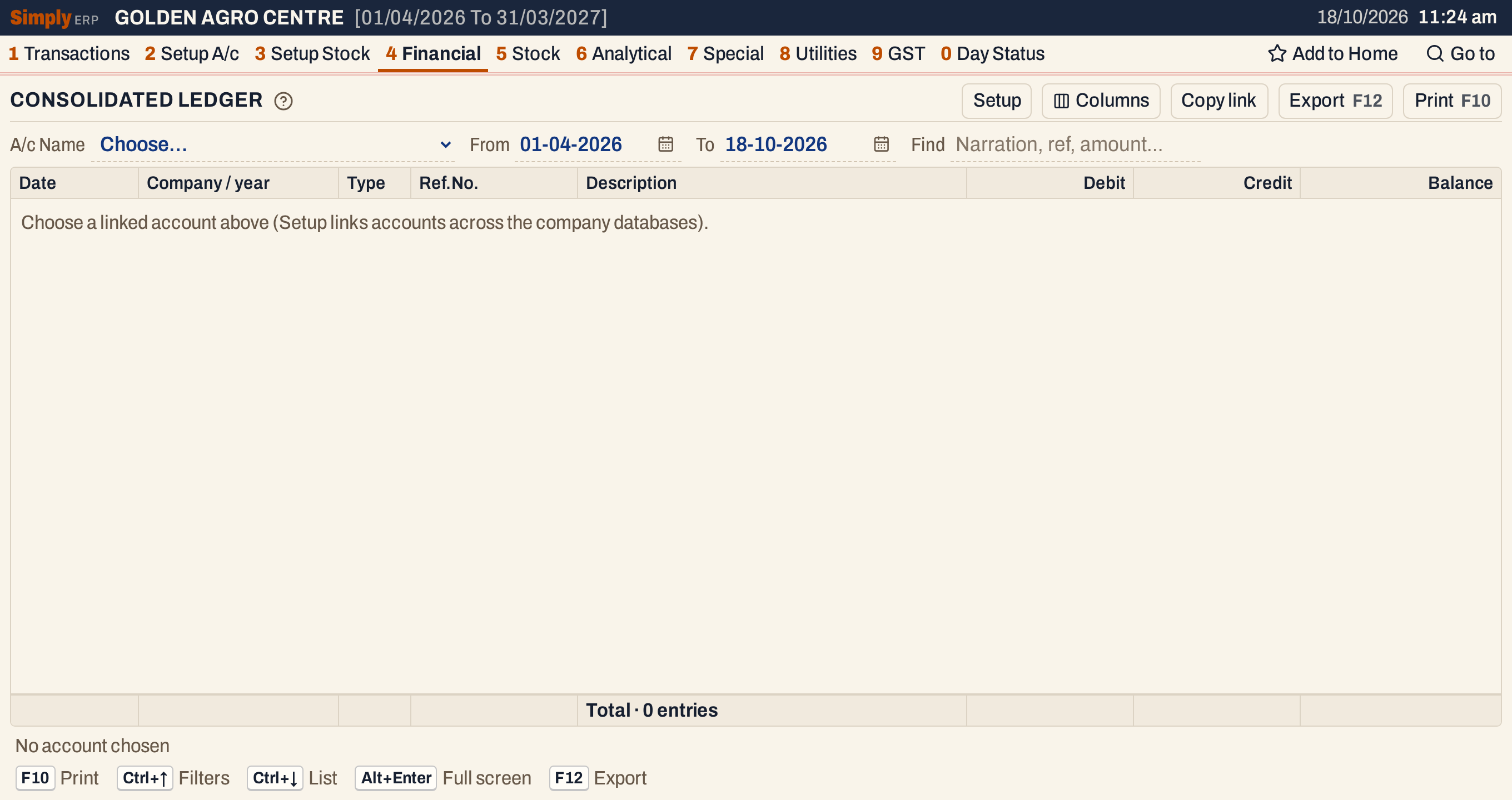 The list of A/c Name is made in Setup.
Set it up: company databases and linked accounts
Press Setup to open the two lists. When no account is linked yet, they open by themselves.
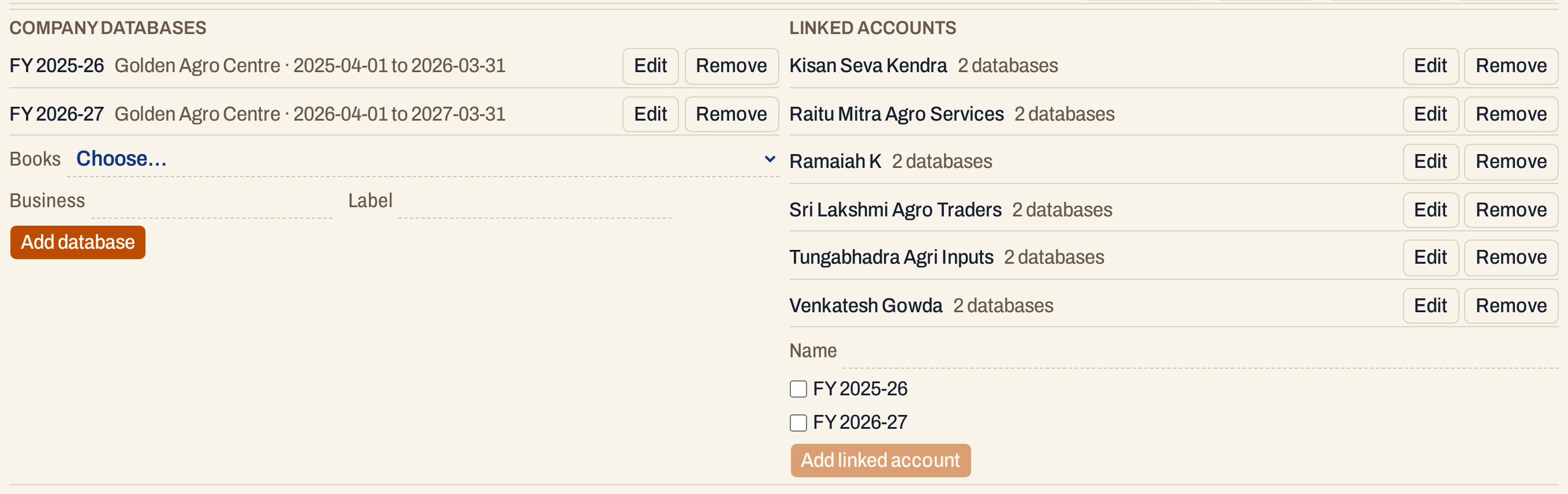 Two sets of books of one business, and six parties linked across them.
Company databases are the sets of books the report may read. To add one, choose it under Books, give the Business (the company’s name by default) and, if you like, a Label, then press Add database. The Books list holds the books SimplyERP finds: in the apps, the companies and years installed on the device, and the years that have a backup your account may read. A path is never typed.
- Give the same Business to the years of one business. Years with the same business name are treated as consecutive years of one company; years with different names are different businesses.
- The label is what the Company / year column shows. Without one, SimplyERP uses the company’s name with its financial year’s dates.
- Edit on a database changes its business or label; Remove deletes it from the list, not its books.
Linked accounts tie together the same party’s accounts in the databases. Type the Name, tick the databases the party appears in and choose its account in each. Press Add linked account.
- One account for each database, and at least one existing account.
- A year before the party’s account was created can be marked Account not yet created. This is allowed only for years before the account first exists.
- A database cannot be removed while a linked account uses it.
- Edit on a linked account changes its links; Remove deletes the link, not the accounts.
What it lists
Everything posted to the party in the linked accounts, taken from each database’s own financial year up to the To date:
- the Opening Balance, as the first line;
- the bills, returns, notes, receipts, payments and journals of each year, one line for each posting.
Opening-balance entries are not listed as postings (they make the opening), and postings of nil amount are left out. Each line says which database it came from in Company / year. It reads as the Ledger: the Type is SIN, BR, JV and so on, and the Description is the narration.
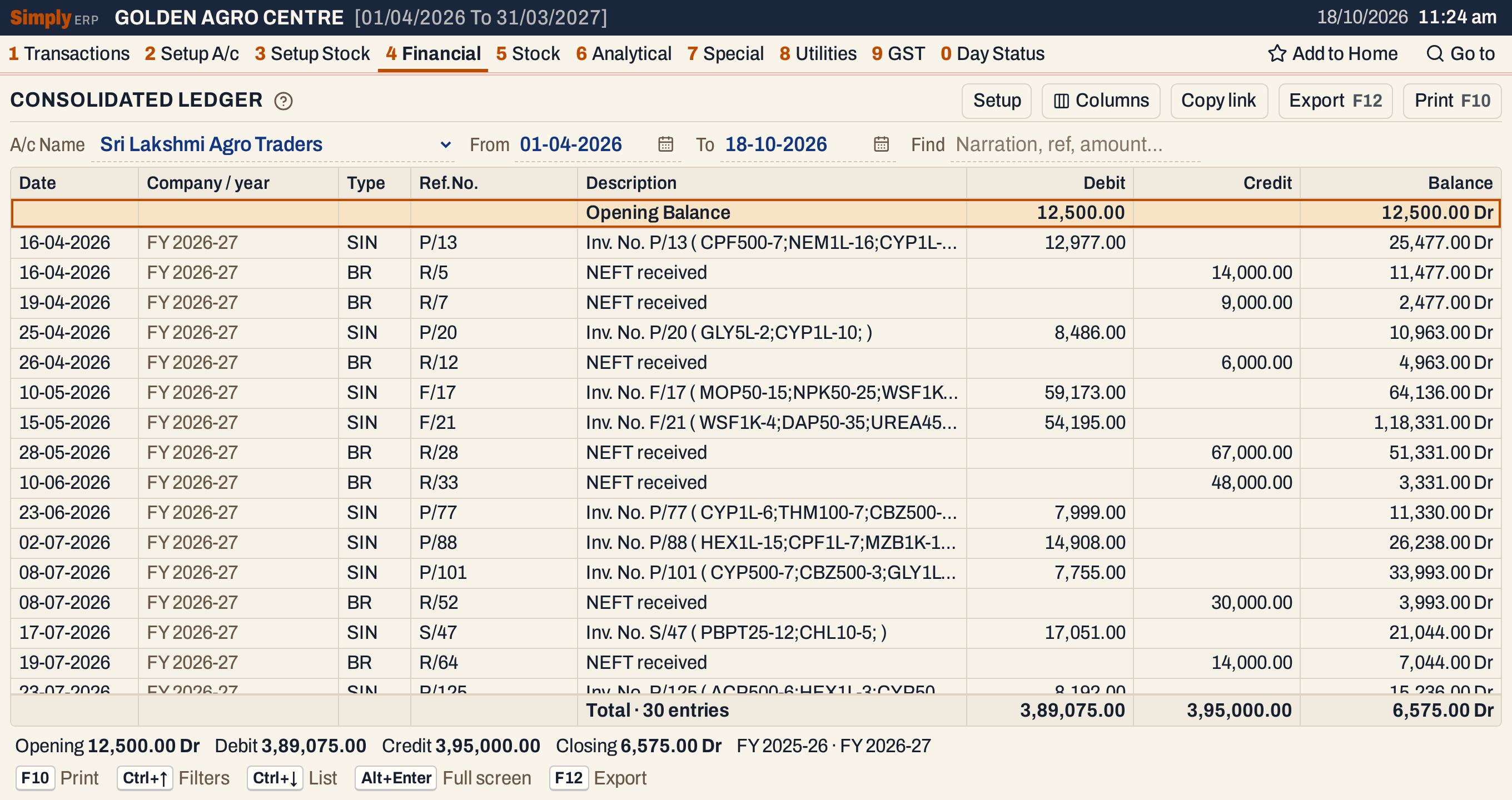 With the default period only this year’s postings are listed. The opening is what the party owed at the start of the year.
Columns
| Column | What it shows |
|---|---|
| Date | The date of the posting. |
| Company / year | The label of the database the posting is from. Hide it with Columns. |
| Type | What posted it. Hide it with Columns. |
| Ref.No. | The document’s number in its book, such as P/13 for a sale bill, R/5 for a receipt, J/36 for a journal. Hide it with Columns. |
| Description | The narration. |
| Debit | The amount, when the posting debits the account. On the Opening Balance line, the opening balance when it is a debit. |
| Credit | The amount, when the posting credits the account. On the Opening Balance line, the opening balance when it is a credit. |
| Balance | The balance after the line, marked Dr or Cr. |
The totals line under the grid counts the lines and adds up their Debit and Credit columns, not the opening; its Balance is the closing balance. The line under it gives the Opening, Debit, Credit and Closing balances and the labels of the databases the statement read.
Choices
| Choice | What it does |
|---|---|
| A/c Name | The linked account. |
| From, To | The period. The statement starts from the opening balance on the day before From. The years you linked must cover the whole period (see below). |
| Find | Shows only the postings in which every word you type is found in the date, company, type, reference, narration, the posting’s other account (not shown as a column) or an amount. The balances stay those of the whole statement. |
| Columns | Hides the Company / year, Type or Ref.No. column. The print leaves them out too. |
| Setup | Shows or hides the two Setup lists. |
 The choices above the grid.
Every choice is kept in the page address, so Copy link gives a link that opens the same statement.
How the figures are worked out
Both years in one statement
Set From to the first day of the earlier year to see its postings as well.
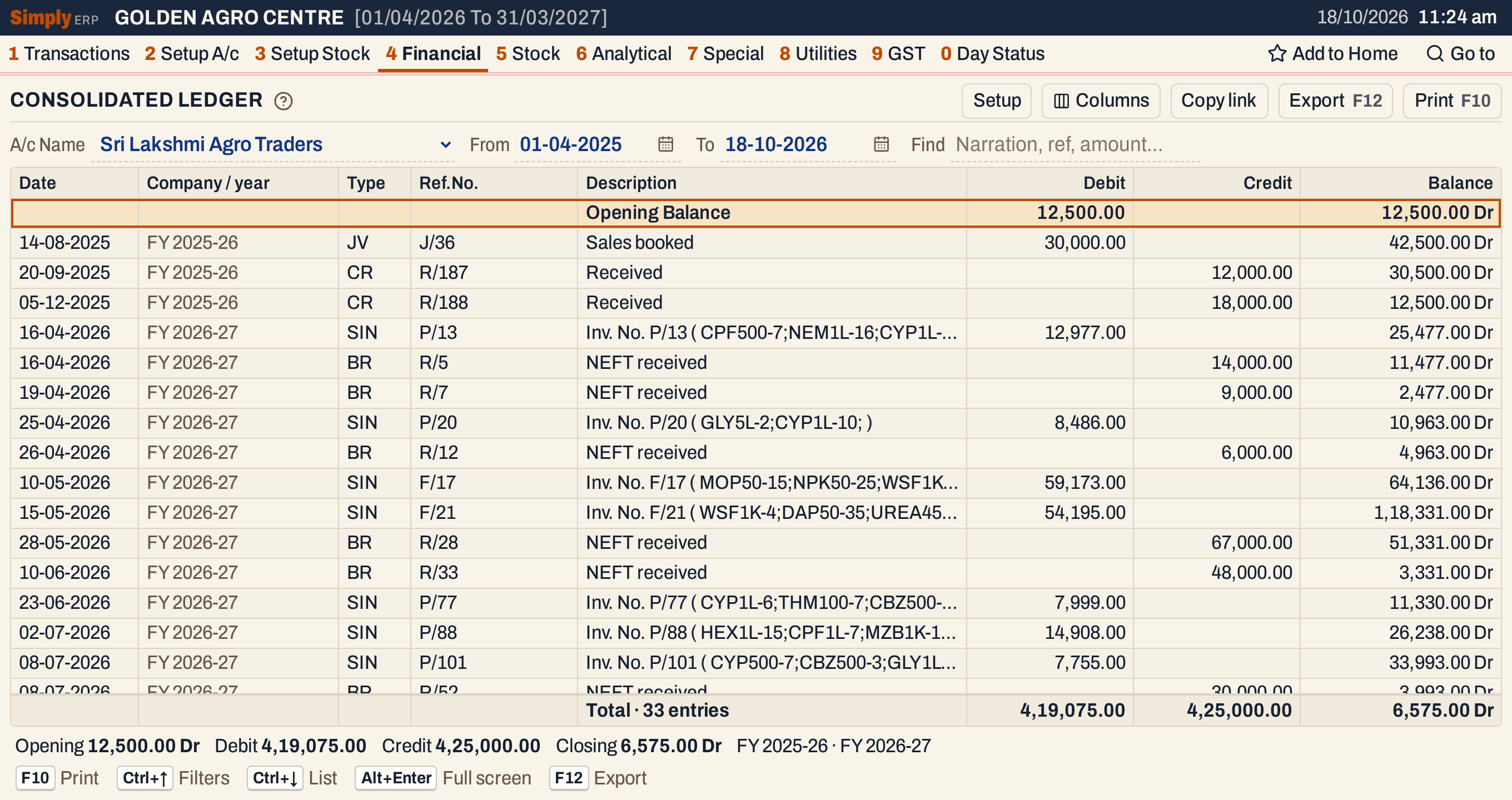 The postings of FY 2025-26 come first, then those of FY 2026-27, in one running balance.
- Opening Balance = the opening balance of the party’s account in the first selected year of each business, plus that business’s postings dated before From. Several businesses are added together.
- Only the first year’s opening balance is used. The openings of the later years are the earlier years’ closings carried forward, so they are not added again.
- Balance on each line = the balance of the line above + Debit − Credit, starting from the opening. A positive balance is Dr and a negative one Cr; a balance of nil keeps the side it had.
- Closing = Opening + the debits − the credits of the lines in the period. In the picture, 12,500.00 Dr + 4,19,075.00 − 4,25,000.00 = 6,575.00 Dr. Both views close at the same figure, because last year’s postings (30,000.00 Dr and 30,000.00 Cr) cancel out.
The lines are in date order. On one day the debits come before the credits, then the databases in the order they were linked, then the postings in the order they were made.
The years must join up
For each business the linked years must follow one another without a gap or an overlap, and together they must cover From to To. Otherwise the report gives no statement and says what is wrong, for example that the selected years do not cover the requested date range.
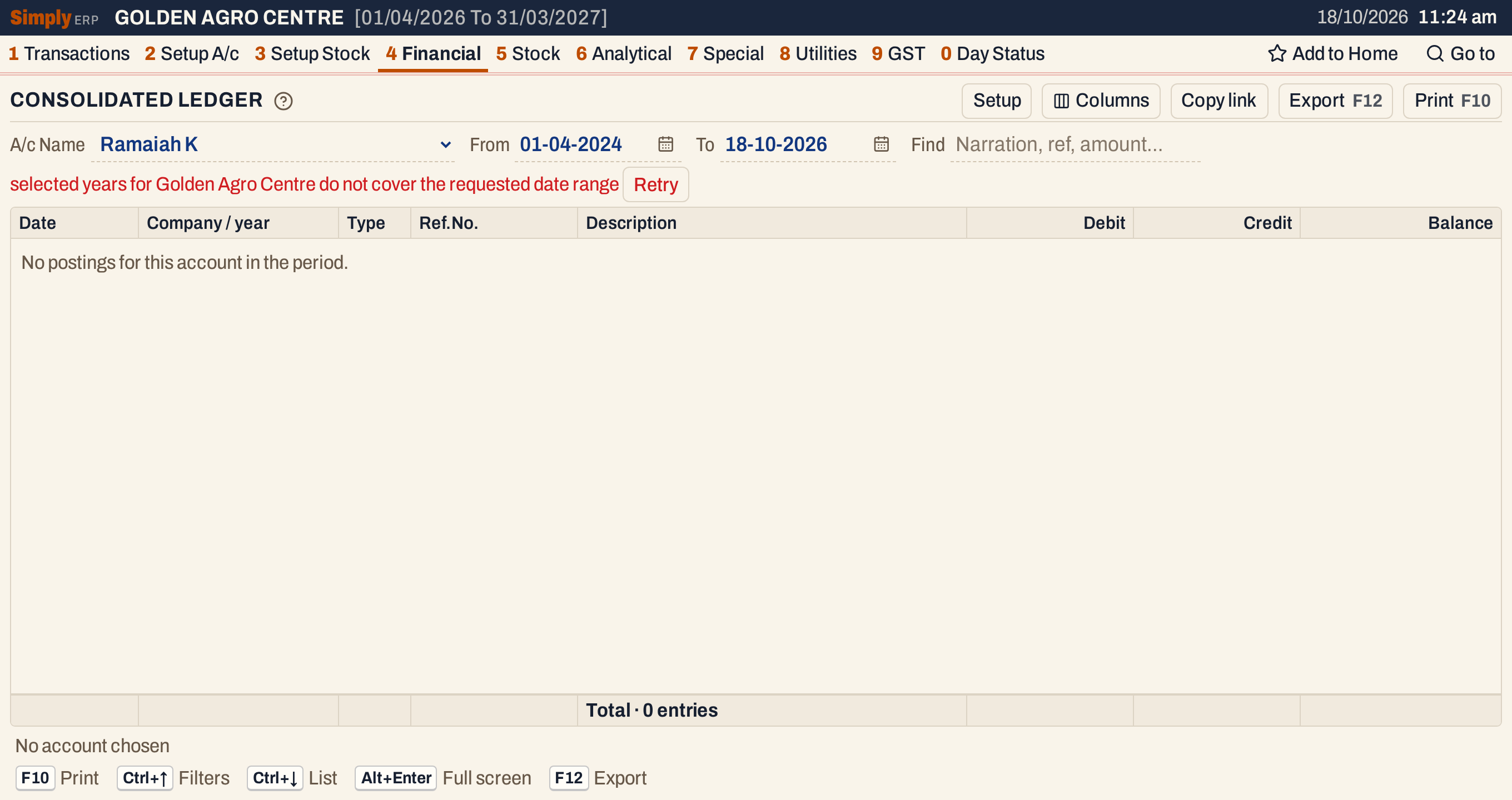 The two years start on 01-04-2025, so a statement from 2024 cannot be made.
When the years do not join up
A year’s opening balance should equal the closing balance of the year before. If it does not, a red message under the choices says so, and the statement carries the earlier year’s closing balance. The year’s own opening is not used.
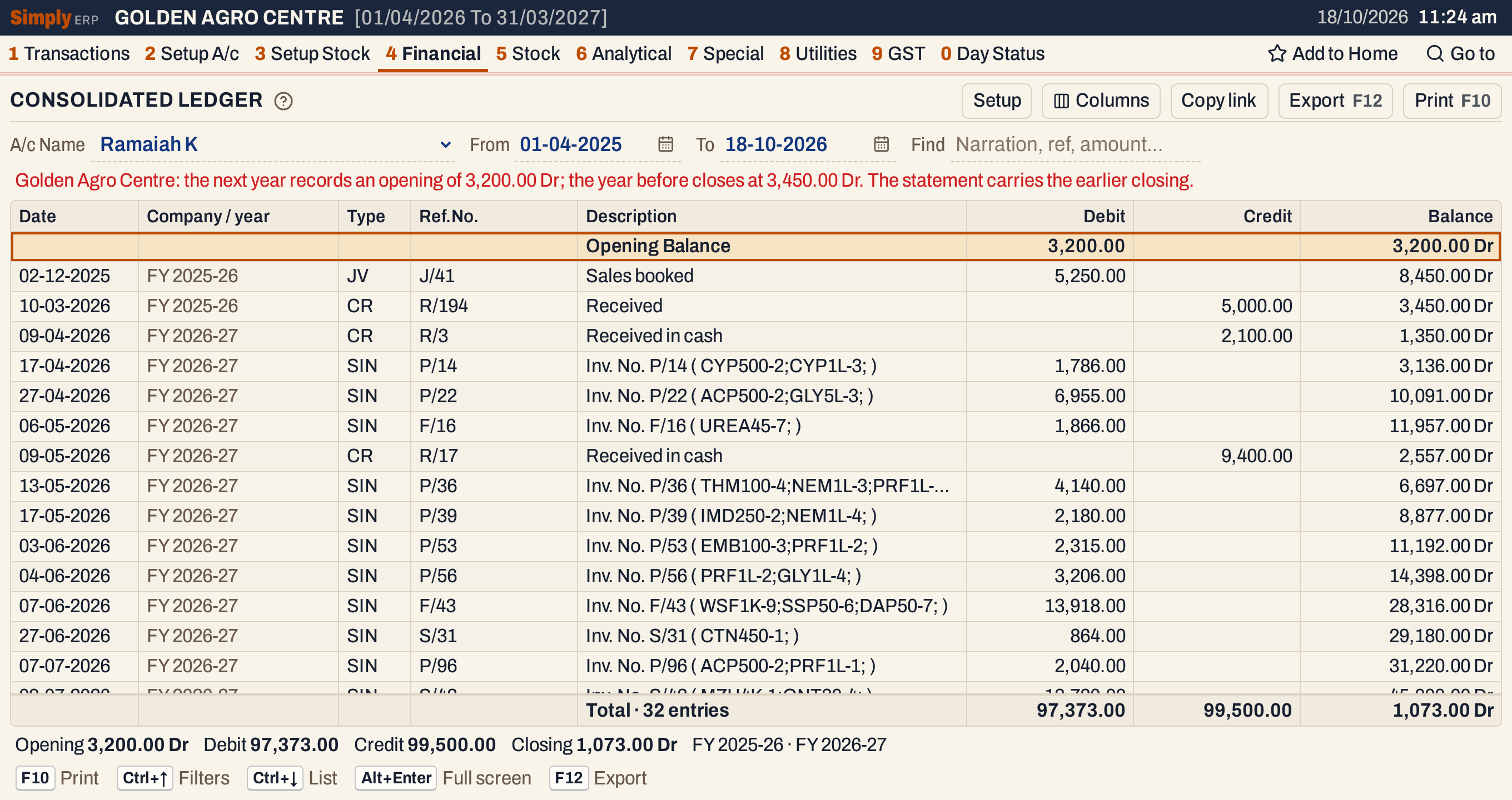 FY 2025-26 closes at 3,450.00 Dr, but FY 2026-27 opens at 3,200.00 Dr. The first receipt of the new year takes the balance from 3,450.00 Dr to 1,350.00 Dr.
Correct the opening balance of the later year in the account, or the postings of the earlier year, and the message goes.
Find
Find narrows the postings, not the balances: each line keeps the balance it had in the whole statement, and the opening and closing balances do not change. The Debit and Credit totals add up only the lines shown.
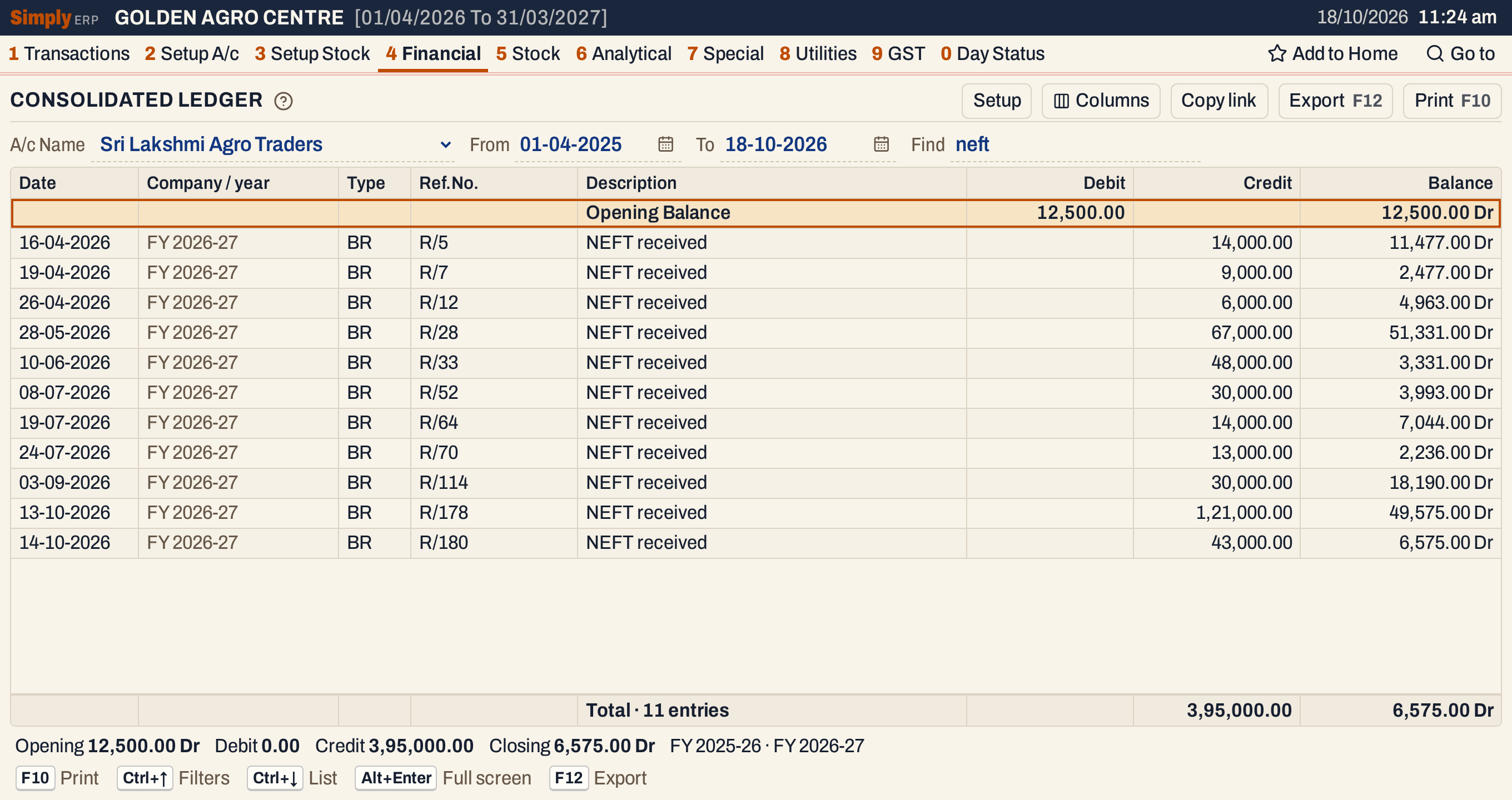 Find “neft” keeps the eleven NEFT receipts. Their balances still count the bills that are not shown.
Print and export
- F10 prints the statement as A/c STATEMENT, with the party’s name, the labels of the databases and the period in its heading. The columns are Tr.Date, Company, Type, Ref.No., Transaction Details, Credit, Debit and Balance. It ends with Totals (the lines’ debits and credits, without the opening) and the Closing Balance.
- F12 saves it as an Excel workbook, with the figures as numbers.
- Alt+Enter gives the whole window to the list.
- Typing letters jumps to a posting whose narration starts with them.
The statement does not open the bills behind its lines: the other years’ books are read, not opened. For the postings of the year you have open, use the Ledger.
Updated 4 November 2026.