Cash Day Book
On this page
The Cash Day Book is the day’s money in one page. For each day it shows the balance the day opened with, what was received and paid, what was posted without any cash moving, the day’s total and the balance it closed on. A day’s sales appear as a handful of lines added up by account, not bill by bill, so a busy day stays on one screen.
It is the 4 Col Day Book limited to bills settled in cash or through a bank, and without non-GST credit and debit notes.
Open the report
Press Alt+4 for Financial Reports, then T. The report opens for the financial year from its first day to today. The pictures show two days, 29-09-2026 and 30-09-2026.
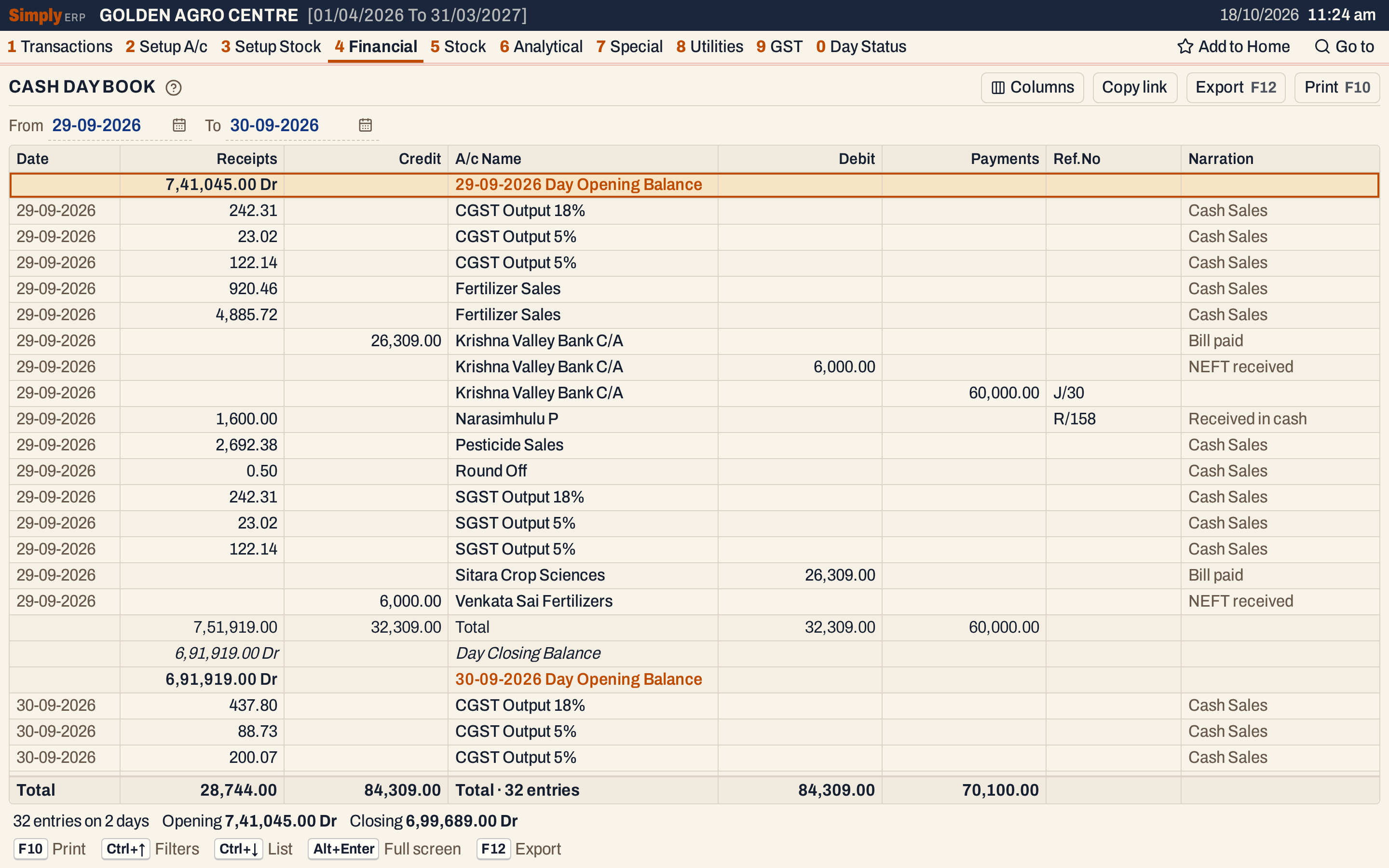 The first day. Each day has an opening balance heading, its lines, a Total and a Day Closing Balance.
What it lists
SimplyERP sorts the postings of the period into two kinds of column.
Receipts and Payments are the money that came in and went out:
- Bills settled in cash or through a bank: a cash bill, and a bill paid by card or wallet. The bill’s credit postings (sales, GST, charges) are Receipts and its debit postings are Payments. The postings to sales, sales return, income, expense, liabilities and current assets accounts (which covers the GST accounts and round off) are added up for the day, one line for each account and way of paying, and the Narration reads Cash Sales. Postings to other accounts, such as Purchases, stay one line each, with the bill’s number under Ref.No. That is why F/216 (paid by wallet) and F/217 (paid in cash) give two lines for Fertilizer Sales on 29-09-2026: 920.46 and 4,885.72. A credit bill is not listed at all.
- Cash receipts and payments: the party or expense account of each voucher, one line for each row of the voucher, with its number under Ref.No. R/158 is 1,600.00 received from Narasimhulu P.
- Journals that have a Cash row: the other accounts of the journal. J/30 deposits 60,000.00 from the cash drawer into the bank, so the bank is a Payment of 60,000.00.
Credit and Debit are the postings that moved no cash: bank receipts and payments, and journals among other accounts. Both sides are listed. On 29-09-2026 a 6,000.00 NEFT receipt from Venkata Sai Fertilizers appears as a Credit to the customer and a Debit to the bank, and a bill payment of 26,309.00 as a Debit to Sitara Crop Sciences and a Credit to the bank.
The money leg itself is not a line: the cash or bank account a bill or voucher is settled to is what the Receipts and Payments columns add up to. Non-GST credit and debit notes are left out.
Columns
| Column | What it shows |
|---|---|
| Date | The day of the line. |
| Receipts | Money received. On a day’s heading and its Day Closing Balance line, a Dr balance. |
| Credit | The credit side of postings that moved no cash. |
| A/c Name | The account of the line. |
| Debit | The debit side of postings that moved no cash. |
| Payments | Money paid. On a day’s heading and its Day Closing Balance line, a Cr balance. |
| Ref.No | The voucher’s number (R/158, J/30), or the bill’s number on a bill line that is not added up. Left empty for added-up sales and for bank vouchers. |
| Narration | The narration: Cash Sales for added-up sales, or what was typed on the voucher. |
The columns Date, Ref.No and Narration can be hidden with Columns.
Choices
| Choice | What it does |
|---|---|
| From, To | The period. Both dates must fall in the financial year. |
| Columns | Hides the Date, Ref.No or Narration column. The Excel file leaves them out too, and so does the print for the narration. |
 The choices above the grid.
Click the title of A/c Name, Ref.No or one of the four amount columns to sort the lines within each day, and click again to reverse. The day headings, totals and balances stay where they are. Every choice is kept in the page address, so Copy link gives a link that opens the same book.
How the figures are worked out
- Day Opening Balance (on each day’s heading, marked Dr or Cr, in the Receipts column when it is Dr and in the Payments column when it is Cr) = the opening balance of the Cash accounts + all Receipts − all Payments of the days before. The first day of the period starts from everything before From, so the book can start on any day.
- Total = the day’s lines added up in each column. In the Receipts column the day’s opening balance is added in when it is Dr (in the Payments column when it is Cr), so the Total of the Receipts side less the Total of the Payments side is the closing balance. On 29-09-2026: 7,41,045.00 + 10,874.00 = 7,51,919.00 under Receipts, and 60,000.00 under Payments.
- Day Closing Balance = Opening + the day’s Receipts − the day’s Payments: 7,51,919.00 − 60,000.00 = 6,91,919.00 Dr. The next day opens with it.
- The line at the foot adds every line of the period without the opening balances, and the status line gives the period’s opening and closing balances: 7,41,045.00 Dr and 6,99,689.00 Dr.
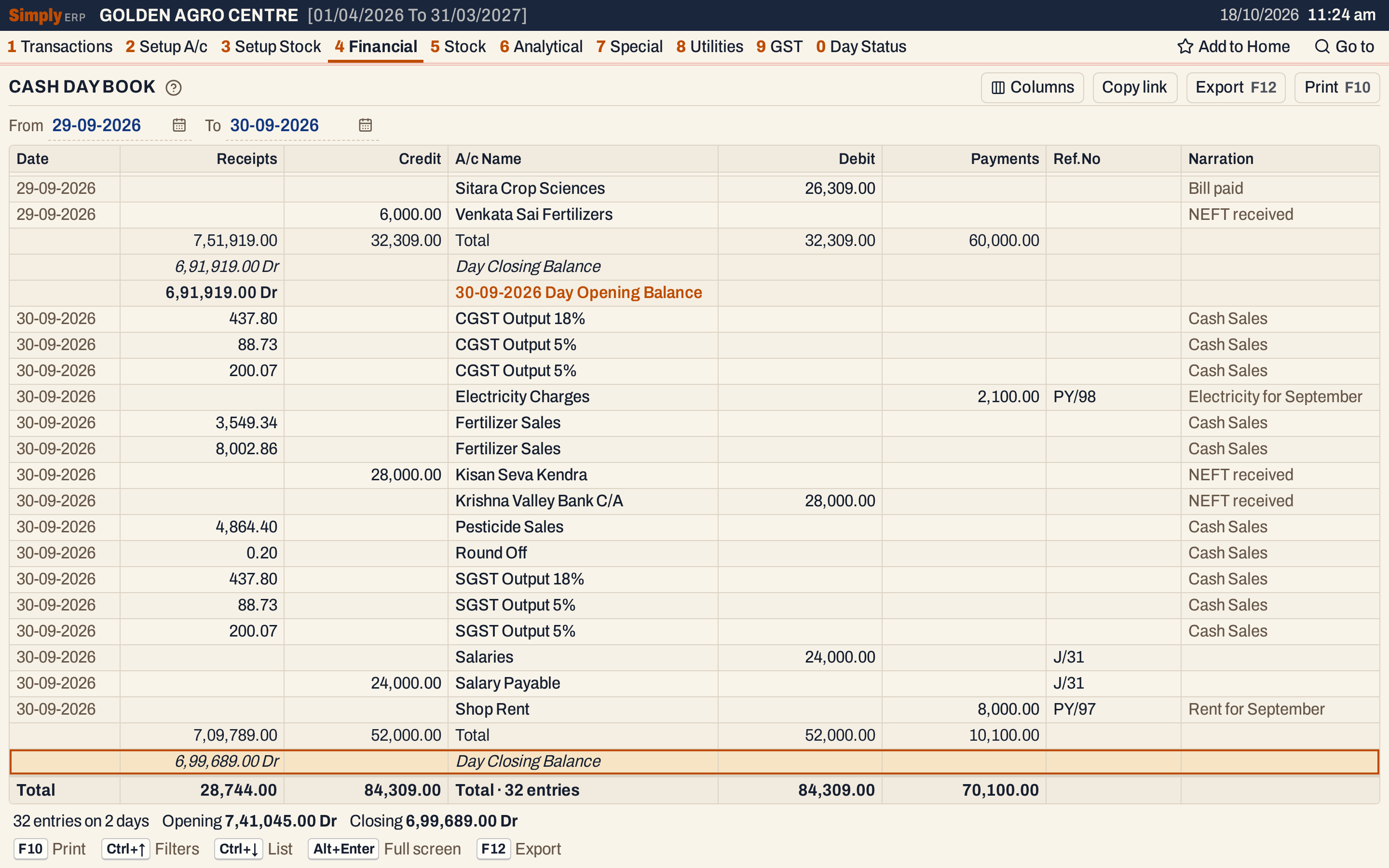 The last day closes at 6,99,689.00 Dr. This is the closing balance in the status line.
The balance therefore includes the sales paid through a bank as well as cash. It is not the balance of the Cash account; for that, use the Cash Book, which closed the same day at 34,496.00 Dr. Cash deposited in the bank counts as a Payment because it is posted as a journal with a Cash row, like J/30.
Within a day the lines come in the order of the account names. Lines of one account come in the order of their Payments, then Receipts, Debit and Credit, smallest first.
Open, print and export
- Enter on a voucher line opens the voucher, and on a bill line that is not added up it opens the bill. On a sales line added up for the day, Enter opens that account’s Ledger for the day, where the bills are listed one by one. Back returns to the same line.
- F10 prints the book headed DAY BOOK, with Receipts, Credit, Particulars, Debit and Payments, and the narration under the account name. The print closes with the opening balance, the period’s totals and the closing balance.
- F12 saves it as an Excel workbook, with the figures as numbers and the date, Ref.No and Narration in columns of their own.
- Alt+Enter gives the whole window to the list.
Updated 4 November 2026.