Seed Stock Register
On this page
The Seed Stock Register is the seed dealer’s stock register, crop by crop. It has a line for each receipt of seed, with the company and distributor it came from, the variety, the lot and its dates, the packets and the weight; a line for each day’s sales; and the item’s stock after each line. Print it for the seed inspector.
Open the report
Press Alt+7 for Special Reports, then Z for More Special Reports, then I. The report opens for the financial year from its first day to today, with the cursor on From.
It lists every item that has a technical (crop) name, which includes pesticides with their active-ingredient names. An item with no technical name is not listed: give each seed its crop name in its stock group (see Technical Names). Choose the category SEEDS to see the seed crops only.
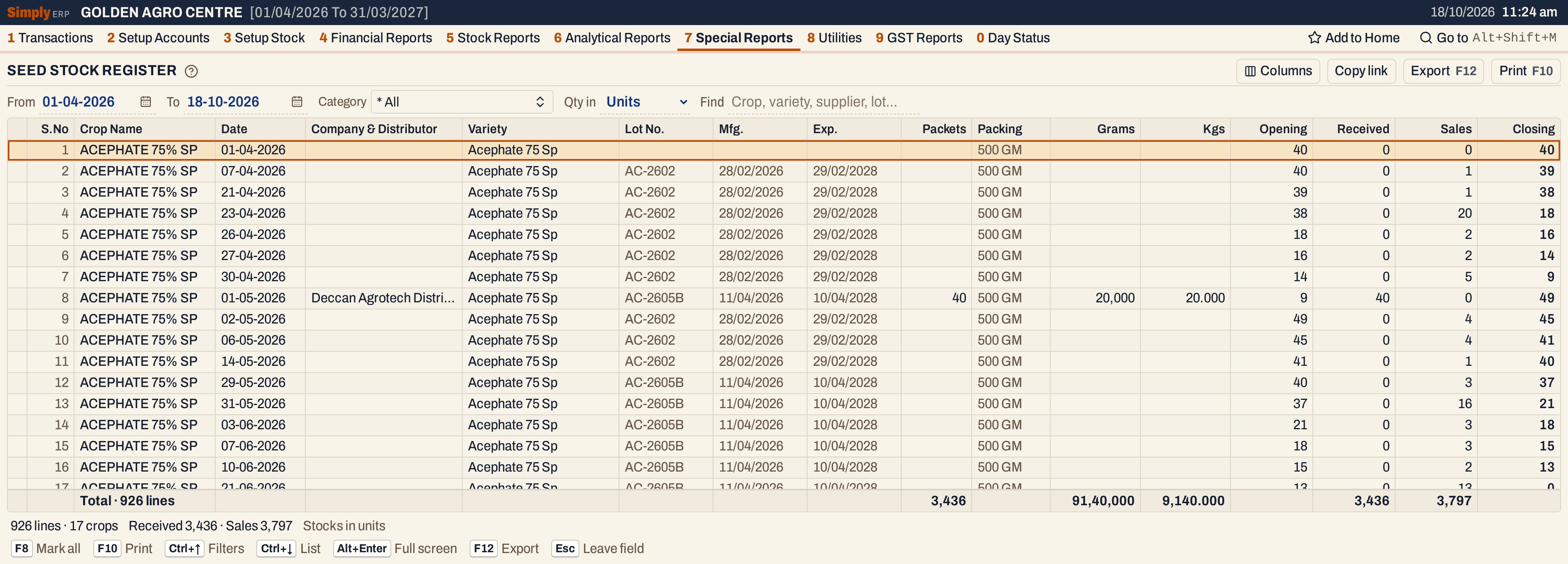 With every category chosen, the register has the lines of every item that has a technical name, crop by crop: 926 lines of 17 crops. The receipt on 01-05-2026 takes the stock from 9 to 49.
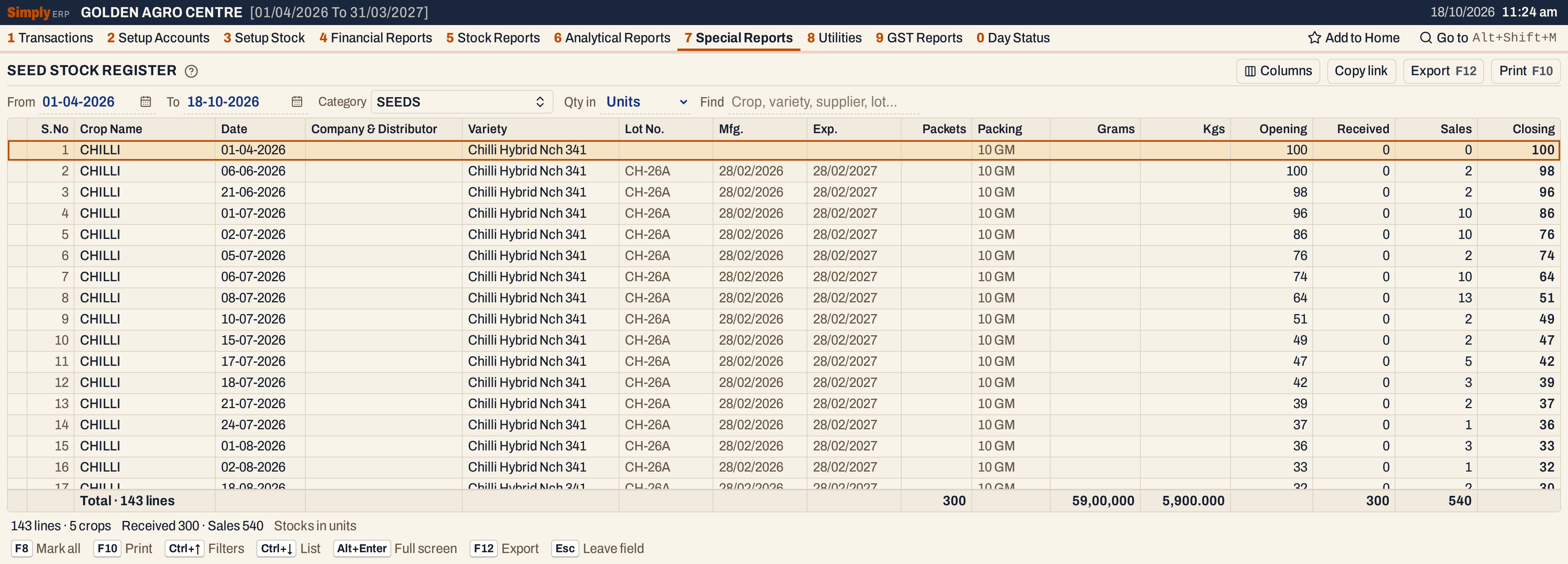 The SEEDS category: 143 lines of 5 crops. The totals line adds up the whole list, not one crop. The 300 packets are of different pack sizes, so the grams and kilograms are the figures to use.
What it lists
For each crop, in order of crop name, then item and date, the register has these lines:
- an opening line for each item, dated the From day and with no company, when the item has stock at the start of the period;
- a line for each receipt of seed: a purchase bill, or goods received without a bill, by item, date, bill and lot, with the company and distributor it came from;
- a line for each return: a sales return is stock received, a purchase return is stock sent out, one line for each item, date and party;
- a line for each day of sales, with no party.
When an item already has a line on a day it also sold, that day’s sales are added to that line (a receipt, a sales return or, on the From day, the opening line) instead of having a line of their own. On one day the lines go in order of company or party name. Damages and breakage entries are not read: they enter neither the opening stock nor the movement, so the register can differ from the Stock Ledger.
Columns
| Column | What it shows |
|---|---|
| S.No | The line’s number. Hide it with Columns. |
| Crop Name | The item’s technical name. |
| Date | The date of the receipt, return or sales day. A purchase bill is dated by the day it was received. |
| Company & Distributor | The supplier or party of a receipt or return. Blank on the opening line and on sales. |
| Variety | The product name, which is the group’s name without the packing, such as Paddy Bpt 5204; the item’s own name when it has no product name. |
| Lot No. | The batch number of a receipt. A sales line shows the lot of one of the batches sold that day. It shows only when some line has one. Hide it with Columns. |
| Mfg., Exp. | The manufacturing and expiry dates of the lot shown. They show only when some line has one. Hide them with Columns. |
| Packets | The packets received on the line, blank on a line with none. |
| Packing | The item’s packing, such as 25 KG. |
| Grams | The packets × the pack size, in grams. |
| Kgs | The same, in kilograms. |
| Opening | The stock before the line. |
| Received | The stock received on the line. |
| Sales | The stock sold or sent out on the line. |
| Closing | The stock after the line: Opening + Received − Sales. In bold. A line whose Closing is below zero is in red. |
The totals line counts the lines and adds up Packets, Grams, Kgs, Received and Sales. Opening and Closing are running figures and are not added up. The status line gives the lines and crops, the total received and sold, and whether the stock is in units or in Lt / Kg. Hide Packets, Packing, Grams or Kgs with Columns, and the print leaves them out too.
On a narrow window the right-hand columns are off to the right; scroll the grid sideways to see them.
Choices
| Choice | What it does |
|---|---|
| From, To | The period, both days included. Both dates must fall in the financial year. The default is the first day of the year to today. |
| Category | Shows only the categories you tick, such as SEEDS. The default is * All, which includes items with no category. |
| Qty in | Units (the default) or Lt / Kg. |
| Find | Shows only the lines that match what you type in the crop, variety, item name, company and distributor, lot, packing, bill number or a date on the line. Every word you type must match; a word of three letters or more also matches when its letters appear in that order, close together. |
Category opens a list: type to find a name, press Enter to tick it, and click Done. The lines keep the register order and cannot be sorted. Every choice is kept in the page address, so Copy link gives a link that opens the same report.
 The choices of the report as it opens.
Lt / Kg
With Lt / Kg, the Opening, Received, Sales and Closing are multiplied by the item’s pack size, so they are in litres or kilograms, with three decimals. The Packets, Grams and Kgs columns do not change. The 10 GM chilli packets here are 0.010 kg each.
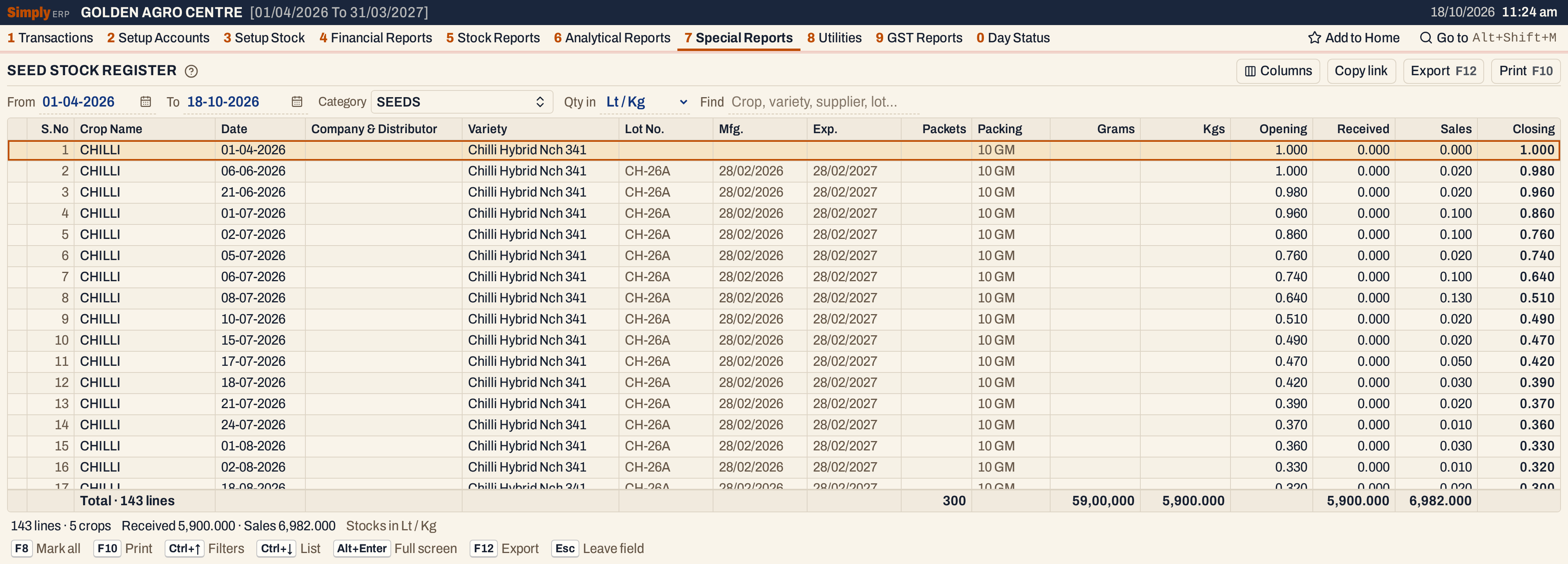 The same lines in kilograms. A 10 GM packet is 0.010 kg, so 2 packets sold is 0.020. The Packets, Grams and Kgs totals are as before.
Find
Type a crop, a variety, a company, a lot or a date. Here krishnaveni leaves the two receipts from Krishnaveni Seeds, both of Paddy Bpt 5204.
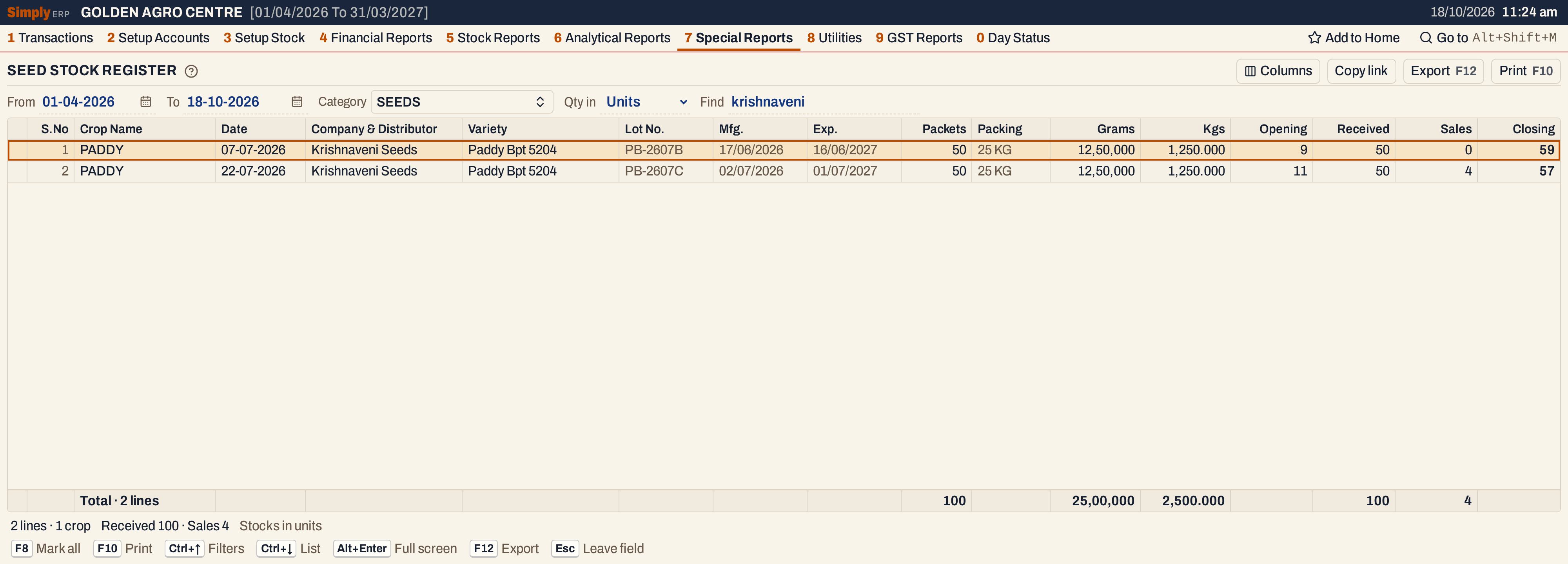 Find narrows the lines, the totals line and the status line. A receipt line: 50 packets × 25 kg = 1,250 kg. The Opening of the second line, 11, takes in the lines Find has hidden between the two, and the 4 sold on 22-07-2026 sit on that day’s receipt line.
How the figures are worked out
For each item with a technical name, SimplyERP reads its purchases, sales and returns, billed and unbilled, up to the To date:
- Opening on the opening line = the item’s opening stock + the stock received (purchases and customers’ returns) − the stock sold (sales and returns to suppliers) before the From date. It is listed when it is above zero.
- Received on a line = the units received on that bill and lot, or returned by customers on that day. Sales = the units sold that day, or sent back to a supplier. Units taken by a bill from goods already received are not counted twice.
- Closing = the running stock after the line, from the opening to that line, in the order of the register. A day’s sales sit on that day’s last line, so the Closing of that line includes them.
- Packets = the units received on the line. Grams = Packets × the pack size × 1,000, and Kgs = Packets × the pack size, where the pack size is the weight or volume of one unit set on the item.
- Opening on any other line = the Closing of the line before it. With Find or Category, the lines you do not see still count: Opening and Closing are always the item’s real running stock.
Open, mark, print and export
- Enter on a line opens the Stock Ledger of its item for the same period. Alt+← returns to the list, with the cursor on that line.
- F2 marks a line and F8 marks every line on the screen. When any are marked, F10 prints only those, and the print says Marked lines only.
- F10 prints the register in a box under the title SEED STOCK REPORT. Its heading gives the period and, when the company details have a seed licence number, S.L.No. and the number. The print has the columns S.No, Crop Name, Date of Stock Recd, Name of the Company & Distributor, Name of the Variety, Lot No., Mfg. Date, Exp. Date, Total Packets, Packing Size, Total in Grams, Total in Kgs, Opening Stock, Received, Sales and Closing, and leaves out the ones you hid.
- F12 saves it as an Excel workbook.
- Alt+Enter gives the whole window to the list.
Updated 4 November 2026.