Book Debits
On this page
Book Debits lists the balance of each debtor together with the date of the last entry posted to their account. A cutoff in days splits the balances into those that moved recently and those that have not moved for longer. It is a quick way to see which debtors have gone quiet.
Open the report
Press Alt+7 for Special Reports, then L. The report opens as on today, for debtors, with a cutoff of 90 days, listing the balances above and below it.
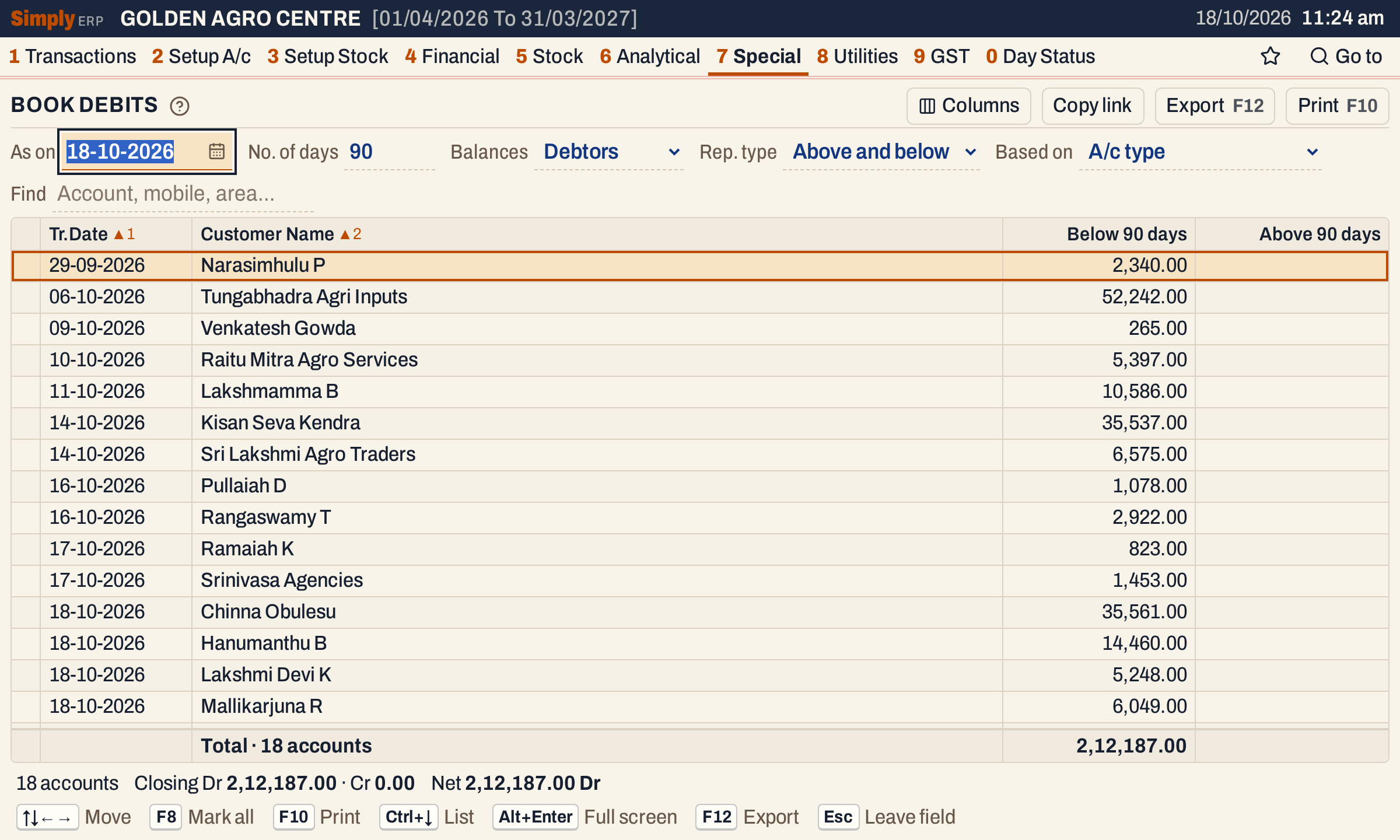 One line for each debtor, the oldest last posting first. Every balance here is below 90 days, so the Above column is empty.
What it lists
One line for each account of type Customer, Customer - Supplier, Farmer or Supplier that has a balance of the side you choose on the As on date. A balance that is nil is left out.
The balance counts everything posted to the account up to the As on date, including its opening balance.
The date shown on the line is the date of the last posting to the account other than its opening balance: a bill, a receipt, a return, a note, a journal. When an account has only its opening balance, the date is the first day of the financial year.
Columns
| Column | What it shows |
|---|---|
| Tr.Date | The date of the account’s last posting. |
| Customer Name | The trade name when the account has one, otherwise the account’s name. |
| Below N days | The balance, when the last posting is N days or fewer before the As on date. N is the cutoff you chose. |
| Above N days | The balance, when the last posting is more than N days before the As on date. Not shown when Rep. type is Below only. |
With Rep. type set to Below only, the one figure column is titled “Below to N days”. The totals line counts the accounts and adds up the figure columns.
Choices
| Choice | What it does |
|---|---|
| As on | The date of the balances. It must fall in the financial year and opens as today. |
| No. of days | The cutoff, from 0 to 999. It opens at 90. |
| Balances | Debtors (the default): balances the party owes you. Creditors: balances you owe the party. |
| Rep. type | Above and below (the default): both columns. Below only: only the balances booked within the cutoff. |
| Based on | A/c type: every account of the four types above. A/c group (Trade Debtors): only accounts whose account group is named Trade Debtors, whatever their type. |
| Find | Only accounts whose name or mobile matches what you type. |
| Columns | Hides the Tr.Date column or a figure column. The print leaves it out too. |
Click a column title to sort by it, and click again to reverse. The lines open in order of Tr.Date, then name. Every choice is kept in the page address, so Copy link gives a link that opens the same report.
 The choices above the grid.
How the figures are worked out
For each account SimplyERP adds up every posting dated on or before the As on date, with the opening balance. Debits count as positive, credits as negative.
- Balances Debtors keeps accounts whose result is a debit; Creditors keeps those whose result is a credit. Nil balances are always left out. The amount shown is the size of the balance.
- The age of the balance is the number of days from the date of the last posting to the As on date.
- When the age is the cutoff or less, the amount goes under Below N days. When it is more, it goes under Above N days. With Below only, accounts with an age above the cutoff are left out altogether.
The whole balance is aged from the last posting, not bill by bill. A debtor who owes 52,242.00 and paid a small amount yesterday shows as recent. For an age worked out bill by bill, with the oldest bills settled first, use Bill Ageing St..
With the cutoff set to 10 days on the showcase books, Narasimhulu P (last posting 29-09-2026, 19 days before) and Tungabhadra Agri Inputs (06-10-2026, 12 days) are above it, with 2,340.00 and 52,242.00. The other 16 debtors are below it, 1,57,605.00 in all.
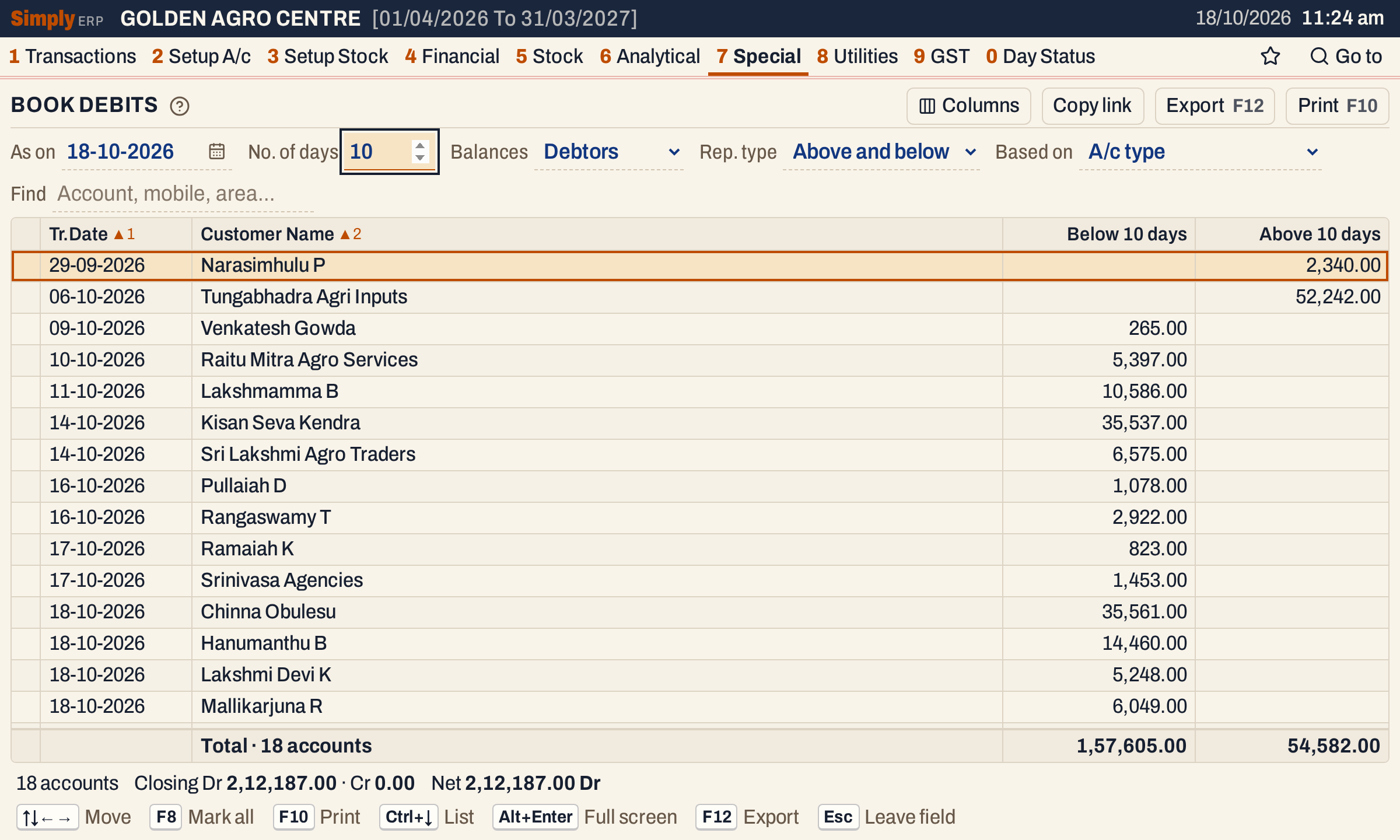 The older balances are in the right-hand column. The totals line adds up each column.
Below only
Set Rep. type to Below only to list the debtors that have posted recently and nothing else. The Above column goes, and the two old balances are left out: 16 accounts, 1,57,605.00.
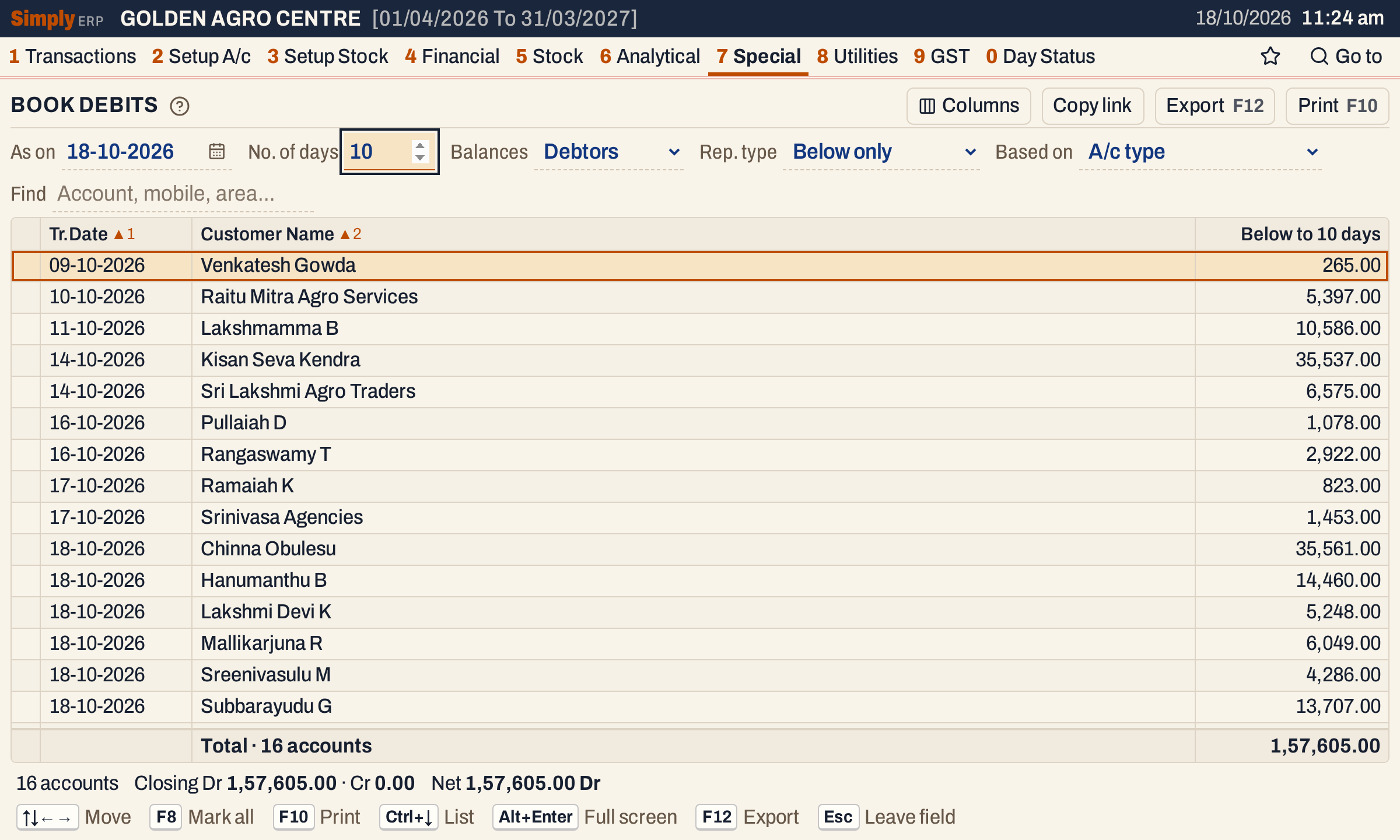 Only the balances booked within 10 days. The column title changes to Below to 10 days.
Open, mark, print and export
- Enter on an account opens its Ledger, from the first day of the financial year to the As on date.
- F2 marks an account and F8 marks them all. F10 then prints only the marked accounts.
- F10 prints the report as BOOK DEBITS STATEMENT, with the As on date and your choices (Debtors or Creditors, the Trade Debtors group, Find) in its heading, the columns Tran.Dt, Customer Name and the amounts, and a totals line. The cutoff is in the amount column titles, for example Below 90 Days.
- F12 saves what the print shows as an Excel workbook, with the figures as numbers.
- Alt+Enter gives the whole window to the list.
Updated 4 November 2026.