Customer Monthly Sales
On this page
The Customer Monthly Sales report shows what each customer bought from you in every month of the financial year, in rupees with GST. Use it to see which customers buy steadily and which buy in one season.
Open the report
Press Alt+7 for Special Reports, then M. The report opens for the financial year from its first day to today, for all customers, grouped by Area, with Include returns ticked.
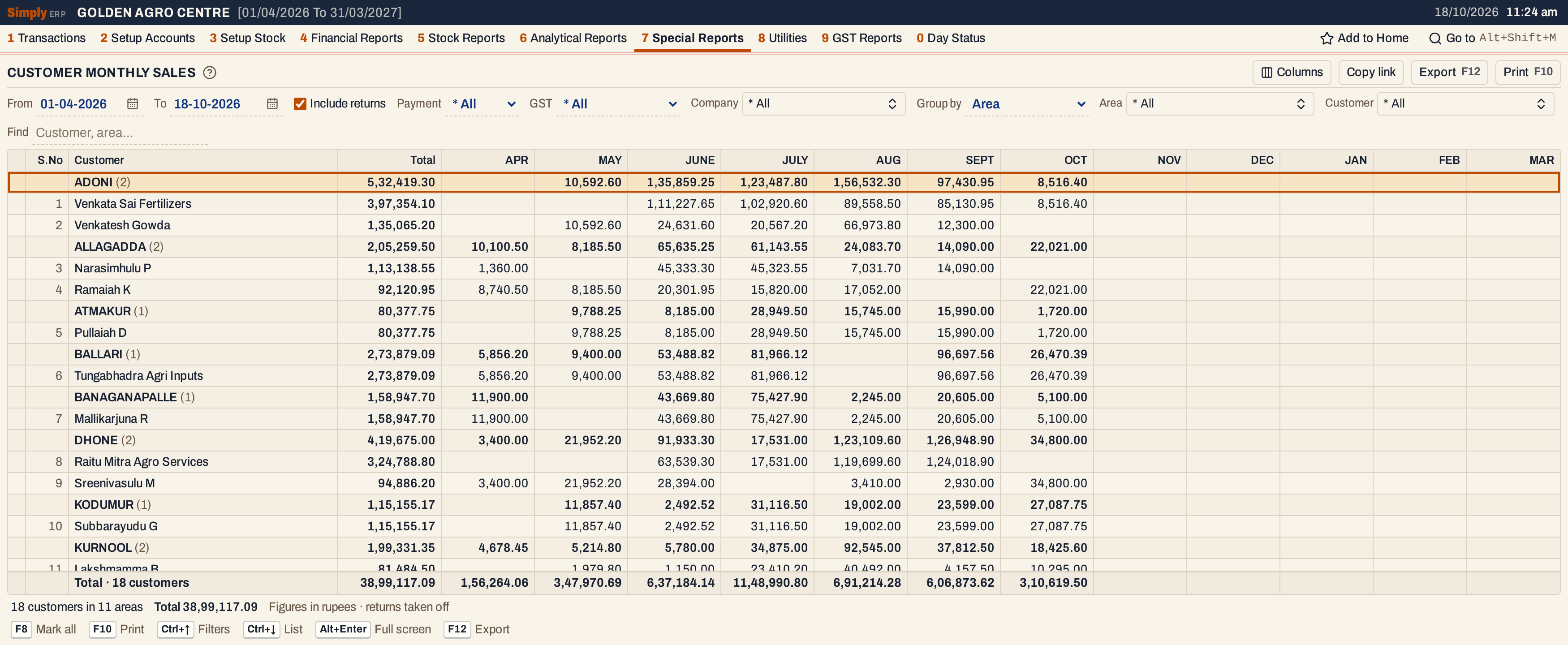 Each area is a bold line with its customers under it. The figures are rupees. NOV to MAR are empty because the books end on 18 October.
What it lists
One line for each customer account with a sale in the period. Each area heading gives the number of customers under it.
- Sales bills to the customer, cash or credit.
- Sales returns, which are taken off when Include returns is ticked.
A cash bill is counted only when it names a customer account. A cash bill with no customer is left out. Goods delivered and not yet billed are left out too. Only items whose product has a manufacturer count.
Columns
| Column | What it shows |
|---|---|
| S.No | The number of the customer in the list, counting on from one area to the next. Hidden by Columns. |
| Customer | The customer’s business name when its account has one, otherwise its account name. An area heading shows the area’s name and the number of customers under it. |
| Total | The sum of the months, from April to March. |
| APR to MAR | The rupees sold to the customer in that month, with GST. A blank cell means no sale that month. |
The totals line adds up each column. The status line gives the number of customers and areas, the total and the note on returns.
Choices
| Choice | What it does |
|---|---|
| From, To | The period, from the financial year’s first day to today at first. Both days are included. |
| Include returns | Ticked by default. Sales returns are taken off the month in which they were made. Untick it to leave the returns out. |
| Payment | * All (the default), Cash or Credit bills. |
| GST | * All (the default), Registered or Unregistered customers, those with and without a GSTIN. |
| Company | Only the sales of items of the chosen manufacturers. * All is the default. |
| Group by | Area (the default) groups customers by the city on their account. Representative groups them by the representative on their account. |
| Area, or Representative | Only the customers of the chosen areas, or of the chosen representatives when Group by is Representative. * All is the default. |
| Customer | Only the customers you choose, from those with sales in the period. * All is the default. |
| Find | Shows the customers or areas that match what you type. |
 The choices above the grid.
How the figures are worked out
For each item line of a sales bill of the customer, in the period:
- The amount is the line’s quantity multiplied by its cost per unit, which is the line’s amount with GST divided by the quantity and rounded to the paisa (half a paisa rounds up). The line’s amount with GST is its saved net amount for a customer with no GSTIN, and its taxable amount plus GST at the line’s CGST, SGST and IGST rates for a customer with a GSTIN.
- Charges and discounts at the foot of the bill, such as transport, round off and cash discount, are not in the figures. They are added to the goods only when a charge line has been set to be spread over them, which the bill screen does not offer.
- A sales return takes its amount off in the same way. A sales bill counts in the month of its date, and a sales return in the month of the day it was received.
- Each month is rounded to two decimal places, and Total = the sum of the twelve months.
- An area’s line is the sum of the customers under it, and the totals line is the sum of the customers listed.
Because every unit cost is rounded, a month can differ by a few paise from the bills’ own amounts: the total here, 38,99,117.09, is 49 paise more than the 38,99,116.60 of Customer vs Product Group Sales, which adds the line amounts as saved.
A customer’s area is the city on its account. A customer with no city is listed under * General. Group by Representative uses the representative on the account in the same way.
The months follow the financial year: APR is April and MAR is March.
 The status line gives the number of customers and areas, the total, the currency and whether returns are taken off.
Open, mark, print and export
- Enter on a customer opens its Ledger for the same period. On an area line it shows only that area.
- F2 marks a row and F8 marks them all. F10 then prints only the marked rows.
- F10 prints the report with the period, the choices and the note on returns. Columns hides S.No and months, and the print leaves them out too.
- F12 saves the printed report as an Excel workbook, with the figures as numbers.
- Alt+Enter gives the whole window to the list.
Updated 4 November 2026.