Supplier vs Product Purchases
On this page
The Supplier vs Product Purchases report shows what you bought from one supplier, product by product, with each purchase bill and the purchase returns you sent back. Use it to see what a supplier has supplied over the period, how much of each product came from them, and what you returned.
Open the report
Press Alt+6 for Analytical Reports, then L. Choose the Supplier first: the report shows nothing until you do. The period starts on the first day of the financial year and ends on today. You can choose a supplier or a customer-supplier account.
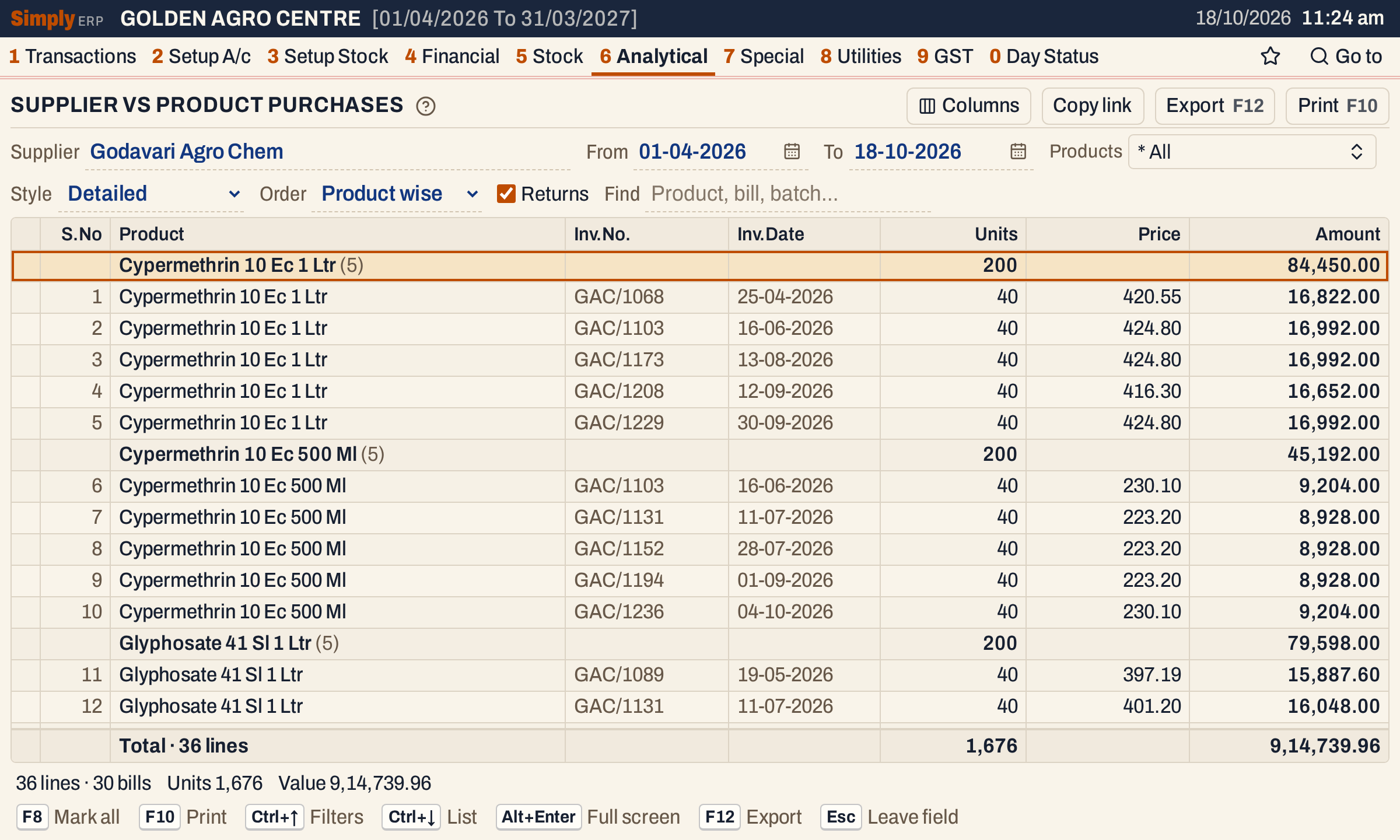 Each product is a heading with its totals, and the supplier’s bill lines for it are under the heading. This picture hides the Bat.No. and Lts/Kgs columns with the Columns button, so that Price and Amount fit the window.
What it lists
- Purchase bills from the supplier in the period. Each item line of a bill is one line. The bill’s charges, such as freight or round off, are not lines. A bill counts on the day it was received (the Recd. date on the bill).
- Purchase returns you made to the supplier, when Returns is ticked. A return counts on its own date. It is a negative line, shown in red and marked Return in the Type column.
- Goods received before their bill, from Goods In / Out (D.C.), for the units not yet billed, on the day they were received. They have no bill to open and no Inv.No., and their value is left out of the Amount: the status line says how many lines that is.
Only the products you choose under Products are listed. Purchases from other suppliers and GST credit and debit notes are not in this report.
Columns
These columns show with the Detailed style:
| Column | What it shows |
|---|---|
| S.No | The line’s number in the list. Hidden with Columns. |
| Product | The product’s name. Under a heading, the product’s totals sit on the heading row. |
| Type | Return, on a purchase return line. Shown only when a return is in the list. Hidden with Columns. |
| Bat.No. | The batch of the line. Hidden with Columns. |
| Inv.No. | The bill’s number, or the return’s number. |
| Inv.Date | The date the line counts on: the day a bill was received, or the return’s own date. |
| Units | The units bought, or returned (negative). |
| Lts/Kgs | The litres or kilograms: units times the pack size. Hidden with Columns. |
| Price | The net rate per unit: the line’s value after its discounts, with GST, divided by its units. Hidden with Columns. |
| Amount | Units × Price. |
Summary shows Purch. (units bought), Retns (units returned), Net (the units bought less those returned), in Lts/Kgs (the net litres or kilograms), Pur. Amt and Net Purch. for each product. The Columns button hides S.No and in Lts/Kgs there.
Choices
| Choice | What it does |
|---|---|
| Supplier | The supplier to report. Required. |
| From, To | The period. The defaults are the first day of the financial year and today. |
| Products | Shows only the products you tick. The default is * All. |
| Style | Detailed (the default): every bill line. Summary: one line for each product. |
| Order | Product wise (the default): by product, then the purchases before the returns, then by date and bill number. Invoice wise: by date, then bill number, then product. Only in Detailed. |
| Returns | Shows the purchase returns under their products. Ticked by default. Only in Detailed; Summary always counts the returns. |
| Find | Shows only the lines where every word you type is found in the product, its manufacturer, the bill number or the batch. A word of three or more letters also matches when its letters appear in that order, close together. |
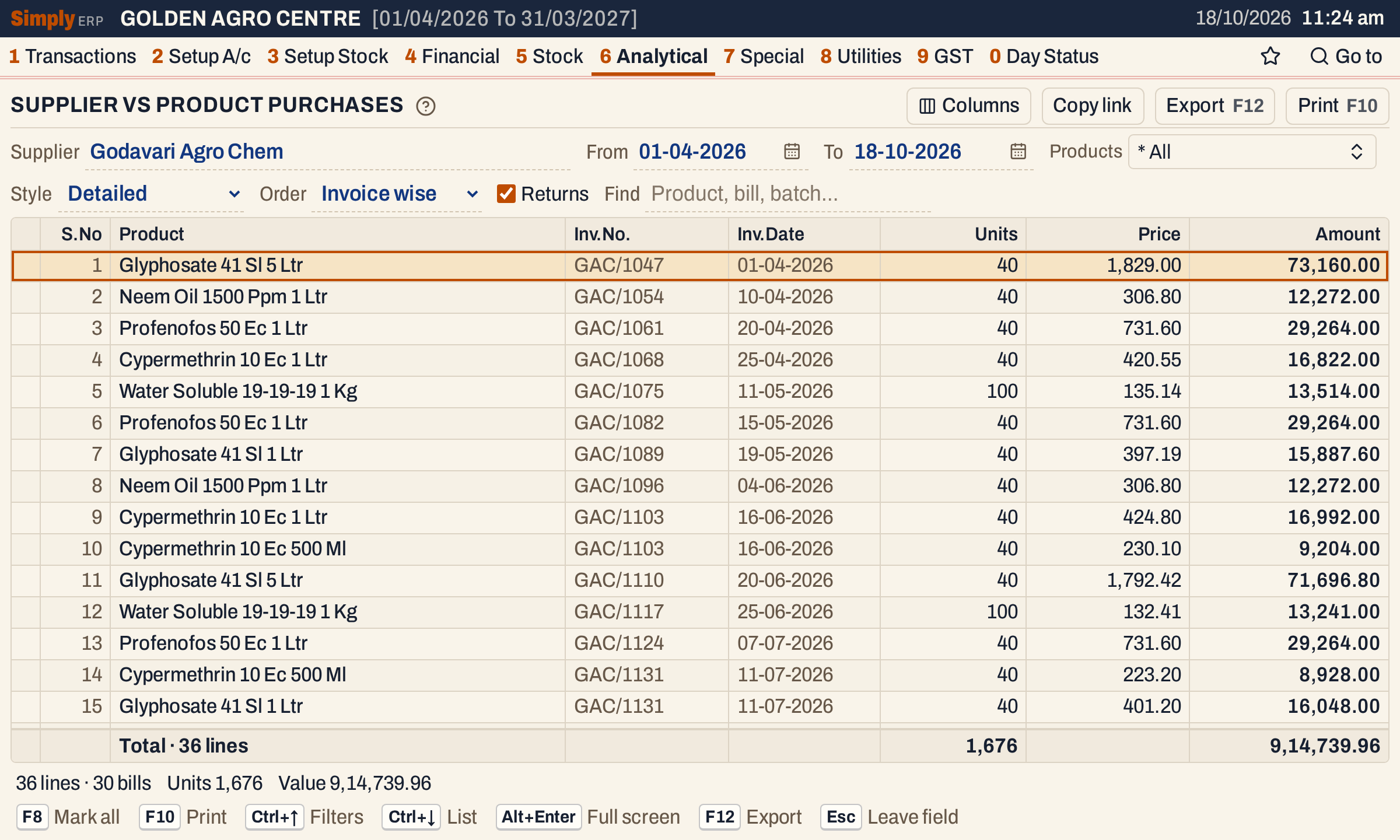 Invoice wise lists each bill in date order, with its products under it, rather than grouped by product.
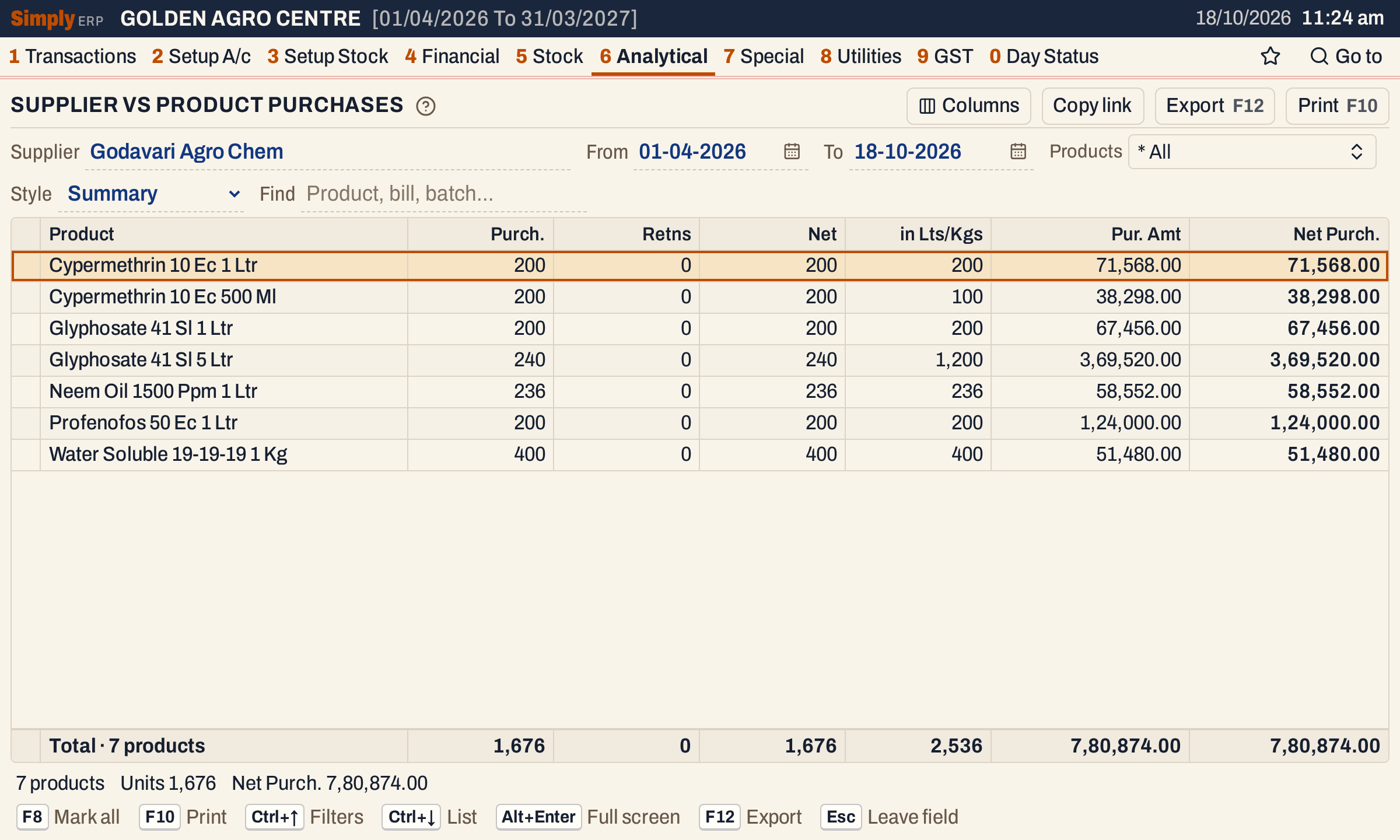 Summary gives one line for each product. Here the purchases are the units bought, with none returned.
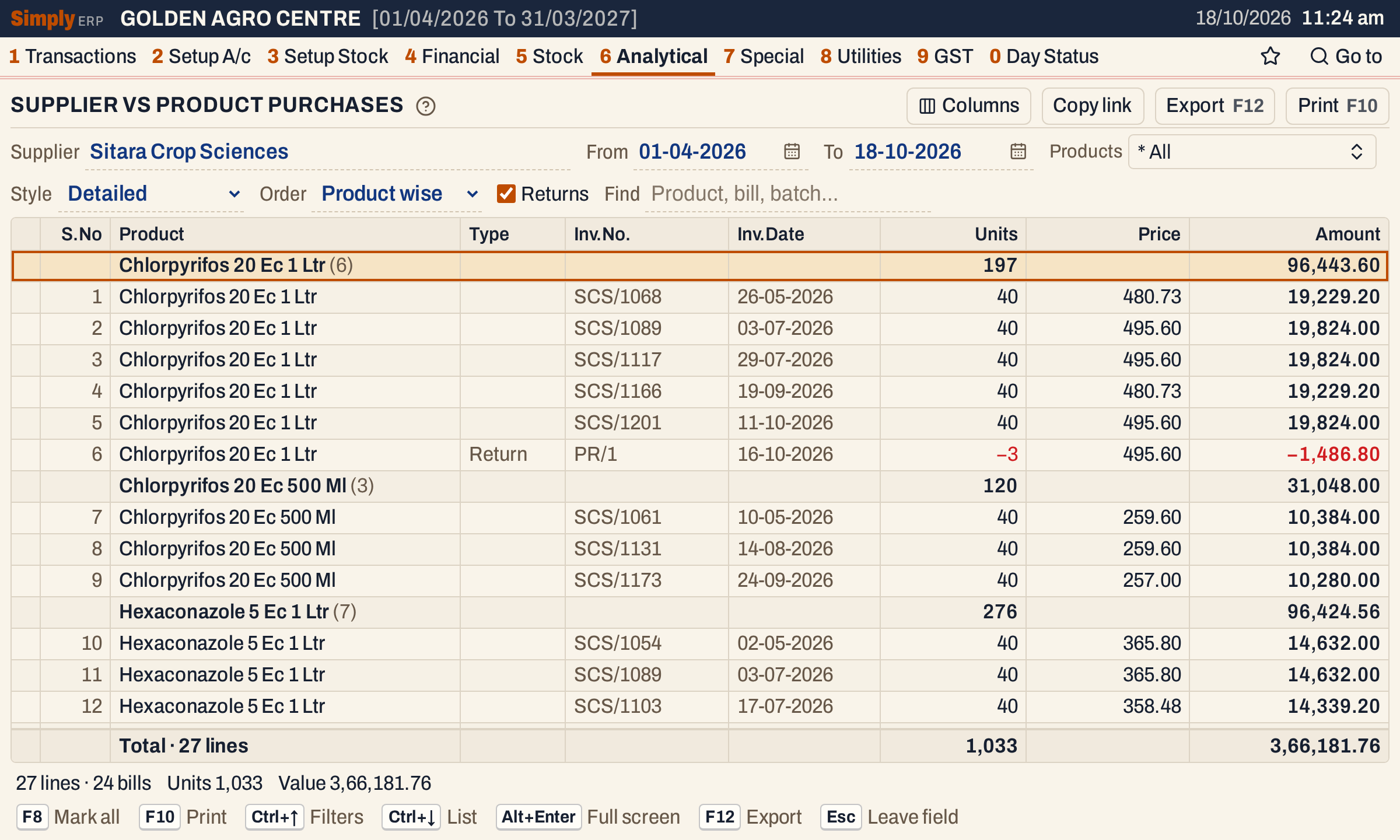 A purchase return is the red line marked Return: 3 units sent back, shown with a minus sign and taken off the product’s total.
How the figures are worked out
For each bill line of the supplier:
- Units = the units on the line. A return counts as negative units.
- Lts/Kgs = the units times the pack size of the product, in litres or kilograms.
- Price = the line’s value after its discounts, with GST, divided by its units and rounded to paise.
- Amount in Detailed = Units × Price. For example, 40 units at 420.55 come to 16,822.00. A return’s Amount is negative, the same way. Because the Price is rounded first, an Amount can differ by a few paise from the line’s value on the bill.
The product heading adds up the lines under it. The Total line adds up every line shown, and the status line below gives the same totals with the number of lines and bills.
In Summary, for each product:
- Purch. = units bought, and Retns = units returned.
- Net = Purch. − Retns.
- in Lts/Kgs = the Lts/Kgs bought less the Lts/Kgs returned.
- Pur. Amt = the amount saved on each bill line, added up. For a bill that carries the supplier’s GSTIN the saved amount is the line’s value before GST; for a bill without one it includes GST. Detailed always includes GST, so for a supplier with a GSTIN Summary and Detailed differ by the GST. For Godavari Agro Chem, Cypermethrin 10 Ec 1 Ltr shows a Pur. Amt of 71,568.00 in Summary; add 18% GST, which is 12,882.24, and you reach 84,450.24, the 84,450.00 on its heading in Detailed (each Price is rounded to paise first). The totals differ the same way: 9,14,739.96 in Detailed against 7,80,874.00 in Summary, a difference of 1,33,865.96, about the 1,33,864.92 of GST that Pur.Analysis ( Disc. ) shows for the same bills.
- Net Purch. = Pur. Amt less the saved amount of the returns, which is also before GST for a return that carries a GSTIN.
Values are shown with Indian grouping and two decimals.
Open, mark, print and export
- Enter on a bill line in Detailed opens the bill. In Summary, Enter on a product opens its lines in Detailed. Enter on a product heading in Detailed does nothing.
- F2 marks a line and F8 marks them all. F10 then prints only the marked lines.
- F10 prints the report as it is on the screen, with the supplier, the period and your choices. The Detailed print ends with COMPANY WISE TURNOVER, the net Amount of each manufacturer’s products with the returns taken off, when more than one manufacturer is in it and no lines are marked.
- F12 saves it as an Excel workbook.
- Alt+Enter gives the whole window to the list.
Updated 4 November 2026.