Merge two accounts into one
On this page
The same party is sometimes entered twice, spelt two ways, and its bills and receipts are split between the two accounts. A/c Transfer merges the duplicate into the account you keep: everything recorded against the duplicate moves to the kept account, the two opening balances add up, and the duplicate is deleted. Use it once for each duplicate. A merge cannot be undone.
Open A/c Transfer
Press Alt+2 for Setup Accounts, then H for A/c Transfer (Merge).
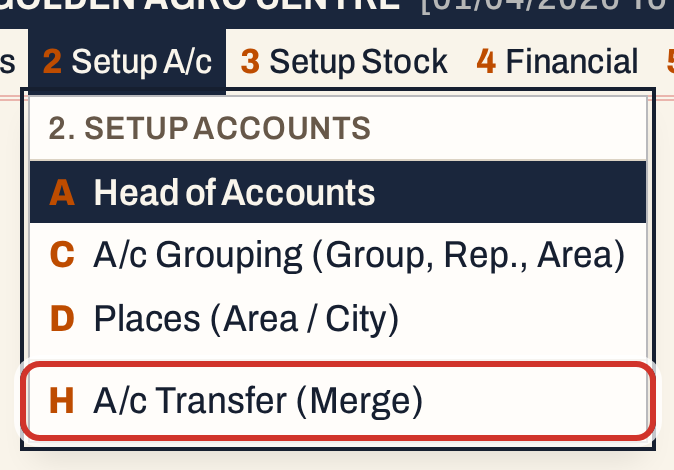 2 H: Setup Accounts, A/c Transfer (Merge).
The screen has two fields, Remove and into. The cursor starts in Remove. Merge is dimmed until both accounts are chosen.
 Nothing is chosen yet.
The examples on this page use a customer, Raitu Mitra Agro Services in Dhone, that a clerk entered again as Raitu Mithra Agro Services, with an opening balance of ₹1,500.00 Dr, a second address and one sale bill.
Choose the account to remove
In Remove, type a few letters of the duplicate. The list shows the matching accounts with their place and current balance. Move down with ↓ to the duplicate and press Enter. F2 lists every account.
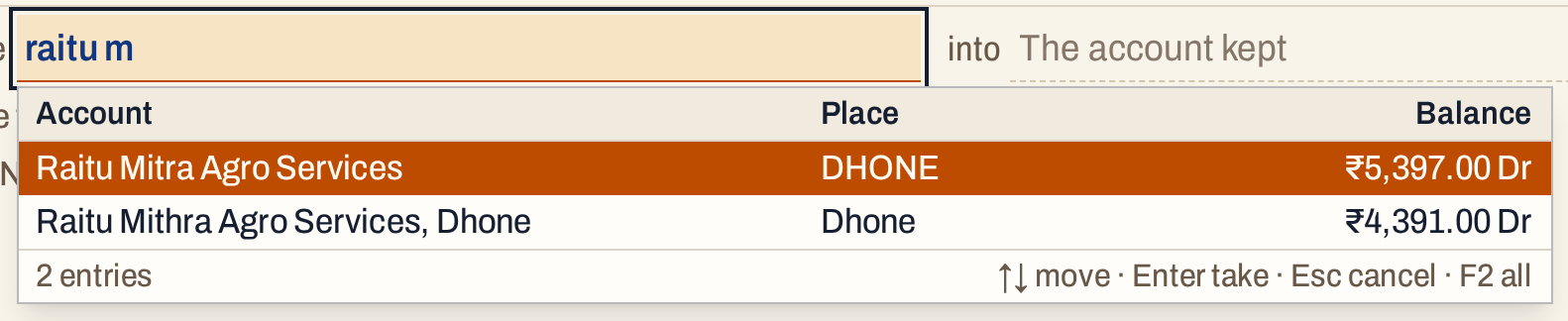 Both spellings are listed. The second line, the duplicate, is chosen with the down arrow.
Check the balance and the place in the list before you choose, so that you remove the duplicate and not the account you want to keep.
Choose the account to keep
Press Enter to go to into, and type the account that stays. The account you chose to remove is not offered again.
 The account kept.
Choose carefully. The name, city, type and the other details of the kept account stay as they are; only its blank details are filled from the duplicate (see below).
Check what the merge moves
When both accounts are chosen, the screen counts what the merge will move and shows the result.
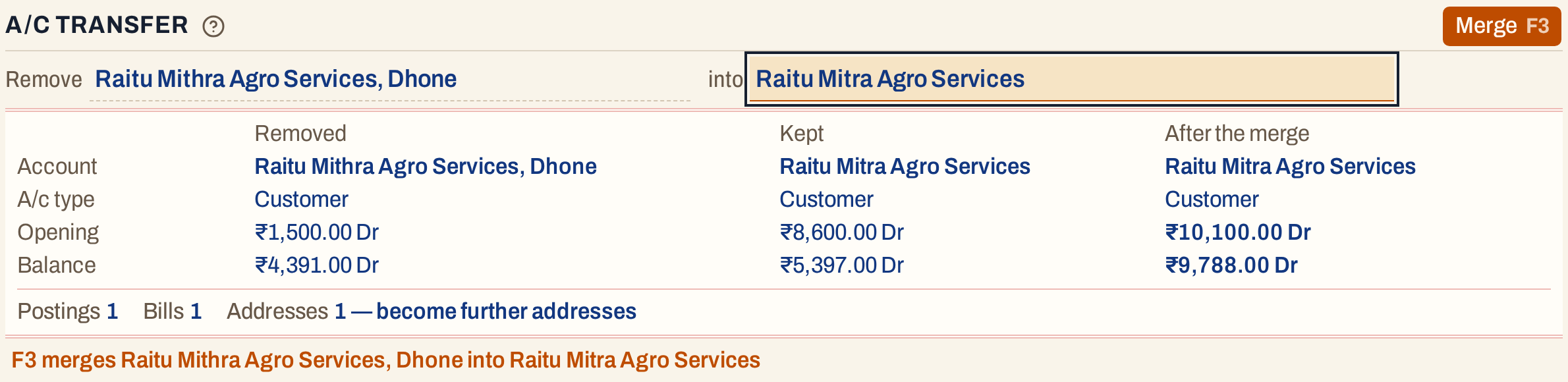 The opening balances add up, and so do the balances.
The table has a column for the removed account, the kept account and the account after the merge. It shows the name, the account type, the Opening balance and the current Balance. Both balances after the merge are the sums of the two accounts: here 8,600.00 + 1,500.00 = 10,100.00 Dr, and 5,397.00 + 4,391.00 = 9,788.00 Dr. A debit and a credit set off each other, so a credit on one account reduces the debit of the other.
Under the table are the counts of what moves. Only the kinds that the removed account has are listed:
| Line | What it counts |
|---|---|
| Postings | Entries in the removed account’s ledger, apart from its opening balance. |
| Bills | Bills (sale, purchase, notes) that name the account as the party, the debit or credit account, the settlement account or the broker. |
| Vouchers | Receipts, payments and journal vouchers that have a row for the account. |
| Cheques | Issued cheques that name the account as the bank or the payee. |
| Stock entries | Stock entries that name the account as the party. |
| Addresses | Addresses that become further addresses of the kept account. |
| Same addresses | Addresses that the kept account already has: they are folded into it. |
| Subaccounts | Subaccounts of the account. |
| Book / GST setup | Bill books and GST rates that post to the account. They post to the kept account afterwards. |
| Drafts | Unfinished entries that name the account. |
If the removed account has nothing recorded, the screen says so.
Merge
Press F3 (or click Merge). A box asks you to confirm, with Cancel selected, so pressing Enter by mistake does not merge.
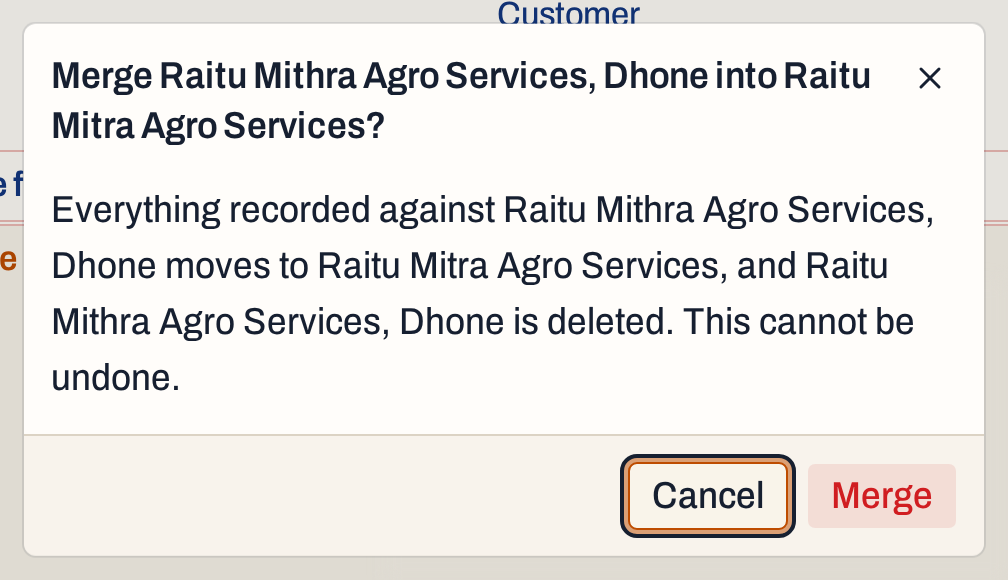 Cancel is the button selected when the box opens. Click Merge to go on.
When the merge is done, the line below the fields says which account was merged into which, and the Remove field is empty and ready for the next duplicate.
 The merge is done.
What the merge does to your books
The merge is one step: either everything moves or, if something goes wrong, nothing does.
- Entries. Every posting, bill, voucher, cheque and stock entry of the removed account is now the kept account’s. A bill that was made out to the duplicate is now made out to the kept account, and it shows in the kept account’s ledger with its date and number.
- Opening balance. The removed account’s opening entry is dropped and the kept account’s opening entry becomes the sum of the two. A result on the debit side is a debit, a result on the credit side a credit.
- Totals. The kept account’s total debit and total credit are worked out again from its ledger.
- Addresses. Each address of the removed account becomes a further address of the kept account. An address that the kept account already has (the same street, place, pincode, GST number, phone and so on) is folded into it: the bills that used it point to the kept address, and the kept address takes the contact person, other phone, e-mail, transport and licence numbers that it did not have.
- Details. The kept account’s blank phone, e-mail, PAN, account group, representative and area are filled from the removed account. A detail the kept account has is not changed.
- Setup. Bill books and GST rates that posted to the removed account now post to the kept one. Subaccounts move too; a subaccount of the same name is joined with the one the kept account has.
- Names and drafts. Drafts that name the removed account now name the kept one, and a ledger line that shows the removed account’s name in Particulars shows the kept account’s name.
- The duplicate is deleted.
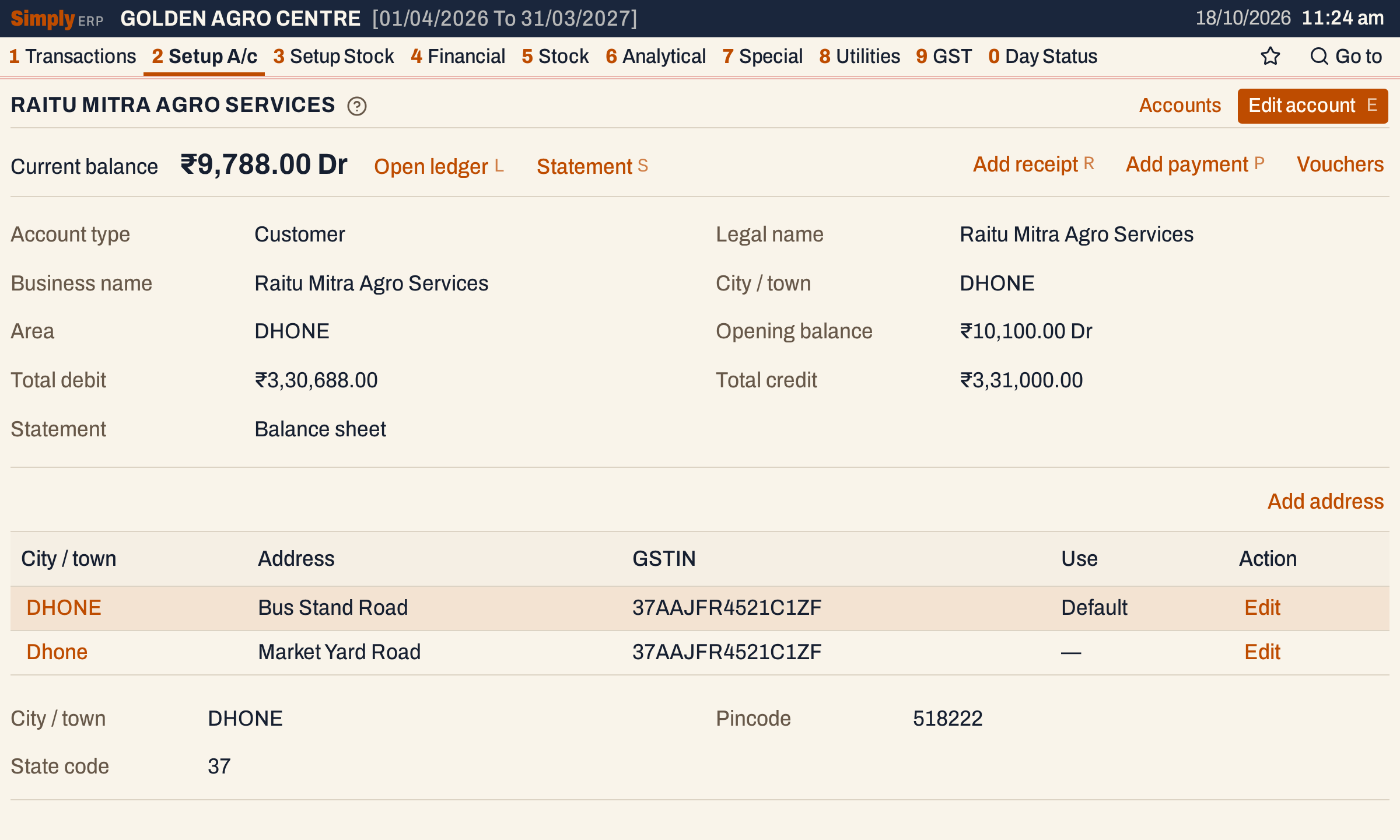 The kept account: opening balance 10,100.00 Dr, and the duplicate’s address as a second address.
In the Ledger of the kept account the opening balance is the sum, and the bill of the duplicate is a line of its own.
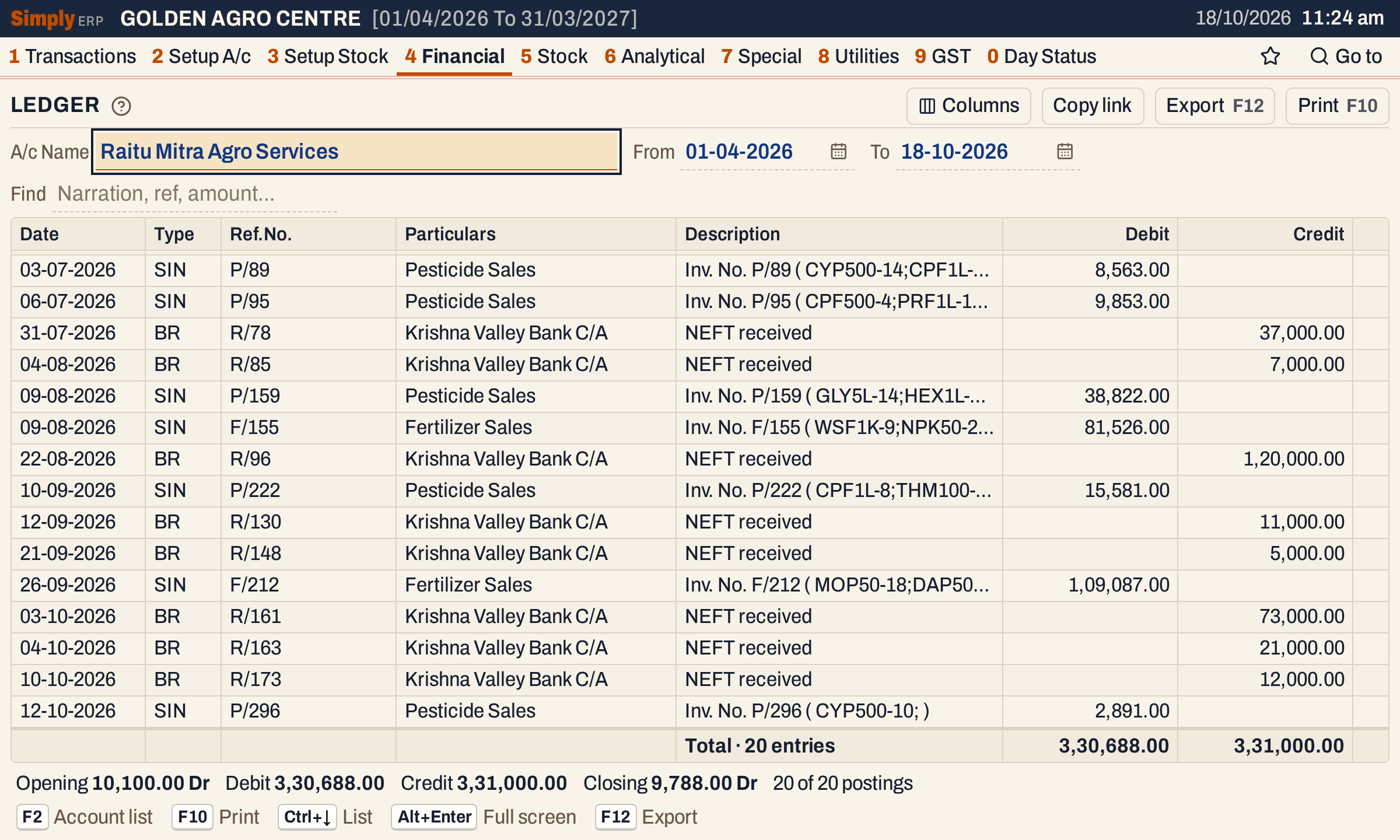 Bill P/296, made out to the duplicate, is now in this ledger. The closing balance is 9,788.00 Dr.
The Trial Balance keeps its totals: the two accounts’ figures are now one line.
Which accounts can be merged
Two parties (customers, suppliers, farmers and brokers) can be merged whatever their types: a customer can be merged into a supplier. Any other account merges only into an account of its own type, so a cash, bank, sales, purchase or tax account that the books post to cannot end up in a party. An account cannot be merged into itself.
 A farmer and an expense account are refused. Nothing changes.
A merge of two banks is refused when both banks issued a cheque with the same number: change one cheque number in the register first.
Keys on this screen
| Key | What it does |
|---|---|
| Enter | Next field |
| F2 | List every account |
| ↑ ↓ | Move in the list |
| F3 | Merge, after the confirmation |
| Esc | Leave the field; in the box, cancel |
Common questions
Which account should I keep? The one whose name, city and details you want to go on using. The kept account’s own details stay, and only the blanks are filled from the other. Its bills do not change.
Can I undo a merge? No. The box says so, and nothing in the screen brings the removed account back. Check the table before you press Merge.
Do reports change? The kept account’s figures are the sum of the two accounts. The removed account is no longer in any list, and its entries are in the Ledger of the kept account.
Does it work on a read-only copy? No. A read-only copy shows the screen with a notice that accounts are merged in the desktop app.
Updated 4 November 2026.