TCS / TDS Statement
On this page
The TCS / TDS Statement adds up your credit sales to each customer, or your credit purchases from each supplier, for a period, and works out tax collected at source (TCS) or tax deducted at source (TDS) on each party’s total at the rate you type. Parties whose total is below an amount you choose are left out. Use it to see which customers or suppliers cross the limit and how much tax their totals give.
Open the report
Press Alt+9 for GST Reports, then G. The report opens on credit sales, from the first day of the financial year to the working date. It has no rate yet, so every tax figure is 0.00 until you type one.
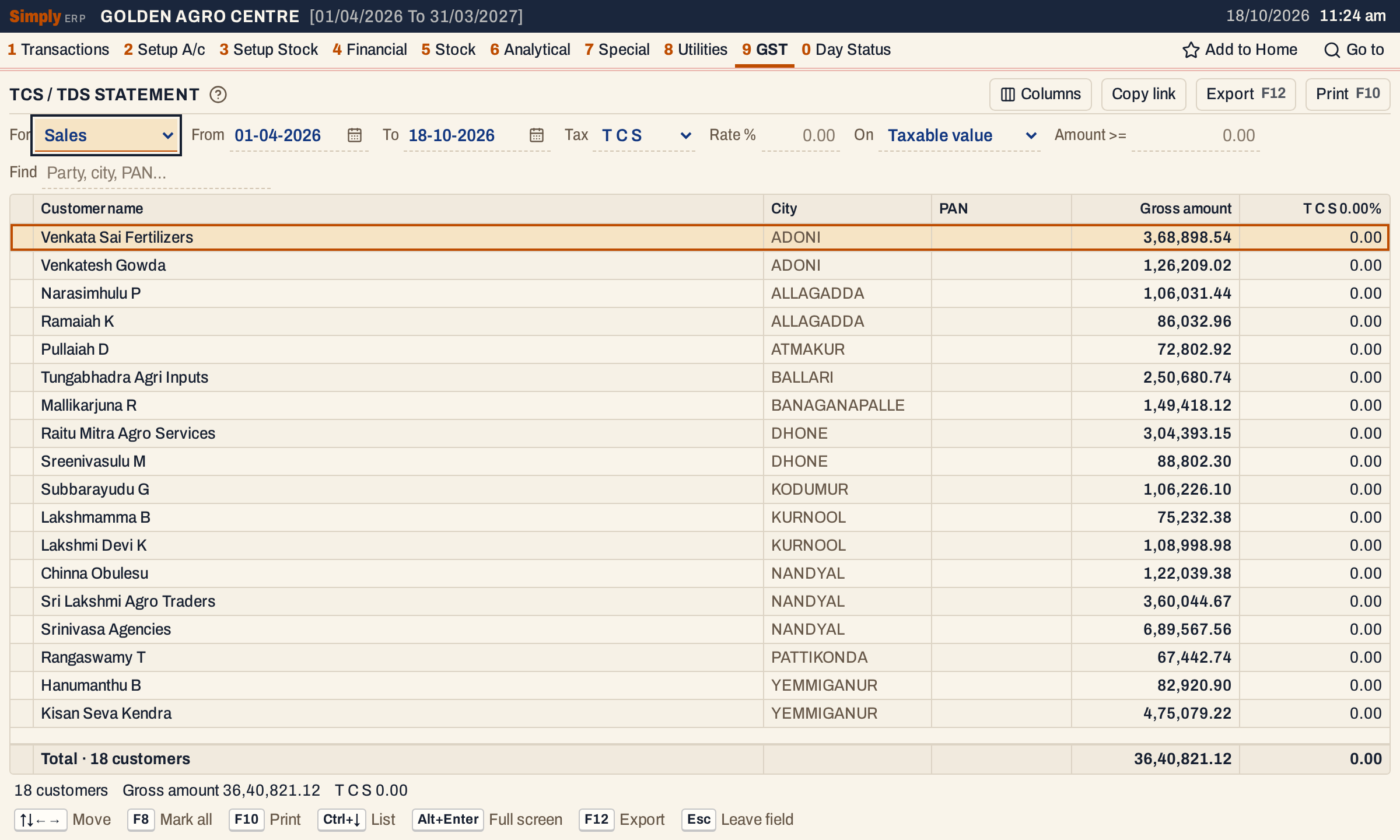 As it opens: 18 customers with credit sales, in city order. The PAN column is empty because the sample accounts have no PAN.
What it lists
One line for each party with at least one credit bill in the period.
- For Sales: the credit sale bills of every bill book, added up for each customer. Bills paid in cash, by card or by wallet are not counted.
- For Purchases: the credit purchase bills, added up for each supplier. Purchases paid in cash, by card or by wallet are not counted.
- A bill counts on its posting date, From and To both included. A sale is posted on its bill date, a purchase on the date it was received (Recd.).
- Sales returns, purchase returns, credit and debit notes and receipts or payments are not taken off. The report is the turnover on bills.
Columns
| Column | What it shows |
|---|---|
| Customer name / Supplier name | The party’s account name. |
| City | The account’s city. Hide it in Columns. |
| PAN | The PAN recorded on the account, in capitals (add it in Head of Accounts, 2 A). Hide it in Columns. |
| Gross amount / Net amount | The party’s credit bills added up, on the basis chosen in On. |
| T C S 0.10% / T D S 0.10% | The tax on that amount at the rate typed in Rate %. The title shows the tax, with its letters apart as the screen writes them, and the rate. |
The totals line adds up the amount and the tax and counts the parties. The status line gives the same and, when parties are left out by the minimum, how many (“12 below 2,00,000.00 left out”).
Choices
 The choices above the list.
| Choice | What it does |
|---|---|
| For | Sales (customers) or Purchases (suppliers). Choosing Purchases changes Tax to TDS and choosing Sales changes it to TCS. |
| From, To | The period, inside the financial year. |
| Tax | T C S or T D S. It names the tax in the column title and the print. |
| Rate % | The percentage of the tax, below 100, for example 0.1. Blank is 0, and the tax is then 0.00. |
| On | Taxable value (the default) or Net value. See below. |
| Amount >= | Parties whose amount is below this are left out. A party at exactly this amount stays. Blank is 0, so no party is left out. |
| Find | Keeps the parties whose name, city or PAN match what you type. |
| Columns | Hides the City or PAN column, in the print and the Excel workbook too. |
Click a column title to sort by it, and click again to reverse. Without a sort the parties are in city order, then name. The rate and minimum take effect as you type; the report does not reload. Every choice is kept in the page address, so Copy link opens the same report again.
How the figures are worked out
- Which bills. Credit bills (payment mode Credit) of the period: sale bills for Sales, purchase bills for Purchases. They are added up for each party’s account.
- Taxable value is the bills’ gross: the sum of the item lines before any discount and before GST, whether the party has a GSTIN or not. The charges that carry GST (Add + GST) are in it, before their GST. The plain charges (Add and Less) are not. Discounts are not taken off, so a bill with a discount counts here for more than its taxable amount.
- Net value is the bills’ totals as saved: after discounts, with GST and all charges.
- Left out. A party whose amount (on the basis chosen in On) is below Amount >= is not listed and not counted in the totals.
- Tax is the party’s amount times the rate divided by 100, rounded to the paisa, halves away from zero. In the pictures, Venkata Sai Fertilizers has credit sales of 3,68,898.54, and at 0.1% its TCS is 368.90 (368.89854 rounded). The tax is worked out on each party’s total, not bill by bill.
- Totals. The amount and tax columns are added for the parties listed. Six customers pass 2,00,000.00 in the picture, with 24,48,663.88 of sales and 2,448.66 of TCS. The 12 others are not in these figures.
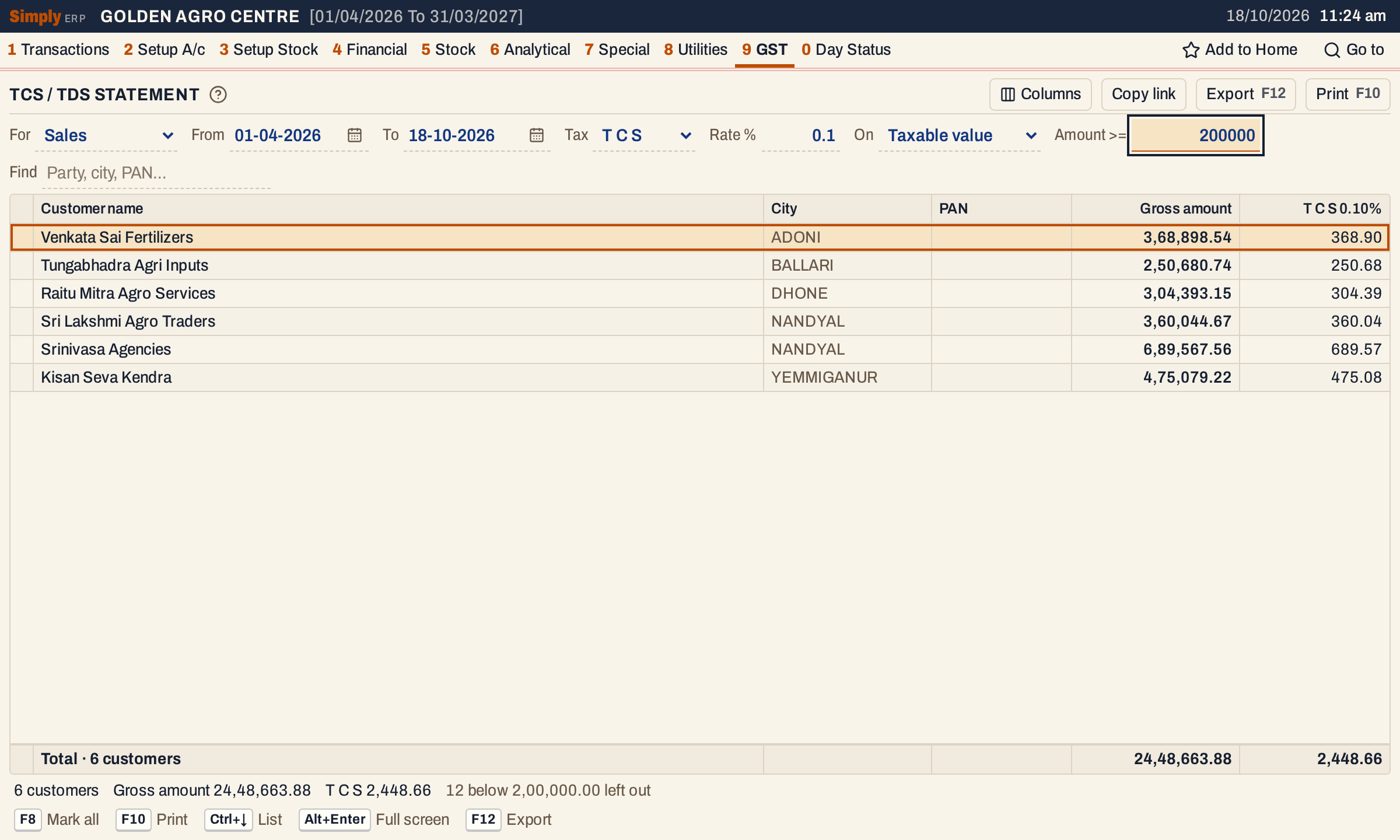 Rate 0.1 and Amount >= 2,00,000: six of the 18 customers remain, and the status line says 12 are left out.
Purchases and TDS
Choose Purchases in For to see your suppliers. The names, the credit bills and the tax work the same way; the column is headed Supplier name and the tax is TDS.
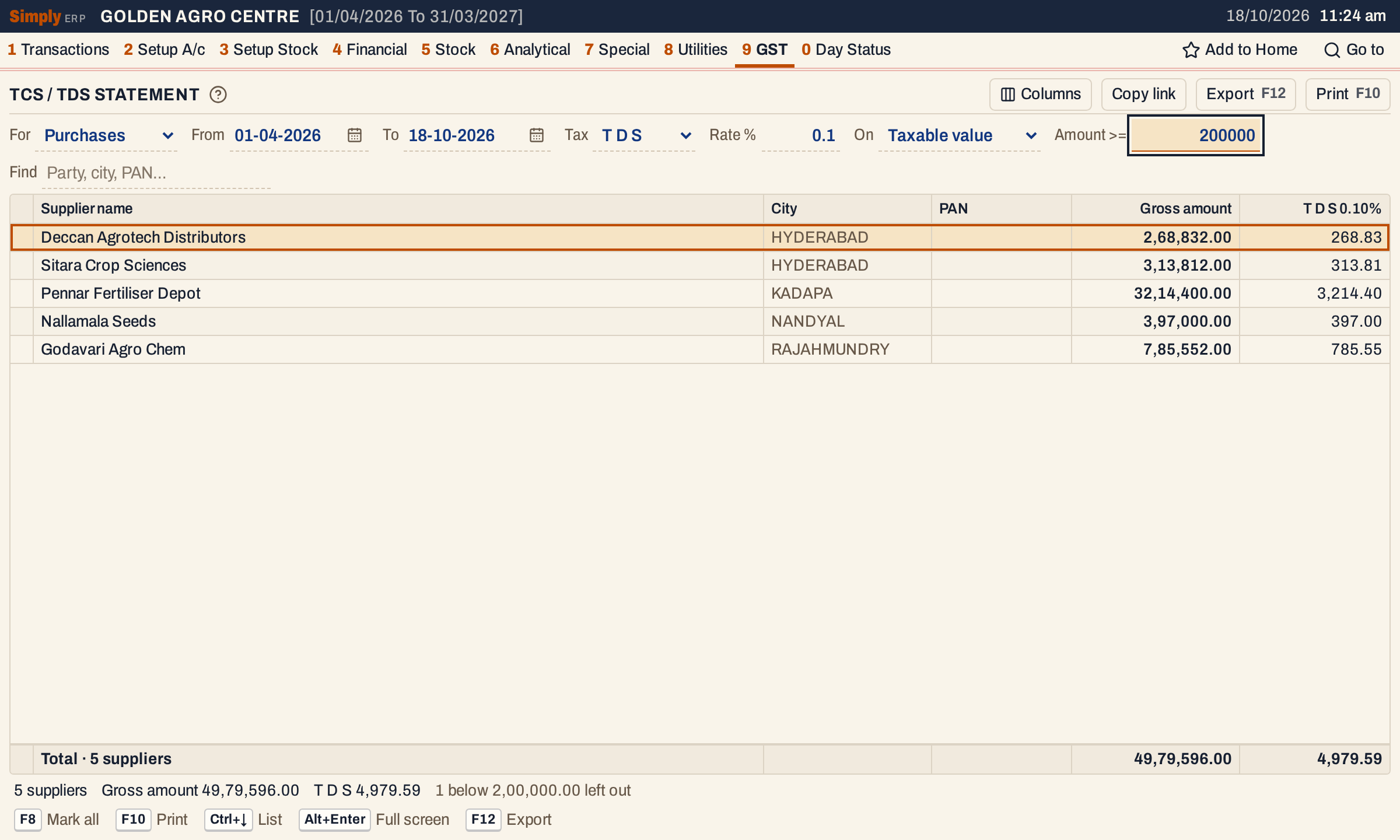 Five suppliers have credit purchases of 2,00,000 or more, 49,79,596.00 in all and TDS of 4,979.59. One supplier is below the minimum and is left out.
Open, mark, print and export
- Enter on a party opens its ledger for the same period.
- F2 marks a party, F8 marks them all, and F10 then prints only the marked parties.
- F10 prints the list as shown, under the heading CUSTOMER / SUPPLIER WISE TURN-OVERS, with the period and your choices (credit sales or credit purchases, taxable or net value, the minimum, Find) in its heading. Its last line is Total Sales Value or Total Purchase Value.
- F12 saves it as an Excel workbook, with the figures as numbers. The print has no City column; the workbook has it unless you hide it.
- Alt+Enter gives the whole window to the list.
The report works out the tax for you to see and to check against your own records. It does not post anything to your books.
Updated 4 November 2026.